















How Should a New CMO Audit the Website in the First 90 Days?


Most new B2B SaaS CMOs I work with hear the same two requests in their first week. The CEO wants a redesign, and sales wants better pages yesterday. Meanwhile, the site has no clear owner, and nobody has looked into why demo requests stall.
You also have a business to learn and a leadership team to win over. Every early move signals how you’ll run marketing. Move too fast on the website, and you redesign on opinion. Move too slowly, and the pressure lands on you anyway.
The window to prove yourself is short. According to the CMO Huddles and Findem 2026 CMO tenure study, CMOs at venture-backed companies have spent an average of 2.6 years in the role so far. Six in ten CMOs appointed this year are stepping into the role for the first time, and the study advises new CMOs to build a proof plan for their first 18 months.
At ThunderClap, my team has launched 144+ B2B websites for brands including Amazon, Cashfree, Freehand, VuNet, and Agiloft. The CMOs who get the most out of their site start with an audit before anyone talks about a redesign.
In this guide, I’ll walk you through the 90-day website audit I recommend to every new CMO. Days 1-30 focus on aligning stakeholders and capturing a baseline, Days 31-60 on auditing the site and shipping quick wins, and Days 61-90 on prioritizing fixes and building a roadmap. By Day 90, you’ll have a stakeholder map, a performance baseline, a scored backlog, three to five shipped quick wins, and a one-page roadmap your CEO can sign off on.
TL;DR
- Run your website audit in three 30-day phases to take control early. Interview five stakeholder groups, secure all logins and contracts, and establish a date-stamped performance baseline in Days 1–30.
- Once you have the baseline, audit six areas, covering messaging, conversion paths, technical health, data trust, content, and AI search. Score findings by impact and effort, then ship three to five quick wins by Day 60.
- With evidence of what works and what needs fixing, prioritize improvements and build a roadmap by Day 90. Use the website audit checklist near the end of this guide to track progress and support redesign decisions with data.
How Does a New CMO Run a 30-60-90 Website Audit?
A new CMO can run a 30-60-90 website audit by dividing the first 90 days into three phases, each with a clear goal and deliverable. Month one focuses on alignment and establishing a baseline, month two on auditing the site and fixing high-impact issues, and month three on prioritizing improvements and building a roadmap.
The table below shows each phase’s goal, main output, and the time to budget for it.
Most generic onboarding plans reduce the marketing website audit to a single line item, usually as a task to review the website alongside team assessments and budget planning. A dedicated audit gives the work a clear sequence, accountable owners, and measurable outputs. The stakes run high because buyers size you up on your website first. According to G2’s 2025 buyer behavior research, nearly two out of three B2B buyers prefer to engage vendor salespeople only in the later stages of their buying journey. At the same time, internal stakeholders may have competing ideas about what needs to change.
The Estimated Time Investment column covers your own hours each week. Your team, agency, or developers can handle much of the execution, so adjust these estimates to reflect your website's size, complexity, and available resources.
Adjust the 90 days to your company stage
The time you need for the audit depends on your company’s size, the number of stakeholders involved, and how the website is managed. At a seed-stage startup, you might establish a baseline in a week and ship quick wins within days. At an enterprise with multiple regional websites, brand guidelines and approval layers, stakeholder alignment alone can take several weeks.
Use your company stage to determine where to spend the most time during your first 90 days.
Regardless of your company's stage, keep the same sequence: understand the current state first, fix immediate problems second, and plan larger changes third. Adjust the time you spend on each phase to match your organization's complexity and decision-making process.
Days 1-30: Baseline the Site and Align Your Stakeholders
Your first month has one job. Establish how the site performs, who owns it, what different stakeholders expect from it, and which metrics define success. The answers give you a shared starting point before anyone pushes for a redesign or new messaging.
Step 1: Map who owns the site and what each stakeholder expects
I start every audit with five conversations. Schedule 30 minutes each with the CEO, sales leader, product marketing lead, RevOps or analytics lead, and whoever manages the website day to day, such as an agency, freelancer, or internal IT team.
Ask each person the same five questions:
- What does the website do well today?
- What feedback do buyers share about it on sales calls?
- Which page do you send prospects to most often, and which do you avoid?
- What would you fix first if you controlled the budget?
- How would you measure whether the website improved?
Record the answers in a one-page stakeholder map with columns for expectations, complaints, and the metrics each person cares about.
Look for patterns and disagreements. If the CEO thinks the site looks dated while sales says prospects struggle to find pricing, you're dealing with two distinct problems that require different solutions. The map helps you separate subjective preferences from issues that affect the buyer journey.
Step 2: Inventory access, contracts, and tools before you touch anything
Next, create an ownership register covering the systems and agreements that keep the website running. Confirm administrative access to your CMS, analytics platform, Google Search Console, tag manager, DNS, and hosting. Trace where website form submissions go, which CRM fields they populate, and whether the data reaches the right teams. Gather agency contracts, retainers, and plugin licenses, including their renewal dates.
Imagine discovering on Day 70 that a former agency still controls your domain or that a retainer has automatically renewed for another year. A few hours spent building the register in your first month can prevent both problems. Without it, even straightforward website changes can stall when you need access, approval, or control of a critical system.
Step 3: Capture a baseline snapshot you can defend in 90 days
Before changing anything, document the site's current performance. Choose metrics you can pull again on Day 90 using the same tools and reporting methods, without depending on a developer to reconstruct the data.
Your baseline should include:
- Traffic and conversions: Pull the top 10 pages by traffic, the top 10 by conversions, and conversion rates by source (organic, paid, direct, and referral) from Google Analytics 4.
- Demo requests: Record monthly demo requests and the pages visitors viewed before converting, using the path exploration report in GA4.
- Pipeline pages: Ask RevOps to pull the pages that show up most often in the buyer journeys of deals closed this year from your CRM’s attribution report.
- Search positions: Export rankings for your top 20 commercial keywords from Semrush Position Tracking. Ahrefs Rank Tracker gives you the same report if your team uses Ahrefs.
- Core Web Vitals: Run your homepage, pricing page, and demo page through PageSpeed Insights on mobile and record LCP, INP, and CLS. Google rates LCP under 2.5 seconds, INP under 200 milliseconds, and CLS under 0.1 as good. Check the Core Web Vitals report in Google Search Console for site-wide patterns.
Use our guide to the right website metrics to identify the numbers most closely tied to pipeline performance. Beyond providing a before-and-after comparison, your baseline can reveal how buyers navigate the site before taking action.
For example, when my team redesigned VuNet Systems’ website, the challenge was to position its banking observability platform clearly for three distinct audiences, including CIOs, SREs, and digital banking leaders. As my co-founder Ayush Barnwal shared on LinkedIn, analytics showed that prospects revisited the Platform and Product pages before booking a demo.
ThunderClap built the site around that journey, clarified VuNet's banking-specific positioning on the homepage, used product animations and real screens to explain the transaction journey, and structured Solutions pages around each audience's priorities.
In the eight months after launch, conversions more than doubled, from 60 to 122. User engagement grew by 24.9%, and the homepage’s Lighthouse performance score climbed by 44.4%.
Step 4: Read the site the way a buyer would
Internal opinions only tell you part of the story. To understand how buyers actually experience your website, run a five-second test with five people outside marketing. Show them the homepage for five seconds, then ask who the site serves, what the company does, and what they would click next.
Next, listen to five recent sales calls and review notes from your last ten lost deals. Finish with a quick review of three competitor websites. Together, these inputs reveal the gaps between how your team sees the site, how competitors position themselves, and what buyers actually need.
Those first five seconds shape how credible you look. Aastha Shad of Zenda described our work on the ThunderClap Wall of Love this way: "ThunderClap took us from looking like a phishing site to a warm, credible brand."
Buyer research can also fall short when teams rely too heavily on existing customer feedback. Peep Laja, CEO of Wynter, surveyed 100 B2B marketing leaders and found that 76% said their teams research buyers who aren't customers yet.
However, only 32% mentioned people outside their customer base when describing their latest research. As Laja put it, "Most of the market isn't in your Gong recordings." I’d apply that to your five-second test. Recruit at least two of your five testers from outside your customer base, such as prospects from recent lost deals or people who match your ICP.
What you need from others: Get access credentials and contracts from IT or your agency, analytics data from RevOps, and call recordings and lost-deal notes from sales.
With a baseline and stakeholder map in place, you can start the audit knowing exactly what you’re measuring against.
Days 31-60: Run the Audit and Ship Quick Wins
Month two is when you turn your baseline into an actionable B2B website audit. If you've already scored your site against our 12-point Revenue-Ready Website Framework, use that assessment as your starting point rather than repeating the work. Otherwise, evaluate the site through the six lenses below.
Step 5: Audit the site through six lenses
Each lens answers a different question. Work through them systematically, recording every finding in a single spreadsheet with the affected page, the problem, and supporting evidence. The spreadsheet becomes your working checklist for month two.
1. Check if your homepage message lands within one scroll
Can visitors understand who you serve and what you help them achieve within one scroll of the homepage? Review the hero copy, navigation labels, and first proof point. During a Women in Product Marketing webinar, I asked attendees what they audit first on a website, with messaging, structure, user journey, and conversions as the options. Most of the product marketers chose messaging.
Messaging is a starting point, but it won't fix confusing navigation, broken user journeys, or weak conversion paths.
{{specficBlog}}
2. Walk the path from the entry page to the demo request
Start with your three highest-traffic entry pages and follow the path to a demo request. Count the clicks, submit the form, and time how long sales takes to reply. Judge what you find against two benchmarks. A buyer should reach the demo form within two clicks from any entry page, and you should treat anything deeper as a finding. Aim to reply to demo requests within five minutes during business hours. Most teams fall well short of that. When Clay submitted 6,346 B2B demo and contact forms, about 68% got no email reply at all, and only 5% of the replies arrived within five minutes. Look for CTAs buried below the fold, unnecessary steps, and forms that demand a revenue band or phone number before a prospect can start a conversation. A full conversion rate optimization audit digs into each of these leaks page by page.
When my team studied the first screen of 100+ B2B SaaS websites, only 60% showed social proof above the fold, and just 13% handled an obvious objection under the CTA. Check your entry pages for both gaps.
3. Crawl the site for technical, speed, and accessibility issues
Crawl the site with Screaming Frog SEO Spider to find broken links, redirect chains, and pages Google can’t index. The free version crawls up to 500 URLs. Then run your key templates through PageSpeed Insights on mobile. Check accessibility with WAVE, WebAIM’s free evaluation tool.
The HTTP Archive's 2025 Web Almanac reports that only 48% of mobile websites pass all three Core Web Vitals. Accessibility presents another widespread problem. The WebAIM Million 2026 report found detectable WCAG 2 failures on 95.9% of the top million homepages and low-contrast text on 83.9%.
Record the affected pages and templates. If the same issue appears across dozens of URLs, fixing the underlying template may resolve it site-wide.
4. Test that form data reaches your CRM intact
Before making decisions based on your dashboards, verify that the tracking works. Submit a demo request through a UTM-tagged link and trace it into your CRM. Does the original traffic source survive? Can you connect the record to the page that generated it?
If not, your baseline may be unreliable. Fix tracking gaps before using conversion data to justify larger investments.
Then follow the same record past the form. Check that the lead converts to an opportunity with its source intact and that closed-won revenue rolls back up to the campaign and page that started it. Without that chain, you can report form fills, but you can’t show your CEO which pages produce pipeline. The gap gets expensive at larger companies, because budget decisions across paid, content, and web all depend on it.
If your CRM can’t connect web visits to revenue on its own, add a B2B attribution tool. Dreamdata maps website and campaign touchpoints to pipeline and closed revenue. HockeyStack covers the same ground for teams that want web analytics and attribution in one tool. HubSpot teams on Marketing Hub Enterprise can start with its built-in revenue attribution reports.
5. Tag every page to keep, fix, or kill
Review every page and tag it: keep, fix, or kill, using four checks: traffic, conversions, backlinks, and fit with your current positioning.
- Keep pages that pass all four, plus pages that convert well on modest traffic.
- Fix pages that still earn traffic or backlinks but carry outdated proof, weak CTAs, or old positioning.
- Kill pages with little traffic, no conversions, and no fit with what you sell today. If a killed page has backlinks, redirect it to its closest live match.
For example, a webinar landing page from an old campaign with 40 visits a month, zero form fills, and no backlinks is a kill. A case study that still earns links and organic traffic but features a churned customer is a fix. Look for outdated customer logos, case studies that are years old, and thin landing pages left behind by old campaigns.
Stale proof points can make buyers question whether your company is still active in that market. Keep the content that supports current positioning, update what still serves a purpose, and remove pages that no longer justify their place on the site.
6. Ask AI search tools how they describe your brand
Run each prompt in a fresh chat on ChatGPT, Perplexity, Claude, and Gemini Fill the brackets with your real buyer context, because specific prompts get specific answers.
Prompt templates
- Awareness: "I'm a [role] at a [company size] [industry] company dealing with [specific problem, e.g., long sales cycles]. What approaches do teams like mine use to solve this, and which vendors or resources come up most? Cite your sources."
- Consideration: "We're a [stage] B2B SaaS company shortlisting [category] tools. Our priorities are [criterion 1], [criterion 2] and [criterion 3, e.g., Salesforce integration]. Recommend five vendors, explain why each fits, and link your sources."
- Evaluation: "Compare [your brand], [competitor 1] and [competitor 2] for [use case]. Show a table covering pricing, strengths, limitations, ideal customer and what reviewers say. Flag anything you're unsure about."
- Decision (optional): "We're a [company size] team with [constraint, e.g., a small RevOps team]. Is [your brand] a good fit? What do customers complain about most?"
What to record for each answer
- Whether your brand appears, and in what position
- How the tool describes your product, and whether the description is accurate
- Which competitors it names
- Which sources it cites (review sites, listicles, forums, your own pages).
G2's 2025 Buyer Behavior Report found that generative AI chatbots were the leading source influencing B2B software shortlists, at 17.1%, ahead of vendor websites at 12.8%. That makes AI visibility worth investigating alongside traditional search.
If AI tools describe a product you discontinued two years ago or omit your brand from relevant comparisons, add the finding to your backlog. Treat these checks as directional snapshots, since AI-generated answers can vary between queries and sessions.
Step 6: Score every finding with an impact-effort matrix
Once you've completed the six reviews, prioritize the findings. Rate each one from 1 to 3 for impact, based on its likely effect on your baseline metrics, and from 1 to 3 for effort, considering developer hours, approvals, and dependencies.
The form blocks your highest-intent visitors, and one person can fix it in a day.
Your scored backlog ranks the work that needs attention. It isn't an overall grade for website health. This prevents the loudest stakeholder's preferred project from automatically taking priority over evidence-backed issues.
{{specficService}}
Step 7: Ship three to five quick wins before Day 60
Choose three to five website improvements that can be implemented in under two weeks, don't require a rebuild, and address an issue identified in your baseline or audit.
Good candidates include:
- Buried or broken CTAs. Move the demo CTA into the hero and the sticky nav, then fix any button that points to a dead page. Rewrite vague button labels using CTA best practices that tell buyers what they get next.
- Form friction. Cut the demo form down to the fields sales uses on the first call, and add a visible label to every field.
- Outdated proof. Swap churned logos and stale case studies for current customers and recent results.
- Money-page metadata. Rewrite titles and meta descriptions on your pricing, product, and demo pages.
- Tracking gaps. Fix the UTM parameters and form events that failed your data-trust test.
Quick wins also help build support for larger investments. Each completed improvement gives you a tangible result to share with the CEO before you present your broader recommendations in Days 61-90. Pushing for a major campaign or full redesign before you establish a baseline makes it harder to show why the investment is necessary.
What you need from others: Developer or agency capacity to implement fixes, design and content assets, and buyer language gathered from sales calls.
Once those wins are live and measured, you’ve earned the credibility to talk about bigger investments.
Days 61-90: Prioritize the Fixes and Build Your Roadmap
Month three turns your audit into decisions, priorities, and next steps. It also closes the loop with the stakeholders you interviewed in your first month. With hiring, budget planning, and board preparation competing for your attention, this phase determines which website initiatives get the resources to move forward.
Step 8: Sort the backlog into three buckets
Review your scored findings and assign each one to one of three categories:
- Fix now. High-impact issues your team can resolve within the next 30 days.
- Plan for next quarter. High-impact initiatives that require more development, design resources, budget, or cross-functional coordination.
- Consider a redesign. Structural problems that incremental fixes won't resolve. Use the evidence gathered over the past 90 days to decide whether a redesign is justified.
Most backlogs will contain a mix of immediate fixes and longer-term improvements. If several high-impact findings point to the same underlying structural problem, it may be time to consider a full redesign.
Step 9: Turn the backlog into a one-page website roadmap
Your website roadmap should fit on one page, with columns for each initiative, its owner, the metric it should improve, estimated effort, and target quarter. Detail the next 90 days and outline the following six months at a higher level.
Tie every initiative to a business goal your CEO already tracks, such as pipeline from organic search or the demo-to-opportunity rate. Projects without a clear connection to business outcomes are harder to justify when budgets come under scrutiny. Our guide to tying your website roadmap to marketing goals explains how to make that connection.
In a LinkedIn post, Florian Radke, a brand strategist and fractional CMO, advocates limiting major priorities. His advice for Days 61-90 is to make "three bets at most, and a written list of what stops."
That approach helps you focus resources on the initiatives most likely to move business metrics. A clear list of what you're deprioritizing also makes trade-offs explicit, so stakeholders understand what the team will and won't take on.
Step 10: Present a readout to the CEO and sales
Keep the readout to one page and cover five things, starting with the progress you’ve already made.
Day 90 Website Readout
- What shipped vs. the baseline: Each quick win, the metric it targeted, and the before-and-after numbers from your date-stamped baseline.
- Top five findings, with evidence: One line per finding, backed by a session recording, a broken form test, or lost-deal feedback.
- Three bets for next quarter: The initiatives on your roadmap, each with an owner and the metric it should move.
- What we’re stopping: The projects and requests you’re deprioritizing. Naming them now prevents surprises later.
- The ask: The budget, headcount, or agency support you need, and the metric each investment should improve.
Close by reminding the room of the website’s role in the deal cycle. Buyers research, compare, and shortlist on their own before they ever book a call, and your website carries that entire conversation. Fund the roadmap accordingly.
Step 11: Set a weekly rhythm to keep the audit moving
The audit shouldn't end when you present the roadmap. Establish a 30-minute weekly check-in with the person responsible for the website to review completed work, blockers, and pending decisions. Send stakeholders a brief written update every Friday, covering progress, outstanding issues, and next steps.
Revisit your stakeholder map and baseline at Days 30, 6, and 90 to track progress against the original goals. Keep your website audit checklist for the CMO updated as findings are resolved and initiatives move into execution.
What you need from others: Decision-making time and budget approval from the CEO, budget-cycle dates from finance, and written feedback or objections from the stakeholders you interviewed.
How Do You Know Your Website Needs a Redesign?
A website redesign makes sense when your audit reveals structural problems that incremental fixes can’t resolve. Unless the site is actively broken, hold off on the decision until Day 90. By then, you'll have a performance baseline, evidence from your audit, and a clearer picture of what the business needs from the website.
Five structural signals tell you a redesign is due:
- Your CMS or tech stack limits growth. The platform can't support requirements such as localization, a gated resource hub, or more complex integrations.
- Your positioning or product has changed. The existing site architecture no longer reflects what you sell, who you serve, or how buyers evaluate your offering.
- You need to consolidate websites or brands. Maintaining multiple properties creates inconsistent messaging, duplicated content, or unnecessary operational work.
- Your platform is becoming unmaintainable. Technical debt or an approaching end-of-life date makes routine updates increasingly difficult.
- Performance or accessibility problems run deep. The issues sit in the underlying templates, themes, or architecture, and they repeat on every page built from them. Audit those templates against the core WCAG guidelines for compliance to see how deep the problems go.
Your personal taste, a competitor's relaunch, or one underperforming page isn’t enough to justify a redesign. Address those issues through targeted fixes or include them in your next-quarter plan unless the wider audit reveals a deeper problem.
For example, roommaster, a hospitality software company running operations for 5,500+ hotels, had outgrown its parent brand, InnQuest, over three decades. Customers searched for one name and landed on the other, and reviews split across both. Two sites competing for the same buyers creates a consolidation problem, and page-level fixes can’t solve it.
ThunderClap brought the experience under a single roommaster website, replaced technical jargon with a calmer story focused on order and efficiency, and migrated the site to Webflow. After launch, roommaster recorded an 80% increase in demo requests and organic traffic, as founder Ayush Barnwal also shared on LinkedIn.
If your audit reveals similar structural problems, make the website redesign vs. optimization decision by Day 90, using your baseline to guide the investment. Build SEO risk management into the plan from the start.
Plan for disruption even when the redesign is justified. In an October 2026 LinkedIn post, I wrote about a CMO who had a major revamp planned just as a newly launched offer doubled signups.
We helped the CMO, demand generation, and paid media teams prepare a contingency plan covering backup campaigns, redirects for legacy pages, and same-day fixes. Signups held steady, and we didn't need the contingency plan.
A rebuild backed by a 90-day audit, a clear business case, and a fallback plan gives you a stronger foundation for your next major website investment.
Also Read: How a website redesign runs, step by step
What Mistakes Should a New CMO Avoid When Auditing a Website?
Most mistakes in a website audit for a new CMO come from moving too quickly or relying on too narrow a view of the site. Avoid these five:
- Pitching a redesign before the audit. Make the rebuild decision at Day 90, once the data supports your case.
- Skipping the baseline. Capture and date-stamp performance in Days 1-30. Without it, you have no reliable way to show what changed.
- Listening to one voice. Interview all five stakeholder groups and give RevOps’ perspective as much weight as the sales VP’s. Website stakeholder alignment depends on hearing from the people who manage, use, and measure the site.
- Treating every finding as equally important. Score issues by impact and effort, then tackle low-effort, high-impact fixes first.
- Trusting dashboards blindly. Test a submission from the website form through to the CRM, including event tracking and UTMs, before acting on the numbers.
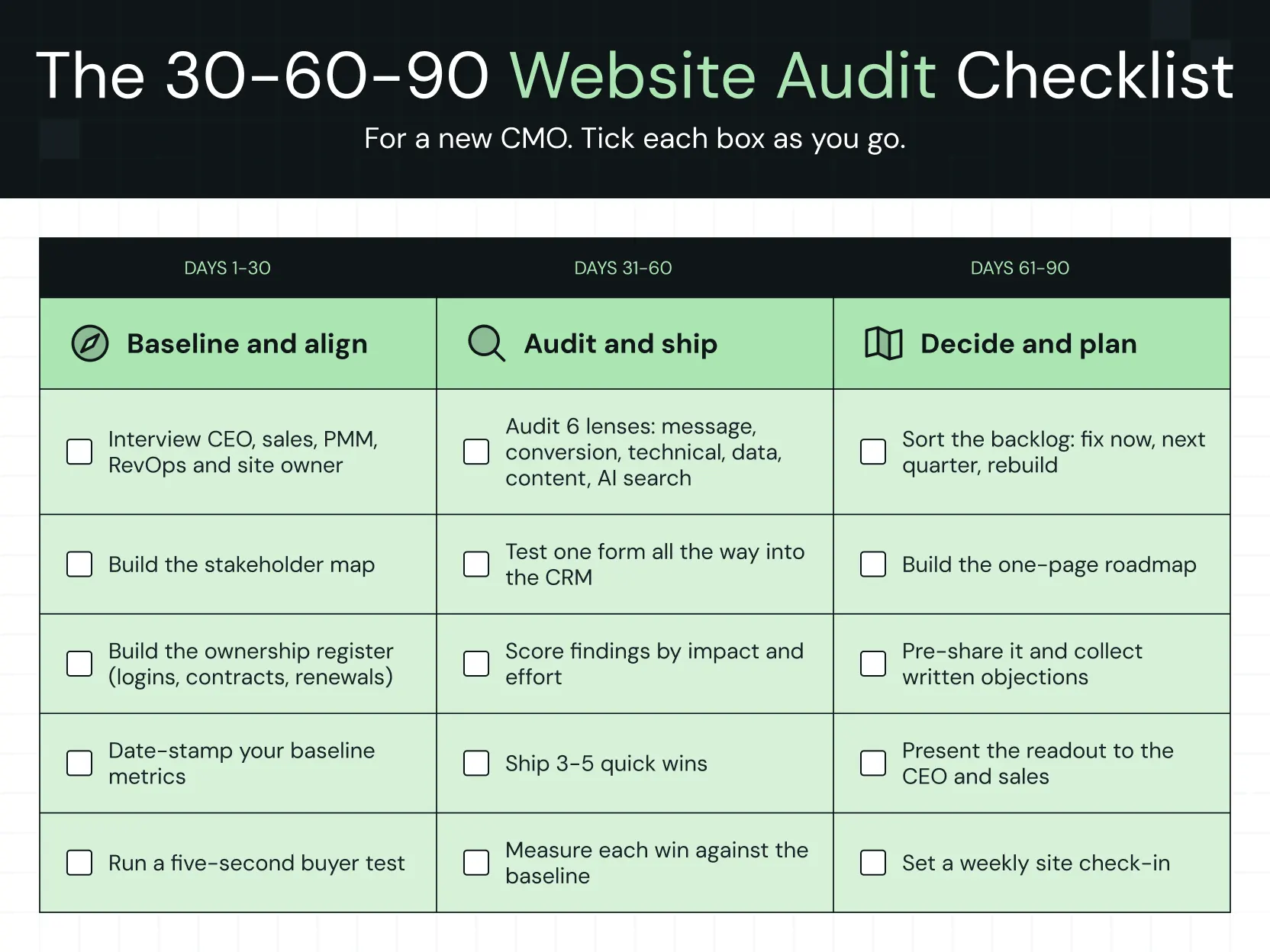
Use this website audit checklist to track your first 90 days, from stakeholder interviews and performance baselines to quick wins and the Day 90 roadmap. Screenshot it or keep it alongside your stakeholder map.
Also Read: How to protect SEO during a website migration
Where to Get Help Turning Your 90-Day Audit Into Shipped Work
By Day 90, your audit should tell you who owns the site, how it performs today, where it loses potential buyers, and which fixes come first. The harder part is turning that roadmap into shipped work with designers, developers, and copywriters who can keep pace with your plans.
My team at ThunderClap helps B2B SaaS teams turn audit findings into shipped work, starting from a prioritized backlog. Our in-house product marketers shape positioning and messaging before design begins, while our SaaS design services and Webflow design services cover everything from targeted page fixes to full website rebuilds, with a typical rebuild running about 10 weeks from kickoff to launch.
We've launched 144+ B2B websites for brands including Amazon, Cashfree, Freehand, VuNet, and Agiloft. You can also read client feedback on our Wall of Love.
{{ctaBlock}}
Frequently Asked Questions
1. What should a new CMO audit on the website first?
For a website audit, a new CMO must start with ownership and data. Confirm who controls the CMS, domain, analytics, and forms, then pull baseline numbers for traffic, conversions, demo requests, and pipeline-influencing pages. Next, run a five-second test with people outside marketing to check message clarity. Hold your design opinions until the baseline exists, since you'll measure every later decision in a marketing website audit against it.
2. How do you prioritize website fixes in the first 90 days?
In the first 90 days, CMO website priorities follow one rule. Score every finding from 1 to 3 for impact and effort, and tie each one to a baseline metric. Ship high-impact, low-effort fixes by Day 60 as website quick wins. Schedule bigger items on your website roadmap for next quarter, and park structural, rebuild-level problems for a Day 90 decision backed by data.
3. When should a new CMO commission a redesign?
Hold off on a redesign for your first 90 days unless the site is broken. Knowing when to redesign a website comes down to structural limits, such as a CMS that can't support the roadmap, a positioning change that breaks the architecture, or several sites that need consolidating. Treat website redesign vs. optimization as a Day 90 decision, backed by baseline data and a plan to protect SEO during migration.
4. How long should a website audit take for a new CMO?
Plan for about 30 days. In the 30-60-90 framework, the audit itself runs from Day 31 to Day 60, after a month of baselining and stakeholder alignment. Smaller sites move faster through the technical and content lenses. Larger sites with multiple regions, brands, or thousands of pages need extra time on those two lenses before scoring begins.
5. Who should take part in a new CMO website audit?
The CEO, the sales leader, product marketing, the RevOps or analytics owner, and whoever runs the site day-to-day (such as an agency, freelancer, or IT) should all take part. Interview each group in Days 1-30, share findings in Days 31-60, and send everyone the roadmap before the Day 90 readout to lock in alignment before any budget request.
6. What tools does a new CMO need for a website audit?
Any B2B website audit checklist for a CMO starts with the right tools. Google Analytics 4 tracks traffic and conversions, Google Search Console flags indexing issues, and PageSpeed Insights measures speed. Hotjar or Microsoft Clarity adds heatmaps and session recordings, Screaming Frog crawls the site, and WAVE checks accessibility. Your CRM reports cover the pipeline, and an A/B testing tool such as VWO, Optimizely, or Webflow Optimize lets you test quick wins before rolling them out.




Browse Similar Articles

How to Write a Website Design Brief Template That Prevents Scope Creep



Website User Experience Audit: 7 Steps to Spot (and Fix) What's Hurting Conversions



AI-Generated Website Not Converting? Here’s What’s Missing (and How to Fix Yours)


10 Best Venture Capital Websites in 2026 for Design Inspiration (Detailed Breakdowns + Templates)

















Leading 5 SaaS Branding Agencies in Florida (That Actually Understand SaaS Growth)


How to Turn Your B2B Website into a Self-Serve Growth Engine? (PLG Ready in 2026)


9-Step Website Copy Audit Checklist to Improve Conversions (Examples from Top B2B Brands)


How to Choose the Right Fintech Web Development Company for Your Business

Top B2B Website Design Principles That Turn Visitors into Qualified Leads


How to Do a Conversion Rate Optimization (CRO) Audit That Actually Improves Revenue
Web Design Agency vs. Freelancer vs. In-House: What Actually Works in 2026
5 CRO Agencies in London and How to Choose the Best CRO Agency for Your Business


The Ultimate Fintech B2B Positioning Guide for 2026 (That Actually Drives Conversions)

Mapping the B2B Buyer Journey to Improve Conversions Across Every Touchpoint
7 Best Website Maintenance Companies in India for Growth-Led B2B Teams (2026)




8 Best Healthcare Website Design Agencies for HIPAA-Compliant Sites in 2026




How to Find the Best Web Design Company in Houston, Texas for B2B Brands (6 Best Picks)


Positioning That Wins: How to Make Complex B2B Products Clear and Compelling
The Step-by-Step Website Redesign Process B2B Teams Use to Increase Conversions (Without Killing SEO and Pipeline)


7 Best Video Production Agencies for SaaS Product Walkthroughs and Feature Videos



How to Choose the Best B2B Website Maintenance Company: 9 Questions to Ask Before You Hire One






How to Choose a Web Design Company in San Francisco in 2026 (with Examples)

10 Best Web Design Companies in Florida in 2026 and How to Choose the Right One

How to Use Brand Storytelling on Your Website to Close More B2B Deals and Build Buyer Trust

SaaS CRO Best Practices: What High-Growth Brands Do Differently to Win Conversions


How a Rebranding Agency Can Redefine Your B2B SaaS Identity and Boost Pipeline

B2B Marketing Trends in 2026 That Directly Influence Pipeline and Revenue

Top 7 Video Marketing Agencies Driving B2B SaaS Brand Awareness in 2026

Why Partnering with a B2B Brand Positioning Agency Accelerates Market Differentiation

The Complete Website Redesign Checklist for B2B SaaS Teams Ready to Scale


10 Best Webflow Development Agencies in India for 2026 (In-Depth Review)

10 Product Marketing Companies Powering the Fastest-Growing SaaS Brands in 2026
Website Copywriting Services vs In-House: What's Right for Your Business?


How to Choose a Marketing Agency That Understands B2B SaaS Growth Metrics


How to Choose a Video Marketing Agency That Understands B2B Storytelling

Outsourcing Web Design: Cost-Benefit Analysis for Mid-Market & Enterprise Brands

From Leads to Lifetime Value: How Growth Marketing Agencies Scale SaaS Revenue

Build a B2B Website Strategy That Aligns with Sales and Marketing Goals

Webflow vs WordPress: Which Platform Is Better for Your Business Website in 2026?

Fintech Web Design That Builds Trust: 8 UX Principles Every Fintech Site Needs





Interested in seeing what we can do for your website?