















How to Write a Website Design Brief Template That Prevents Scope Creep


Most B2B website briefs get written in a hurry. You’ve just closed a round, launched a product, or realized the site still tells last year’s story, and now you need agencies quoting before the launch date gets any closer. So the website design brief ends up as a few paragraphs in a doc, sent to three agencies, with the details left for kickoff.
That’s where the project starts to drift. Send the same loose brief to three agencies, and you’ll often get back three quotes that read like three different projects. Pick one, and the gaps come back mid-project as extra pages, surprise invoices, and a launch date that slips past the moment it was meant for. For the marketing lead who signed off on the budget, that’s a hard conversation with the CEO.
TinyPilot founder Michael Lynch expected his three-page redesign to take “maybe a few months and $15k.” It took eight months and $46k, and the agency designed blog pages his spec had listed as out of scope.
His brief wasn’t the problem. Nothing turned it into sign-offs. This guide covers both: a design brief template with the 12 fields agencies need to quote the same project, a filled-in SaaS example, what to leave to your agency, and the checkpoints that keep scope from drifting once work starts.
TL;DR
- A website design brief template captures why you need a new site, what it must achieve, which pages and features are in and out of scope, who owns content, who signs off, and your budget and deadline.
- Your brief should hold the facts and decisions only you have. Positioning, sitemap, and information architecture are the agency's job.
- A brief on its own doesn't stop scope creep. Milestones, sign-off gates, and a priced change process do.
What Is A Website Design Brief Template?
A website design brief template is a fill-in document you complete before you hire an agency. It records why you need a new site, what it must achieve, which pages and features are in and out of scope, who owns content, who signs off, and your budget and deadline.
You write it for three reasons. It gets your own team to agree on what the project is before anyone outside sees it. It gives every agency you contact the same facts, so the quotes that come back are for the same project and you can actually compare them. And once you’ve picked a partner, it’s the document you both point to when a new request shows up in week six.
The template in this guide comes from that exact problem. ThunderClap has launched 144+ B2B websites, and after analyzing 71 of our sales calls from January to June 2026, we kept seeing the same gaps in the briefs companies brought to us. This template is built around the fields that decide whether a redesign stays on scope.
A website brief is also narrower than the general design brief templates you’ll find from tool vendors, which cover logos, ad creative, and packaging. It adds the things that only matter on a website build: a sitemap, page templates, CMS collections, integrations, and redirects. Those are also the line items where website budgets tend to slip.
A website brief often gets confused with a creative brief, so it helps to separate the two before you start writing.
What's The Difference Between A Creative Brief And A Website Brief?
A creative brief sets the message, a website brief sets the project's goals and boundaries, and a scope of work is the agency's contractual answer to both. Mixing them up is how a team ends up sending a tagline and a mood board when the agency needs a page count and an approver.
Knowing which document does what also explains why projects still overrun when a brief exists.
Why Do Website Projects Go Over Scope Even When There's A Brief?
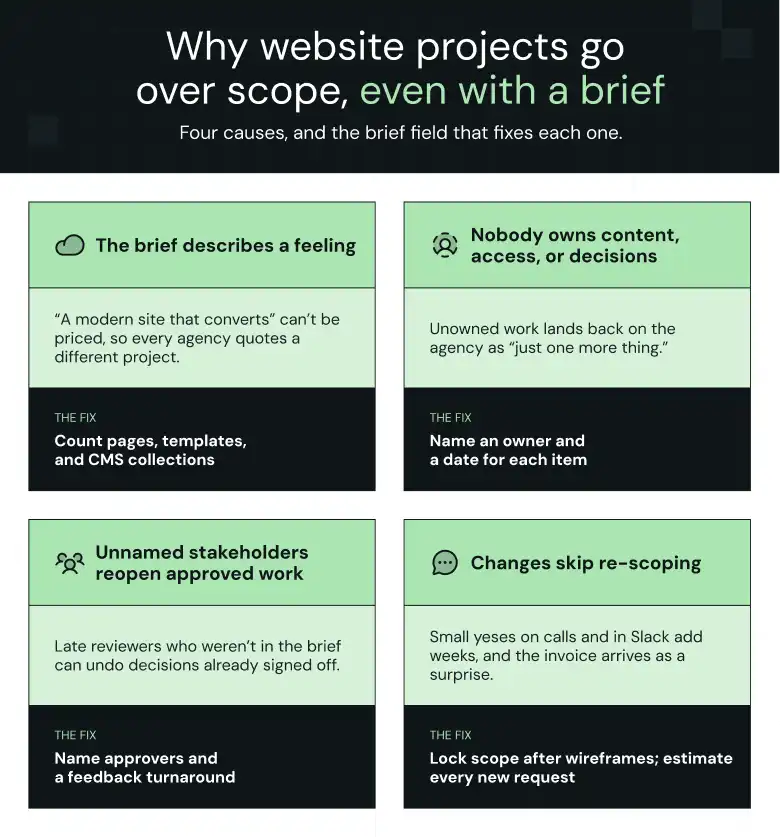
Scope creep starts at intake, in whatever the brief leaves vague, and grows wherever there’s no sign-off. It’s a problem on the service side too: in Moovila’s State of the Industry: MSP Project Management Trends & Impacts 2025, 58.7% of the 263 service providers surveyed named scope creep as their most common project challenge, up from 46% in 2024. In website projects, scope creep usually has four causes.
1. The brief describes a feeling, not countable deliverables
"A modern site that converts" can't be priced. "14 pages, 5 templates, 1 blog collection" can. When a brief describes a mood instead of countable items, every agency fills the gap with its own assumptions, which is why three quotes can describe three different projects.
2. Nobody owns content, access, or decisions
Every website project has work that sits between “your side” and “the agency’s side,” and the brief is usually silent on it. Agencies assume you’re writing the copy, and you assume they are. “Can you handle copy or just design?” comes up often enough on ThunderClap’s sales calls that it deserves its own line in your brief. The same gap shows up elsewhere:
- Content and assets: copy, case studies, product screenshots, and video
- Access: the domain, the current CMS, analytics, and integrations like HubSpot or Salesforce
- Decisions: who confirms the messaging, the pricing page, and the legal copy
- After launch: who updates pages, publishes blog posts, and fixes things when they break
Each of these needs a named owner and a date. When nobody owns one, it lands back on the agency as “just one more thing,” and that’s where the hours you didn’t budget for come from.
3. Unnamed stakeholders reopen decisions that were already approved
In B2B, the person writing the brief is rarely the person approving the website. Marketing leaders say it often: the project is on track until the week before launch, when 20 people suddenly want “just a quick review.” Every reviewer the brief didn’t name can reopen a decision that was already signed off.
4. Changes get approved without being rescoped or re-priced
Most overruns aren’t caused by one big change. They come from a string of small ones: an extra page for a new product, one more design round because the CEO joined late, “while you’re at it” on the pricing page. Each gets a quick yes on a call or in Slack, and nobody stops to ask what it adds to the timeline or the invoice. By launch, those small yeses have added weeks, and the bill arrives as a surprise.
The fix isn’t saying no to changes. It’s agreeing upfront on where scope gets locked (usually after the sitemap and wireframes are signed off) and how anything new gets estimated before work on it starts. Without that, even a brief with a clear out-of-scope list turns into a starting point rather than a boundary.
Buyers notice when this goes wrong. Across 71 ThunderClap sales calls from January to June 2026, a bad experience with a previous agency came up in roughly half of discovery calls, and “scope creep without warning” was one of the failures buyers named most. As one founder put it in the Indie Hackers discussion of Lynch’s post: “make sure everything is crystal clear, to the point of being over-documented.”
{{specficBlog}}
What Should Be Included In A Website Brief?
The brief is usually filled in by whoever owns the website, often a PMM, demand gen lead, or CMO, with input from sales, product, and leadership. Most teams start it when something has a date attached: a website redesign that’s been approved, a product launch, a funding announcement, or an event the new site needs to be live for.
A website brief should include 12 fields:
- Why now (scope creep field)
- Business context
- One primary goal with a baseline
- Audience and buying group
- Current site
- Scope (scope-creep field)
- Content ownership (scope-creep field)
- Brand constraints
- Platform and tech
- Out of scope (scope-creep field)
- Stakeholders and sign-off (scope-creep field)
- Budget, timeline, and life after launch
Five of these matter more than the rest: why now, scope, content ownership, out of scope, and stakeholders and sign-off. They set the boundaries of the project, so they decide whether it stays on budget. Fill those in first, then copy the table below into a Google Doc or Notion page, and you have a working website design brief template.
If you’re unsure what range to write in field 12, a B2B SaaS website redesign typically costs $15,000 to $40,000 for an early-stage company, $40,000 to $80,000 for a scaling Series A to C company, and $80,000 to $160,000+ for an enterprise platform, as of March 2026. Website Redesign Cost Breakdown for B2B SaaS Companies in 2026 explains what drives the number at each stage.
A template tells you what goes in. The steps below show how to fill it in without stalling your team for weeks.
How Do You Write A Design Brief Template, step by step?
You write a design brief template in seven steps: name the trigger and the date, set one goal with a baseline, interview the teams that touch the website, sort the current site into keep, kill, or merge, write the scope and the out-of-scope list, assign every content owner, and agree on sign-offs and a budget range. Each step fills one or more fields in the template above, so by the end you have a brief an agency can quote without guessing.
Most of the work is gathering information you already have inside the company. The steps below cover who to talk to, what to ask, and which numbers matter.
1. Name the trigger and the real deadline
Almost every redesign has an event underneath it: a funding round, a product launch, a new CMO, a conference, or a board meeting. Write down the event and the exact date the site needs to be live. A real date sets the timeline and tells the agency what can realistically fit before it. “Ideally by Q2” doesn’t.
A fixed date also shapes the scope. When Ampliz, a US healthcare data company, needed a new homepage live for the HIMSS conference in May, the deadline set a five-week timeline. That’s why the first phase was scoped to the homepage alone, with inner pages planned for later.
2. Set one goal that matches the trigger, and record today’s baseline
Your goal should come from the reason you’re redesigning. If the trigger is a funding round, the goal is usually credibility with bigger buyers rather than more traffic.
Pick one primary metric and pull its value for the last 90 days from GA4 and your CRM. Without a baseline, nobody can tell later whether the new site worked.
Not every goal is a conversion rate. When WizCommerce rebuilt its site, demo conversion wasn’t the priority. High-intent buyers were arriving from events impressed, then landing on a website that felt less mature than the product they’d just seen. The goal was to make the site match that impression.
3. Interview the teams that touch the website
Talk to each team before the agency arrives, then consolidate everything into one doc with one owner. Two or three questions per team are enough:
- Sales: What do prospects misunderstand before a call? Which pages do you send, and which do you avoid sending?
- Product: What launches in the next six months that the site has to support? Which features set you apart?
- Customer success: Why do customers say they chose you? Which customers would agree to a case study?
- Leadership: What should be different six months after launch? Who gives final sign-off, and what’s the budget ceiling?
The answers feed the business context, audience, goal, and sign-off fields. Collecting them yourself also stops five stakeholders from sending conflicting notes straight to the agency.
4. Sort the current site into keep, kill, or merge
Export every URL from your CMS or sitemap, add its traffic and conversions from the last 12 months, and tag each page using three rules:
- Keep pages that bring organic traffic or backlinks, convert, or get sent by sales.
- Merge pages that target the same audience or keyword, or that are too thin to stand alone.
- Kill pages with no meaningful traffic in 12 months, or that describe products and offers you no longer sell. Every killed page that has traffic or backlinks still needs a 301 redirect.
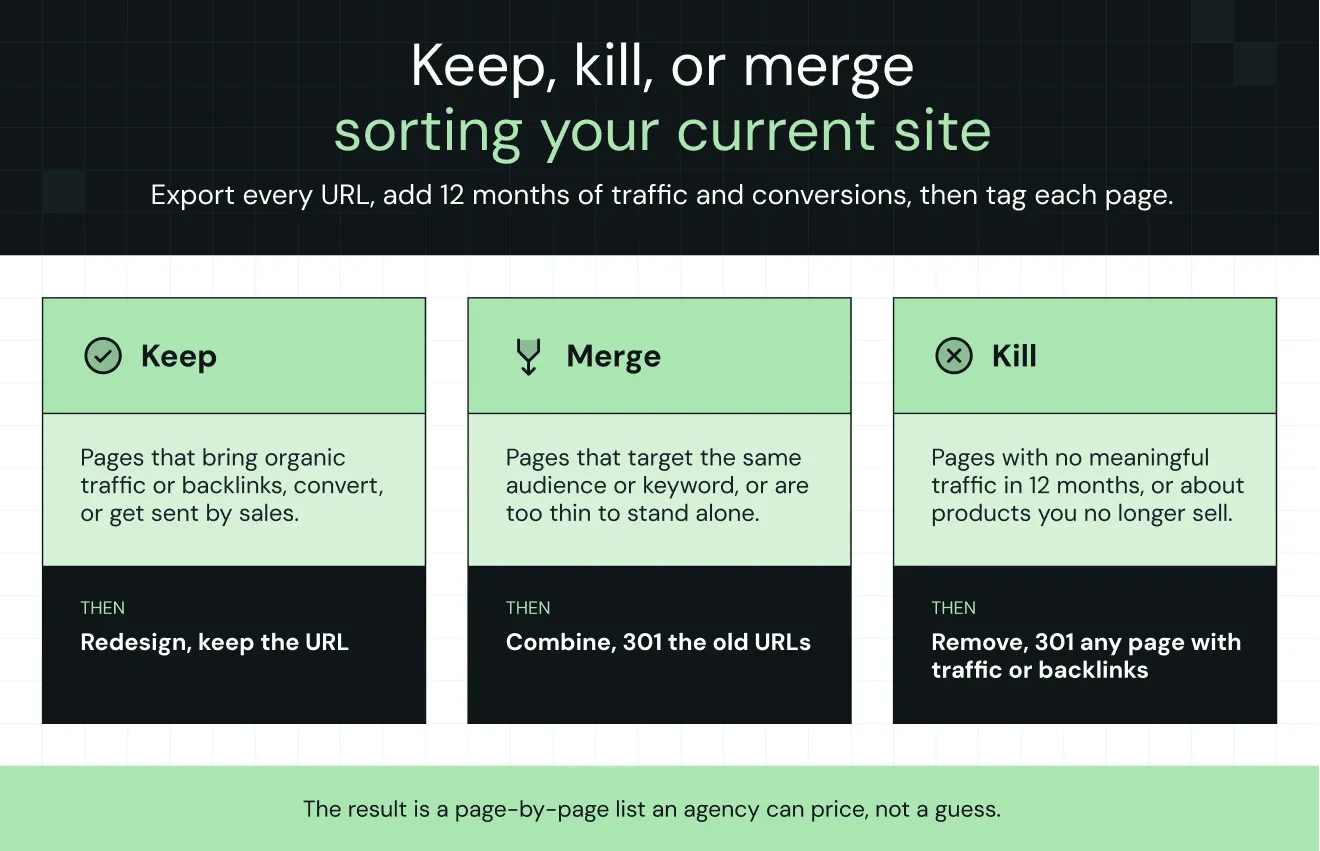
Skip this step and the page count can be wildly off. On one healthcare fintech project, the scope was first discussed as 10 to 15 pages, and the real site turned out to be closer to 140. A page-by-page list is the only way to catch that before it’s priced.
5. Write the scope as countable items, then the out-of-scope list
List the work you need first: strategy, copy, design, development, migration, SEO setup. Then count the build: pages, unique templates, CMS collections, languages, and landing pages. If the budget or deadline is tight, split the list into what must be live at launch and what can wait for a second phase.
Then write what’s out. Start with the items teams most often assume are included:
- Product UI or in-app screens
- Help center or documentation
- Migrating every old blog post
- Translations
- New photography or illustrations
- Ongoing SEO after launch
This list is what you’ll point to when a “quick” addition shows up in week six.
6. Assign an owner and a due date to every piece of content
List each content type the site needs: page copy, case studies, product screenshots, demo video, logos and testimonials, and legal pages. For each one, decide whether you or the agency owns it, and set a delivery date tied to the design phase. Content usually needs to be in before the pages it sits on get designed.
If copy belongs to the agency, say whether that includes research interviews or only writing from your notes. Late or unowned content is one of the most common reasons launch dates slip.
7. Agree on sign-offs, feedback turnaround, change pricing, and a budget range
Name one owner who consolidates feedback, the approvers at each gate (sitemap, wireframes, design, staging), and a turnaround in working days. Then agree on how changes work: every new request is written down, estimated in time and cost, and approved by the owner before work starts.
Finish with a budget range rather than a single number, so the agency can scope to it instead of guessing. For B2B SaaS, a redesign typically runs $40,000 to $80,000 for a scaling Series A to C company, as of March 2026 (Website Redesign Cost Breakdown for B2B SaaS Companies in 2026).
How involved do you need to be? Expect a few hours of interviews and a few hours of writing, not weeks of work. A good agency’s discovery phase covers the rest, and after that your time goes into reviews at each sign-off gate. For the full project view, [The Complete Website Redesign Checklist for B2B SaaS Teams Ready to Scale] picks up where the brief ends.
Here’s what those seven steps look like once they’re done
What Does A Good Design Brief Example Look Like?
A good design brief example is short and countable: one measurable goal, a page and template count, named content owners, named approvers, and an out-of-scope list. The example below is illustrative. It's written for Brightwell, a fictional Series B SaaS company that has just closed its funding round.
Brightwell website brief (illustrative example):
- Why now: Closed a $30M Series B in September. The new site has to be live before sales kickoff on February 2.
- Business context: Spend management software for mid-market finance teams (200 to 2,000 employees). Two products have launched since the last redesign in 2023, and the site describes one.
- Primary goal and baseline: Lift visitor-to-demo conversion from 0.6% to 1% within 90 days of launch. Today: 9,000 monthly visitors and 54 demo requests a month.
- Audience: Controllers (integrations, security), CFOs (ROI, peer logos), and IT (SSO, compliance).
- Current site: 22 pages. Keep the 3 integration pages, which rank. Merge 4 solution pages into 2. Retire the old pricing calculator.
- Scope: Strategy, copy, design, and Webflow development. 14 pages, 5 unique templates, 2 CMS collections (blog, customer stories), English only.
- Content ownership: The agency writes homepage, product, and pricing copy. Brightwell supplies 6 customer stories, product screenshots, and the security overview by week 3.
- Brand constraints: Keep the logo and primary green. Typography, illustration, and motion are open.
- Platform: WordPress to Webflow. HubSpot forms and CRM, GA4, and 301 redirects for every URL with organic traffic.
- Out of scope: Product UI, help center, careers page, migrating blog posts beyond the top 40 by traffic, and new illustrations.
- Sign-off: Owner is the Director of Marketing. Approvers are the CEO and VP Sales. Feedback is expected within 3 working days for each round.
- Budget, timeline, and life after launch: $45k to $65k, 10 weeks to launch. The in-house marketing team runs the CMS after a 30-day post-launch support window.
The goal field is modeled on real briefs. One communications API company we worked with set out to lift its form fill rate from 0.6% to 1%, the industry benchmark it wanted to reach. A number like that gives the agency something to design toward and gives you something to measure after launch.
Here's how four of those fields read when they're written weakly versus written to hold scope:
Notice what the example leaves out: positioning, a sitemap and color preferences. That's deliberate, and the next section explains why.
What Should You Leave To Your Agency Instead Of Putting In The Brief?
Leave positioning, messaging, sitemap, information architecture, wireframes and visual direction to your agency. Your brief should cover what only you know: the trigger, the goals, the constraints, and who signs off. The thinking about how the site should work is what you’re hiring the agency for. When a brief asks you for design preferences and competitor opinions instead, you end up doing the strategy yourself, and the agency simply carries it out. That’s the opposite of what most buyers want: they expect to be guided, which is why an agency that opens with “what colors do you like?” reads as an order-taker.
You bring facts and decisions:
- The trigger and the real deadline
- Goals and baseline data
- Access to customers, sales calls and analytics
- Constraints: brand, legal, platform and integrations
- A budget range
- Named approvers
The agency brings judgment
- Positioning and brand messaging hierarchy
- Sitemap and information architecture
- Wireframes and conversion paths
- Visual direction
And this is exactly how ThunderClap splits the work on every project. Before any strategy starts, clients fill in a brand questionnaire that captures what only they know: their buyers, their competitors, what’s changed in the business, and what the site has to achieve. From there, the strategy is ThunderClap’s to lead. The work is handled by an in-house team of strategists, copywriters, designers, and developers, and every strategist has worked inside a B2B SaaS company before joining. Clients review and approve at each stage, but they aren’t asked to come up with the positioning themselves.
roommaster is a hotel property management software company based in Clearwater, Florida, with offices in Canada, Australia, and the UK. It came to ThunderClap during a big shift: after 30+ years as InnQuest Software, the company was renaming itself after its best-known product and repositioning from a property management system provider to an all-in-one hospitality platform.
A brief for that kind of project usually asks for a new look. The harder question was what the new brand should stand for, and the answer came out of discovery rather than the brief. ThunderClap’s research kept returning to roommaster’s history. The company had been building software for hotels since 1994, alongside the hoteliers who used it, and that experience was something newer competitors couldn’t claim. That became the line the site was built around: “by hoteliers, for hoteliers.”
The positioning then shaped the rest of the decisions:
- Copy: technical jargon gave way to a calmer story about order and efficiency, because hotel teams buying a PMS want fewer moving parts, not more features.
- Product proof: the site shows how unified data cuts duplicate entry and how simpler interfaces shorten training, instead of listing modules.
- Name and platform: the rebrand to roommaster helped the company own the search terms buyers already used, and the move to Webflow gave the marketing team a site they could update themselves.
After launch, roommaster saw an 80% increase in demo requests and organic traffic. CEO Rachel Douglas described the result: “Our new website reflects our core belief that technology should enhance hospitality, not complicate it.”
The number matters, but the bigger point is where the positioning came from: questions the brief didn’t ask. That’s exactly the work an agency should be doing.
A red flag to watch for: an agency that accepts your brief without asking a single question is taking orders, not consulting.
That raises the obvious question of what a good agency actually does with your brief once it lands.
How Does ThunderClap Turn Your Brief Into A Scope That Holds?
ThunderClap turns a brief into a scope by filling its gaps in a two-week discovery, locking pages and structure on paper before visual design starts, and running every phase through milestone sign-offs. ThunderClap is a B2B website agency working with SaaS and fintech teams across the US, Europe, and India, with 144+ websites launched for 100+ B2B brands. Here's how the process works, phase by phase.
Weeks 1 to 2: Discovery
This is where the gaps in your brief get filled, so you don't have to fill them yourself. Discovery covers:
- A brand questionnaire
- Stakeholder interviews
- A competitor audit
- Google Analytics analysis
- Buyer persona mapping
- A current site audit
Weeks 2 to 4: Strategy to structure
The team builds the messaging framework, page-by-page architecture, sitemap, information architecture and UX wireframes. Scope gets locked here, on paper, before visual design starts. Every page, template and CMS collection is counted and signed off at this stage, which is the gate TinyPilot's project never had.
Throughout the project
- A dedicated senior project lead who owns the project end to end
- Milestone-based delivery with defined sign-offs
- Review rounds that consolidate feedback into one list, so five stakeholders don't send five sets of notes
- Weekly syncs, a shared Slack channel and live trackers showing status, next steps and owners
- Working hours aligned to the client's time zone
After launch
Every revamp includes 30 days of post-launch support and a CMS handover, so your team can update pages and publish content without filing dev tickets. If you're weighing who should run the site after that, Outsourcing Webflow Maintenance vs. In-House Management: Which is Better? lays out the trade-offs.
{{specficService}}
Scope checks before visual design starts
Before a single high-fidelity screen is designed, the brief and discovery output have to answer six questions:
- Is every page, template, and CMS collection counted?
- Is the out-of-scope list written down and agreed?
- Does every content item have an owner and a delivery date?
- Are the sitemap and wireframes signed off?
- Are approvers named, with a feedback turnaround in working days?
- Is it clear how a new request gets estimated before work on it starts?
ThunderClap builds on Webflow, WordPress, and Framer, so the platform you list in your brief is a starting point for the conversation, not a filter on who can take the project. Webflow vs WordPress: Which Platform Is Better for Your Business Website in 2026? covers how to choose.
What clients say about the process
When those checkpoints are in place, the project stops feeling like something you have to chase. For nativeMsg, an RCS business messaging platform based in St. Louis, Missouri, that showed up as a timeline that held from kickoff to launch. Steve Lys, Head of Marketing, described the revamp as having “consistent timeline execution and unmatched reliability throughout.”
For the wider view of how projects run from audit to launch, read this: The Step-by-Step Website Redesign Process B2B Teams Use to Increase Conversions (Without Killing SEO and Pipeline).
Your brief needs your facts, not your strategy. Record the trigger, the baseline, the countable scope, the out-of-scope list, and who signs off, and you’ll get three quotes for the same project and a project that matches the quote.
Got a brief, or half of one? Send it to ThunderClap. In a free 30-minute call, a strategist will go through it with you, point out the gaps that usually turn into scope creep, and give you a realistic scope, timeline, and budget range for your redesign.
{{ctaBlock}}
Frequently Asked Questions
1. What is the difference between a website brief and an RFP?
The difference between a website brief and an RFP is what each one is for. A website brief explains your project so agencies can understand and scope it. An RFP (request for proposal) is a formal procurement document that asks agencies to respond in a set format, usually with deadlines, evaluation criteria, and legal terms. Most growth-stage SaaS and fintech teams only need a brief, while enterprise and regulated companies often attach the brief to an RFP.
2. Can I use ChatGPT or Claude to write a website design brief?
You can use ChatGPT or Claude to write a website design brief, but treat it as a drafting aid. AI can turn your interview notes into a clean structure and flag fields you’ve missed. It can’t supply your baseline numbers, approvers, budget, or real deadline, and it tends to fill those gaps with generic goals like “a modern site that converts.” Write the facts yourself, then use AI to tidy the wording.
3. How many agencies should I send my website brief to?
You should send your website brief to two or three agencies. That’s enough to compare approaches and pricing without spending weeks on calls. Send every agency the same brief, so the differences in their proposals reflect how each would tackle the project, not what each one assumed. Watch who sends questions back: that’s usually a better signal than the lowest quote.
4. Who should write the website brief, us or the agency?
You should write the website brief's facts and decisions, and the agency should fill in the rest during discovery. You know the trigger, the goals, the constraints, and the approvers. The agency should bring positioning, a sitemap and structure, and a good agency sends back questions, not just a quote.
5. How long should a website design brief be?
A website design brief should be two to four pages long. Anything much longer usually means you've started designing the site yourself, which is work your agency should be doing in discovery.
6. Should I include my budget in a website brief?
Yes, you should include your budget in a website brief as a range rather than a single number. Without one, agencies either pad the quote to protect themselves or scope a different project from the one you can afford.
7. What if we're not sure of the scope yet?
If you're not sure of the scope yet, send what you know and say so. Unclear scope is a discovery task: a questionnaire plus stakeholder interviews should close the gaps before visual design starts, and the agency that helps you define the scope is usually the one worth hiring.




Browse Similar Articles

Website User Experience Audit: 7 Steps to Spot (and Fix) What's Hurting Conversions



AI-Generated Website Not Converting? Here’s What’s Missing (and How to Fix Yours)



10 Best Venture Capital Websites in 2026 for Design Inspiration (Detailed Breakdowns + Templates)
















Leading 5 SaaS Branding Agencies in Florida (That Actually Understand SaaS Growth)


How to Turn Your B2B Website into a Self-Serve Growth Engine? (PLG Ready in 2026)


9-Step Website Copy Audit Checklist to Improve Conversions (Examples from Top B2B Brands)


How to Choose the Right Fintech Web Development Company for Your Business


Top B2B Website Design Principles That Turn Visitors into Qualified Leads



How to Do a Conversion Rate Optimization (CRO) Audit That Actually Improves Revenue
Web Design Agency vs. Freelancer vs. In-House: What Actually Works in 2026

5 CRO Agencies in London and How to Choose the Best CRO Agency for Your Business


The Ultimate Fintech B2B Positioning Guide for 2026 (That Actually Drives Conversions)


Mapping the B2B Buyer Journey to Improve Conversions Across Every Touchpoint
7 Best Website Maintenance Companies in India for Growth-Led B2B Teams (2026)




8 Best Healthcare Website Design Agencies for HIPAA-Compliant Sites in 2026




How to Find the Best Web Design Company in Houston, Texas for B2B Brands (6 Best Picks)

Positioning That Wins: How to Make Complex B2B Products Clear and Compelling
The Step-by-Step Website Redesign Process B2B Teams Use to Increase Conversions (Without Killing SEO and Pipeline)


7 Best Video Production Agencies for SaaS Product Walkthroughs and Feature Videos


How to Choose the Best B2B Website Maintenance Company: 9 Questions to Ask Before You Hire One







How to Choose a Web Design Company in San Francisco in 2026 (with Examples)

10 Best Web Design Companies in Florida in 2026 and How to Choose the Right One

How to Use Brand Storytelling on Your Website to Close More B2B Deals and Build Buyer Trust

SaaS CRO Best Practices: What High-Growth Brands Do Differently to Win Conversions


How a Rebranding Agency Can Redefine Your B2B SaaS Identity and Boost Pipeline



B2B Marketing Trends in 2026 That Directly Influence Pipeline and Revenue

Top 7 Video Marketing Agencies Driving B2B SaaS Brand Awareness in 2026

Why Partnering with a B2B Brand Positioning Agency Accelerates Market Differentiation

The Complete Website Redesign Checklist for B2B SaaS Teams Ready to Scale

10 Best Webflow Development Agencies in India for 2026 (In-Depth Review)

10 Product Marketing Companies Powering the Fastest-Growing SaaS Brands in 2026
Website Copywriting Services vs In-House: What's Right for Your Business?


How to Choose a Marketing Agency That Understands B2B SaaS Growth Metrics


How to Choose a Video Marketing Agency That Understands B2B Storytelling

Outsourcing Web Design: Cost-Benefit Analysis for Mid-Market & Enterprise Brands

From Leads to Lifetime Value: How Growth Marketing Agencies Scale SaaS Revenue

Build a B2B Website Strategy That Aligns with Sales and Marketing Goals

Webflow vs WordPress: Which Platform Is Better for Your Business Website in 2026?

Fintech Web Design That Builds Trust: 8 UX Principles Every Fintech Site Needs


Optimizing for Intent: How B2B Website Messaging and UX Changes Help Capture Top-Funnel Buyers




Interested in seeing what we can do for your website?