















How to Do a Conversion Rate Optimization (CRO) Audit That Actually Improves Revenue

%20Audit%20That%20Actually%20Improves%20Revenue.webp)

TL;DR
- Most conversion rate optimization (CRO) audits fail because they focus on page-level tweaks instead of buyer decisions. Changing button colors will not resolve hesitation or build trust.
- Companies using CRO tools report a 223% ROI, yet only 39.6% have a documented CRO strategy. The gap is in execution, not tools.
- High-pressure environments reduce the odds of a purchase by 43%, and much of this friction is not visible in standard analytics.
- An effective CRO audit identifies friction across the entire user journey, not just at the final conversion point.
- Segmenting users by intent, such as cold, warm and high-intent, is the step most teams skip, and it's where the biggest revenue opportunities hide.
- The future of CRO is not a one-time audit. It is a continuous system that evolves, adapts, and improves alongside your buyers.
You ran a CRO audit. You got a 47-slide deck. Your developers fixed some CTAs, your designer tweaked a hero banner, and your conversion rate moved from 2.1% to 2.3%.
Champagne? Not quite.
Here's the thing about most CRO audits: they look at the right data but ask the wrong questions. They tell you what happened on your pages, including clicks, scrolls, and drop-offs, but not why your buyers hesitated or left quietly to evaluate your competitor instead.
A real conversion rate optimization (CRO) audit doesn't just measure behavior. It maps decisions. And for B2B teams in high-stakes markets, that is the difference between a good-looking report and actual revenue growth.
Why Most Conversion Rate Optimization Audits Don’t Move the Needle
Only 28% of companies are satisfied with their conversion rates, while 37% report being either quite dissatisfied or very dissatisfied. The reason isn't that they lack data. It's that the data they're acting on doesn't tell the whole story.
They optimize pages, not buyer intent
The classic CRO audit obsesses over button colors, CTA placement, and microcopy.
These things matter at the margins. But they don't resolve the core problem.
High-pressure environments reduce the probability of purchase by 43%, and that friction rarely occurs at the CTA. It lives in unanswered questions, vague positioning, missing trust signals, and pricing pages that feel like a locked door.
When a VP of IT at a defense contractor lands on your product page, they're not bouncing because your button is the wrong shade of blue. They're bouncing because your page didn't answer the question, "Is this built for organizations like mine?"
They treat traffic as uniform
A first-time visitor who found you through a blog post is not the same as a returning buyer who just visited your pricing page three times this week.
Same URL. Very different intent.
B2B buyers go through an average of 27 touchpoints before making a purchase decision, distributed across different channels, devices, and times. This means what looks like a single “user journey” is actually a series of fragmented interactions.
This fragmentation makes the journey difficult to track and even harder to interpret:
- 61% of B2B marketing managers say they lack a clear view of the customer journey
- Only 21% of companies can effectively measure the ROI of their content marketing efforts
- 84% of B2B companies still rely on last-click attribution models
When visibility is this limited, decisions become flawed. Teams optimize for what they can measure, not what actually drives conversions, and critical intent signals get ignored.
Audits that treat all traffic as a single segment average across wildly different journeys and draw conclusions that apply to no one in particular. A government contractor in Texas doing early-stage research needs completely different information than a procurement manager in Florida who's already shortlisted two vendors.
They rely too heavily on surface-level data
Heatmaps tell you where people clicked. Scroll depth tells you how far they read. Neither tells you what they were actually thinking or what stopped them from moving forward.
B2B buyers spend only 17% of their total purchase journey talking to sales reps, split across all vendors. This suggests your company's actual share of that interaction is less than 5%. The rest happens in self-directed research, your analytics can't fully see.
Heatmaps capture the visible tip of that iceberg. The doubt, the internal alignment conversations, the competitor comparison happening in a different browser tab, and none of that shows up in a scroll depth report.
This is where most CRO audits fall short. They track behavior, not intent. High-performing teams, such as ThunderClap, do the opposite, building their messaging on real customer insights (instead of behavioral data).
As highlighted in a LinkedIn post by Rahul Nair of VuNet Systems, this shift from surface-level data to deep customer understanding can fundamentally change how websites perform.
For example, when VuNet Systems revamped their website, the team based every line of copy on actual ICP discovery calls with stakeholders. Instead of relying only on behavioral data, they focused on how their customers think, evaluate solutions, and make decisions.
The result was not just a visual upgrade, but a measurable business impact:
- Stronger brand perception
- Clearer product positioning across their customer base
- More effective communication of solutions and differentiation
- Improved interaction with prospective customers
What a High-Impact CRO Audit Actually Does Differently
A high-impact audit doesn't pick one of these lenses. It uses what we call The 4-Lens CRO Audit Framework to understand not just what users do, but why they do it and how those behaviors connect to revenue outcomes.
Each lens reveals a different layer of the B2B buyer journey. When combined, they provide a complete picture of conversion friction and opportunity.
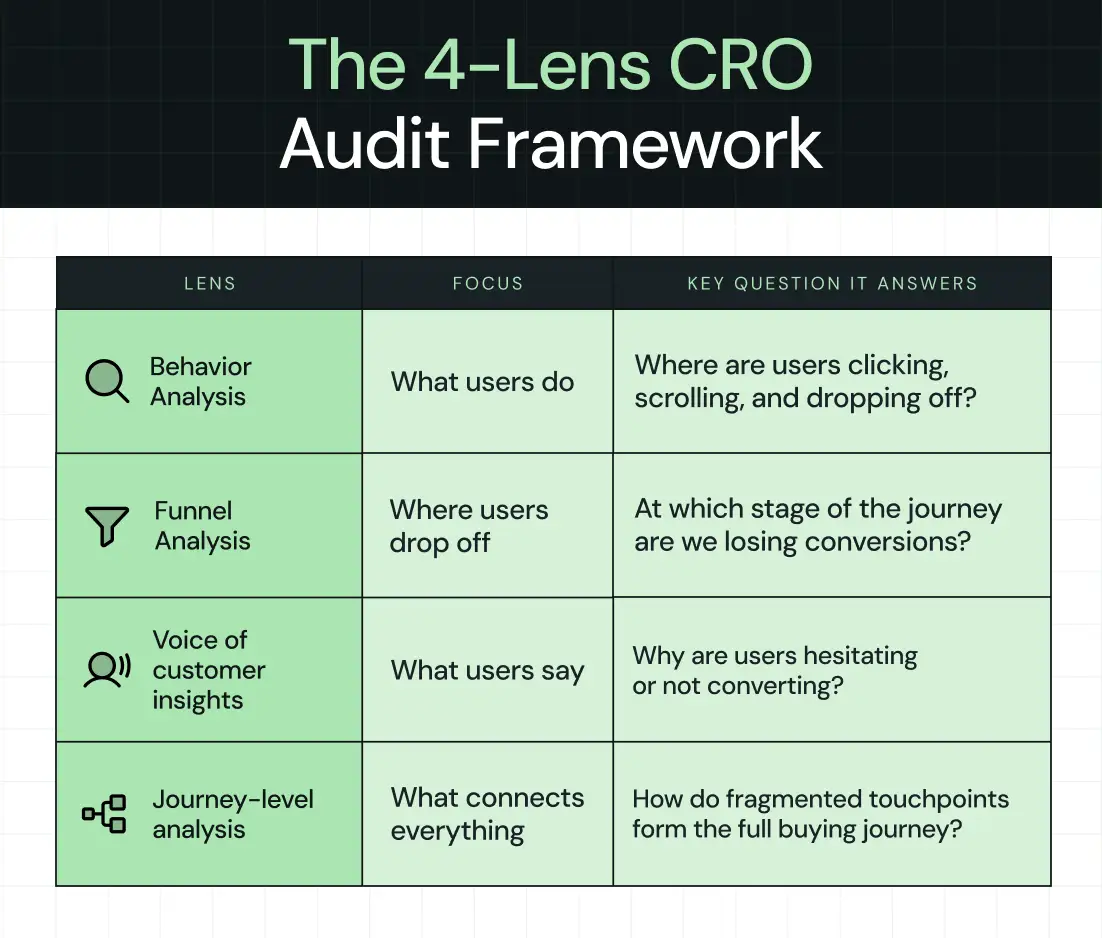
Behavior analysis (What users do)
Clicks, scrolls, navigation paths…this is the foundation.
But where do users go? Where do they stop? Which paths lead toward conversion and which ones lead to exit?
Behavior data is your starting map, but it's still just a map.
Funnel analysis (Where users drop off)
Entry points to exit points, conversion paths, and where the gap between traffic and revenue lives. A one-point lift in B2B website conversion, say, from 2% to 3%, can cut customer acquisition cost by 15–25%.
This makes funnel clarity one of the highest ROI investments you can make. However, it’s not enough.
The real question is: What's actually causing the drop?
That's what funnel data alone can't answer.
Voice-of-customer insights (What users say)
Surveys, on-site feedback, and sales call analysis. Forrester data shows that more than 90% of B2B buyers trust peers in their industry, while only 29% trust vendor sales reps.
That trust gap shows up in your conversion data, and closing it requires actually listening to what buyers tell you about why they hesitated. Sales call recordings, in particular, are a goldmine. The objections your reps hear on calls are often the same doubts silently killing conversions on your website.
Journey-level analysis (What connects everything)
This is where most teams struggle, connecting fragmented touchpoints into a single, coherent buyer journey. Pre-visit influence, multi-session behavior, and off-site research provide the full picture of how a buyer went from being vaguely aware to ready to buy.
Platforms like ThunderClap are built to surface these patterns, not just isolated interactions.
The Modern CRO Audit Framework (Step-by-Step)
The CRO audit framework we’re going to walk through consists of 6 steps (yes, just 6 this time, but don’t worry, we’re not cutting corners).
Each step builds on the previous one, so by the end of this, you won’t just have a checklist. You’ll actually understand how conversions happen and what’s stopping them on your website.
Let’s get into it.
Step 1: Start with conversions, not traffic
The first thing you need to do is shift how you think about your website.
Most teams start with traffic. They look at how many people are visiting, where they’re coming from, and how to increase those numbers. But here’s the problem. Traffic doesn’t mean anything if it doesn’t convert.
So instead of asking, “How do we get more visitors?” you need to ask, “What are visitors actually doing when they convert?”
Start by defining what a conversion means for your business. This could be a purchase, a demo request, a form submission, or even a newsletter signup. Whatever it is, be specific. Saying you want to “increase revenue” is too broad and not helpful when you’re auditing performance.
Once that’s clear, look at where these conversions are happening.
- Which pages do users visit right before converting?
- What actions do they take along the way?
- Are there specific paths that show up again and again?
You’ll often find patterns you didn’t expect. For example, users might not convert on their first visit. They might check your pricing page, leave, come back later, read a case study, and only then take action. At this stage, the goal is not to fix anything yet. It’s to understand what’s already working so you can build on it instead of guessing.
Step 2: Identify high-intent user journeys
Now that you know what a conversion looks like, the next step is to understand how people get there.
Every user follows a path before converting. Some land on your homepage and leave. Others explore multiple pages, compare options, and then take action. These paths are what we call user journeys.
However, not all journeys are equally valuable. Some users are just browsing. Others are much closer to making a decision. You need to focus on the journeys that show clear intent.
For example, you might see patterns like:
- A visitor lands on a feature page, then moves to pricing, and then books a demo
- Someone reads a case study, checks your product page, and signs up
- A user visits your site multiple times before finally converting
These are high-intent journeys. So, what should you do here?
Go through your data and identify:
- The most common paths taken by users who convert
- The pages that appear right before conversion
- The sequences that lead to faster decisions
This helps you separate casual visitors from serious prospects.
And that’s important because improving a high-intent journey has a direct impact on conversions, while optimizing random pages usually doesn’t get you anywhere.
Step 3: Analyze friction at key touchpoints
Once you’ve identified the important journeys, it’s time to figure out what’s getting in the way. Start by reviewing the key touchpoints in your high-intent journeys and ask yourself a simple question. “Why would someone not continue from here?”
You’ll usually find issues like:
- Missing information: Users don’t have enough detail to make a decision
- Confusing messaging: They don’t fully understand what you offer
- Weak or unclear CTAs: They’re not sure what to do next
- Lack of trust: There are no testimonials, proof points, or credibility signals
Sometimes, the problem is not the content, but the experience itself. Pages might load slowly, forms might be too long, or important elements might be hard to find.
These patterns show up more often than most teams expect. The tricky part is that users won’t tell you what’s wrong. They’ll just leave.
Kiran Kulkarni, Partner and Head of Growth at ThunderClap, audited over 100 SaaS home pages and found that the same conversion mistakes keep repeating. Many of these sites were built to satisfy internal preferences instead of helping buyers take action, which leads to polished pages that look good but fail to convert.
Chances are, you’ve made one or more of these mistakes, too.
So, your job is to observe behavior, spot patterns, and identify where people drop off or hesitate.
Write everything down. You’ll need it later.
Step 4: Segment users by intent (this is a critical step)
At this point, you might be tempted to treat all users the same. Don’t.
One of the biggest mistakes in CRO audits is analyzing data without segmentation.
Think about it. A first-time visitor who just discovered your brand is very different from someone who has already visited your pricing page twice. They have different questions, different concerns, and different levels of intent.
You need to break your audience into meaningful groups. A simple way to start is:
You can refine this further by looking at new vs returning visitors, traffic sources, or even device types. If you treat everyone the same, your messaging becomes generic, and your conversion rate suffers. Before making any changes, be clear about who you’re actually optimizing for.
Step 5: Evaluate the decision-stage experience
This is where things get serious.
Forrester reports that 86% of B2B purchases stall at some point in the buying process, often because one stakeholder’s concern was not addressed early enough. This is exactly why decision-stage experiences need to remove doubt, not add complexity.
By the time a user reaches this stage, they’re already considering taking action. Take a close look at the experience around key decision points.
- Start with pricing. Is it clear and easy to understand? Or does the user have to figure things out on their own? Any confusion here can cause hesitation.
- Look at your demo or sign-up flow. How many steps does it take? Are you asking for too much information upfront? Is the process smooth from start to finish?
- Consider what happens after the user converts. Do they get immediate confirmation? Is the next step clear? Is there a delay in follow-up?
If demo requests are a key conversion point for your business, it helps to study how high-performing B2B companies structure these pages. The ThunderClap High-Converting Demo Page Playbook breaks this down with real examples, wireframes, and messaging patterns used by leading SaaS brands.
Consider what happens after the user converts. Do they get immediate confirmation? Is the next step clear? Is there a delay in follow-up?
All of these factors influence whether a user feels confident in their decision.
In this scenario, users don’t need more features or more content. They need reassurance that they’re making the right choice.
Step 6: Connect the full journey (not isolated steps)
Now for the part that most CRO audits completely miss.
Up until now, you’ve been analyzing pages, journeys, and touchpoints. But all of that still happens within your website.
In reality, users don’t make decisions in isolation. They might discover you through a blog, leave your site, read reviews elsewhere, come back via a search, check your pricing, and only then convert.
If you only look at individual pages, you miss everything that happens in between.
Take a step back and look at the bigger picture.
- Where are users coming from before they convert?
- How many visits does it take?
- What other channels or touchpoints influence their decision?
This is exactly where most audits fall apart. Traditional tools show you snapshots of behavior, but they don’t connect the entire journey. According to Forrester, 61% of B2B marketing managers say they have no clear view of the customer journey. This means most audits are drawing conclusions from incomplete maps.
A strong example of this comes from a recent website revamp for Z47, one of India’s leading VC funds. The work focused on improving the brand's user experience across touchpoints, not just individual pages. The team analyzed engagement patterns, clarified the messaging structure, and refined how information was presented across the site to better align with how users evaluate high-trust investment opportunities.
After launch, the impact showed up clearly across key engagement and traffic signals:
- +59% website traffic
- +54% active users
- +50% engagement
- +121% direct traffic
- +465% social traffic
These numbers show what happens when journey-level thinking is applied correctly, where messaging, structure, and user paths are aligned with how real buyers explore and decide.
Ayush Barnwal shared on LinkedIn how this redesign elevated both brand perception and user engagement:
At ThunderClap, we help you bring all these touchpoints together, so you can see how users move across sessions, channels, and interactions. Instead of running a one-time audit and moving on, you start building a continuous system that continually improves as user behavior evolves.
And that’s the real goal of CRO. Not just fixing what’s broken today, but understanding how to keep getting better over time.
Best Tools for Conversion Rate Optimization Audits (2026 View)
The question is not which of the best tools for conversion rate optimization audits in 2026 exist, but which ones to use and when.
For a complete breakdown of CRO tools, refer to our guide to the 9 Best Conversion Rate Optimization Tools for B2B Companies.
Behavior analysis tools
Use Hotjar or Microsoft Clarity when you need a fast, qualitative read on what users are doing on specific pages, especially for diagnosing drop-off on high-traffic pages like your homepage, pricing page, or demo request form.
Clarity is free and surprisingly robust for early-stage audits. Hotjar gives you more control with surveys layered in. Use these to generate hypotheses, not conclusions.
Product and funnel analytics
Google Analytics 4 is your baseline for traffic segmentation and goal tracking, and trust us, you’ll need it.
When you're ready to go deeper into user-level paths and multi-event flows, Mixpanel or Amplitude will show you what GA4 can't: the sequences that lead to conversion and the ones that silently don't.
AI-powered behavior intelligence
When you need to move from "what happened" to "why it happened" at scale, FullStory, Contentsquare, and Glassbox are built for that. These tools stand out in enterprise audits, where session replay and anomaly detection can surface friction points that no one would have found manually.
If you're auditing a complex SaaS product or a multi-step demo flow, this tier is worth the investment.
AI-driven personalization and experimentation
Once you've identified what to fix, Mutiny, Dynamic Yield, and Adobe Target let you test and personalize at the segment level, serving different experiences to cold visitors versus high-intent buyers without building separate pages.
Mutiny is particularly strong for B2B SaaS teams running account-based experiences.
Voice-of-customer and conversation intelligence
Gong turns your sales calls into CRO data.
The objections your reps hear, such as "We're not sure about the integration," "Our legal team will want to see your SOC 2," are the same objections killing conversions on your website.
Survicate adds on-page survey capability to capture friction in the moment.
Traditional tools analyze parts of the journey. ThunderClaps connect the full picture, helping teams move from isolated insights to continuous optimization.
{{specficService}}
Best Conversion Rate Optimization Audit Services (And When to Use Them)
Up to this point, you’ve seen how a strong CRO audit works and what it should uncover. The next question is simple:
Should you handle this internally or bring in external expertise?
This is where choosing the best conversion rate optimization audit services becomes important.
When to consider CRO audit services
There are two clear situations where bringing in external help makes sense.
- The first is when there is no dedicated CRO expertise in-house. Someone needs to connect behavior data, funnel performance, and VOC insights into a single clear direction.
Without this, teams often collect data but struggle to turn it into meaningful action.
- The second is when conversions stop improving. Internal teams may already be testing and optimizing, but results begin to level off.
Here, a fresh perspective can identify gaps that were not visible earlier.
What to look for
The best CRO services start with a B2B website strategy, not tools or templates. They take the time to understand your buyer journey, your sales cycle, and how revenue actually happens in your business.
From there, they turn insights into clear next steps. Instead of pointing out surface-level issues, they explain what users are missing, where decisions break down, and what should be tested first.
This kind of clarity is what separates useful audits from reports that sit unused.
Limitations of traditional CRO services
Most CRO engagements are still treated as one-time projects. You receive a report, implement a few recommendations, and move on. The problem is that user behavior keeps changing. What worked a few months ago may not work today.
Median free-to-paid conversion rates in B2B SaaS dropped from 50% in 2023 to 34% by 2025. Buyer expectations are shifting quickly, and static audits struggle to keep up with that pace.
The shift toward continuous CRO systems
A more effective approach treats CRO as an ongoing system rather than a one-time effort.
Teams are moving toward platforms like ThunderClap that continuously track behavior, identify pain points, and improve conversion paths over time. This turns CRO into a consistent capability instead of an occasional project, with each insight building on the last and contributing to long-term growth.
Where Most Conversion Rate Optimization Audits Miss Revenue Opportunities
Most revenue is decided long before a form is filled out or a demo is booked. Buyers quietly research, compare options, and narrow down choices without leaving obvious signals.
Many CRO audits miss this phase entirely, which is where the biggest opportunities exist.
- Over-focus on TOFU: Most teams focus on traffic and landing pages. High-intent buyers get the same experience as first-time visitors, even though they are much closer to a decision. This is where revenue is lost.
- Ignoring high-intent users: Buyers shortlist most vendors before formal evaluation even begins. By day 1, they have already placed about 4 out of 5 vendors on their shortlist, and 95% of the time, the final choice comes from that list. If your site does not clearly differentiate you at this stage, you are quietly ruled out.
- Not accounting for multiple stakeholders: B2B decisions involve large groups with different priorities. The person converting is not the only decision-maker. Your site needs to address financial, technical, and leadership concerns simultaneously.
- Treating CRO as one-time: One-time audits capture a moment. User behavior keeps changing. Ongoing CRO efforts perform better because they adapt and build on continuous learning.
A Practical CRO Audit Checklist (What to Actually Review)
A conversion rate optimization audit checklist is only useful if it reflects how buyers actually move.
Most users do not follow funnels in a straight line. They jump between pages, compare silently, and decide long before most checklists even look at them.
Here’s a checklist that’ll actually work for you:
Acquisition: Entry points
1. Are landing pages aligned with the intent of the traffic source?
A paid ad targeting IT buyers should land on a page that speaks directly to government use cases, not a generic product overview.
2. Is your messaging consistent with where the visitor came from?
Inconsistency between an ad's promise and a landing page's content is one of the fastest ways to lose a high-intent visitor.
Engagement: Key pages
1. Are users finding what they came for quickly?
Attention is short, and patience is shorter. If a buyer can't orient themselves within the first few seconds, they leave.
2. Is navigation reducing friction or adding it?
Menus that bury pricing three clicks deep, or feature pages that dead-end, are quiet conversion killers.
Consideration: Trust-building elements
1. Are case studies present and specific?
A case study from a company in the same industry with the same compliance requirements is worth 10 generic logo testimonials.
2. Are product capabilities clearly explained, without burying them in jargon?
Case in Point: Apollo.io
Their social proof section does not rely on a single validation format. Instead, it layers credibility in a way that matches how buyers evaluate risk and relevance.
.webp)
- Conversion cues first: The “500k+” metric is placed upfront, giving immediate scale and credibility before any testimonial is read.
- Role-based testimonials with outcomes: Testimonials are segmented by roles like Account Executives, SDRs, RevOps, and Founders. Each one connects directly to a specific buyer perspective with clear outcomes.
- Interactive flip cards: Users can hover to reveal full testimonials and measurable results, such as “75% more meetings booked.” The interaction itself encourages deeper engagement rather than passive reading.
This structure works because it reflects how buyers actually process trust, not how websites typically present it.
Once trust is established, the next question a buyer has is straightforward: "Is this worth it, and what's the actual next step?"
Decision: Conversion point
1. Is pricing transparent?
When someone hits your pricing page, they're essentially saying, "I'm interested, convince me this is worth it."
Hiding pricing or requiring a call just to get a ballpark creates friction at the exact moment when a buyer is ready to move.
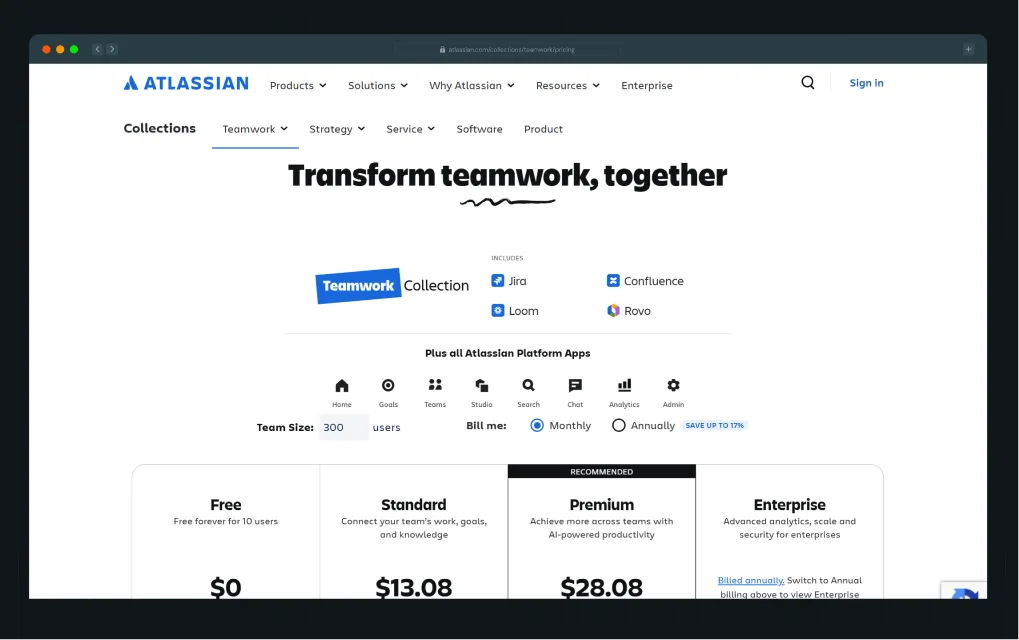
Some SaaS teams address this by introducing structured transparency instead of full opacity or full exposure. Interactive pricing experiences are one example. They allow buyers to understand cost based on their own context, without creating unnecessary back-and-forth.
Case in point, Atlassian’s pricing experience shows how clarity can be maintained without friction. Buyers can view plans side by side, understand what each tier includes, and get a realistic sense of cost without needing to contact sales first.
1. Is your CTA clear about what happens next?
“Request a demo” means different things to different buyers. It helps to clarify what the demo includes, who it is for, and what value they will get from it.
Post-conversion: Follow-through
1. What happens immediately after a form fill or demo request?
If the answer is "a generic confirmation email and a three-day wait," you're losing momentum at the moment of highest intent.
2. Are new users guided toward value, or left to figure it out on their own?
Hidden friction: What analytics won't show
This is the category most audits skip entirely, and it's often where the biggest deals are dying.
- Internal stakeholder hesitation: A champion loves your product, but their security team has concerns that your website has never addressed. The deal stalls. Your funnel shows "lost, no decision."
- Messaging misalignment: Your website speaks to technical users, but your buyers are increasingly executives. Forrester's 2024 Buyers' Journey Survey found that over two-thirds of buyers in large, complex transactions are Millennials and Gen Z, who expect clear value framing rather than feature lists.
1. Confusion during evaluation: Buyers comparing you to a competitor get confused about what makes you different. Without clear differentiation, they default to the safer, more familiar option, or they wait.
{{specficBlog}}
The Shift: From CRO Audits to Conversion Systems
CRO is moving from reports to systems. From snapshots to continuous visibility. From analyzing what happened to understanding what's happening right now. What determines the outcome is not how the journey begins, but how well it holds when momentum slows.
Winning teams do not stop at identifying conversion gaps. They build systems that continuously improve themselves. These systems connect behavior data, intent signals, and journey insights into a loop that continually refines itself as buyer expectations evolve. This is where optimization moves from isolated fixes to understanding the full buyer journey.
CRO Agencies like ThunderClap are built around this shift. Instead of treating CRO as a one-time exercise, they help teams build an always-on system that learns from every interaction and improves how buyers move from interest to decision.
We’ve worked on 129+ B2B websites for mid-market SaaS, fintech, AI, and complex B2B products, including brands such as Amazon, Storylane, Factors, Roommaster, Zamp, Dropit, Wizcommerce, and DPDZero. The challenges are often similar. Positioning is unclear, conversions are low, and the website does not reflect the company's maturity.
Our experience across industries helps teams improve demo signups, reduce acquisition costs, and sharpen positioning.
If you want to turn your landing page into a stronger revenue driver, we can help identify where users lose clarity and build a roadmap to improve conversions in weeks, not months.
{{ctaBlock}}
FAQs
1. What does a CRO audit typically include?
A CRO audit reviews your full conversion path, from how traffic arrives to where users drop off to what finally drives action. It covers behavior analysis, funnel data, landing page evaluation, and voice-of-customer insights. The goal is to find where buyers are hesitating and why, then prioritize fixes by revenue impact.
2. How can a CRO audit improve my website's conversion rate?
A CRO audit surfaces the pain points that are quietly costing you conversions. This includes unclear messaging, missing trust signals, confusing navigation, or a demo flow that creates doubt at the wrong moment.
3. What tools are used in a CRO audit?
The best audits combine behavioral tools like Hotjar or Microsoft Clarity, funnel analytics from Google Analytics 4 or Mixpanel, AI-powered session analysis from tools like FullStory, and voice-of-customer tools like Gong or Survicate. Each tool covers a different layer.



.webp)
Browse Similar Articles




Leading 5 SaaS Branding Agencies in Florida (That Actually Understand SaaS Growth)

.svg)
How to Turn Your B2B Website into a Self-Serve Growth Engine? (PLG Ready in 2026)

9-Step Website Copy Audit Checklist to Improve Conversions (Examples from Top B2B Brands)

.webp)

How to Choose the Right Fintech Web Development Company for Your Business
Top B2B Website Design Principles That Turn Visitors into Qualified Leads
Web Design Agency vs. Freelancer vs. In-House: What Actually Works in 2026
5 CRO Agencies in London and How to Choose the Best CRO Agency for Your Business
The Ultimate Fintech B2B Positioning Guide for 2026 (That Actually Drives Conversions)
Mapping the B2B Buyer Journey to Improve Conversions Across Every Touchpoint
.webp)
7 Best Website Maintenance Companies in India for Growth-Led B2B Teams (2026)

.webp)
8 Best Healthcare Website Design Agencies for HIPAA-Compliant Sites in 2026

How to Find the Best Web Design Company in Houston, Texas for B2B Brands (6 Best Picks)
Positioning That Wins: How to Make Complex B2B Products Clear and Compelling
The Step-by-Step Website Redesign Process B2B Teams Use to Increase Conversions (Without Killing SEO and Pipeline)
7 Best Video Production Agencies for SaaS Product Walkthroughs and Feature Videos
How to Choose the Best B2B Website Maintenance Company: 9 Questions to Ask Before You Hire One

How to Choose a Web Design Company in San Francisco in 2026 (with Examples)

10 Best Web Design Companies in Florida in 2026 and How to Choose the Right One

How to Use Brand Storytelling on Your Website to Close More B2B Deals and Build Buyer Trust
SaaS CRO Best Practices: What High-Growth Brands Do Differently to Win Conversions

How a Rebranding Agency Can Redefine Your B2B SaaS Identity and Boost Pipeline

B2B Marketing Trends in 2026 That Directly Influence Pipeline and Revenue
Top 7 Video Marketing Agencies Driving B2B SaaS Brand Awareness in 2026
Why Partnering with a B2B Brand Positioning Agency Accelerates Market Differentiation

The Complete Website Redesign Checklist for B2B SaaS Teams Ready to Scale
.avif)
10 Best Webflow Development Agencies in India for 2026 (In-Depth Review)
10 Product Marketing Companies Powering the Fastest-Growing SaaS Brands in 2026
Website Copywriting Services vs In-House: What's Right for Your Business?

How to Choose a Marketing Agency That Understands B2B SaaS Growth Metrics

How to Choose a Video Marketing Agency That Understands B2B Storytelling
Outsourcing Web Design: Cost-Benefit Analysis for Mid-Market & Enterprise Brands

From Leads to Lifetime Value: How Growth Marketing Agencies Scale SaaS Revenue
Build a B2B Website Strategy That Aligns with Sales and Marketing Goals
Webflow vs WordPress: Which Platform Is Better for Your Business Website in 2026?
Fintech Web Design That Builds Trust: 8 UX Principles Every Fintech Site Needs
Optimizing for Intent: How B2B Website Messaging and UX Changes Help Capture Top-Funnel Buyers

12 Best B2B Web Development Agencies in the US to Build Scalable Websites

From Audit to Action: 8-Step Process to Optimize Your B2B Website Strategy for 2026 Buyers
How to Design a High-Converting Landing Page from Scratch (2026 Edition)
From Click to Customer: Proven Landing Page Conversion Optimization Techniques
How to Write Website Copy That Converts: A Step-by-Step Guide for 2026




Interested in seeing what we can do for your website?



.webp)
