















The Complete Website Redesign Checklist for B2B SaaS Teams Ready to Scale


TL;DR
- Most B2B SaaS redesigns fail because teams chase visuals instead of buyer needs and pipeline impact.
- This leads to traffic loss and weak conversions, with nearly 80% of redesigns failing to deliver measurable business value.
- A structured checklist fixes this by protecting SEO, clarifying messaging, and turning UX into conversion infrastructure.
- ThunderClap applies this framework across 129+ B2B website projects to build scalable growth infrastructure.
Most B2B SaaS website redesigns start with excitement. Teams rush to make things look modern without thinking about how a website actually drives revenue. In fact, as many as 80% of website redesigns fail to create measurable business value when they ignore buyer needs and growth metrics.
When a redesigned site launches without a strategy built around retention, conversion, SEO protection, and pipeline impact, traffic drops and conversion lifts never materialize. B2B SaaS redesigns only break even after 10.4 months on average and yield wildly different outcomes when they are not tied to growth goals.
At ThunderClap, we see this pattern repeatedly. Companies come to us frustrated, not because their website looks bad, but because it fails to support growth. It does not clarify positioning, convert intent, or scale with the business. We’ve rebuilt over 129 B2B sites for SaaS, fintech, AI, and enterprise tech clients, including Amazon, Storylane, Factors, Deductive AI, and roommaster. Our sites consistently convert and even get recognized by AI. These successes come not from flashy design alone, but from treating every redesign as a growth initiative.
This very mindset turns a risky visual refresh into a structured, outcome-driven transformation. It forces teams to protect traffic, sharpen messaging, guide buyers, and connect the website directly to pipeline impact.
This guide lays out a complete B2B website redesign checklist built specifically for B2B SaaS teams preparing to scale.
1. Pre-Redesign Strategy Checklist (Before You Touch Design)
This phase determines whether your redesign succeeds or quietly fails. If you skip this work, the site will look better but perform the same. Sometimes, even worse.
This section anchors the entire project and forms the foundation of your checklist for website redesign.
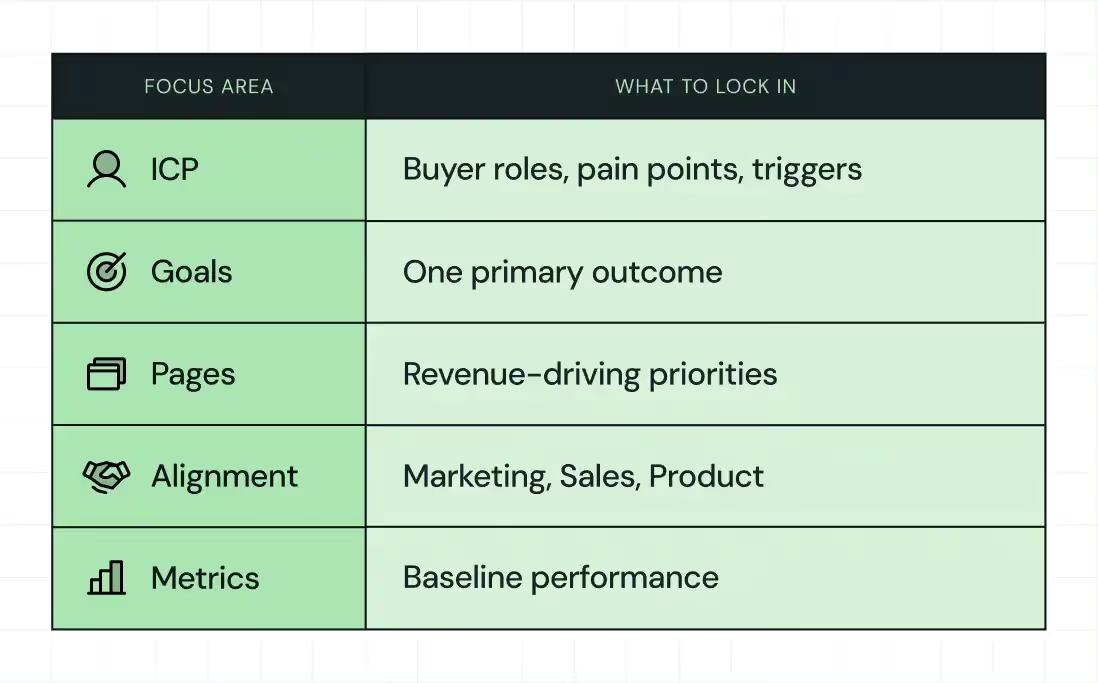
Get crystal clear on your ICP and buying journey
Every effective B2B website starts with profound clarity about who it serves.
Most teams claim they know their ICP, but when you look closer, the definition feels vague. “Mid-market SaaS” or “enterprise teams” does not guide messaging or design decisions.
You need sharper insight. Here’s what you need to do:
- Identify the real buyers, not just the users
- Understand job titles, responsibilities, internal pressures, and success metrics
- Learn what triggers their search and what stalls their decision
- Then, map the buying journey
- Early-stage buyers want clarity and education
- Mid-stage buyers look for differentiation and proof
- Late-stage buyers want reassurance, pricing clarity, and risk reduction
For example, when the VP of Marketing lands on your homepage after a board meeting where pipeline pressure came up, they skim for proof, credibility, and outcomes. If your site leads with vague claims, they bounce.
Define the real goal of the redesign
With buyers clearly defined, the next step is to set a primary goal. Fuzzy goals lead to wasted effort, so decide on success metrics before touching design.
Some of these metrics include increasing qualified demo requests, improving conversion rates on pricing pages, repositioning for enterprise buyers, or supporting a product-led growth motion.
At ThunderClap, we push teams to choose one primary goal and two secondary goals. This constraint creates focus and prevents endless scope creep.
{{specficBlog}}
Prioritize pages that drive growth
Not every page deserves equal attention. So, focus on pages that influence revenue and trust.
These typically include the homepage, core product pages, pricing pages, comparison pages, security pages, and high-intent solution pages. Supporting content matters, but your redesign energy should follow buyer intent.
Align stakeholders early
Redesigns break down when teams work in isolation.
Bring marketing, product, sales, and RevOps into the same conversation early. Align on messaging, lead quality expectations, and conversion flows.
This alignment prevents late-stage conflicts where everyone wants something different.
Capture baseline metrics
You cannot prove impact without a baseline.
Before redesigning, record traffic, rankings, conversion rates, bounce rates, page speed, and engagement metrics. These numbers will serve as your benchmark and proof later.
2. Website Redesign SEO Checklist (Protect & Grow Organic Traffic)
This is where most teams panic, and rightly so.
SEO damage during redesigns happens quietly and compounds quickly. Rankings disappear when URLs change without redirects. Traffic drops when high-performing pages vanish. Recovery can take months. A redesign should never wipe the slate clean.
This website redesign SEO checklist ensures you protect existing momentum and create room for growth.
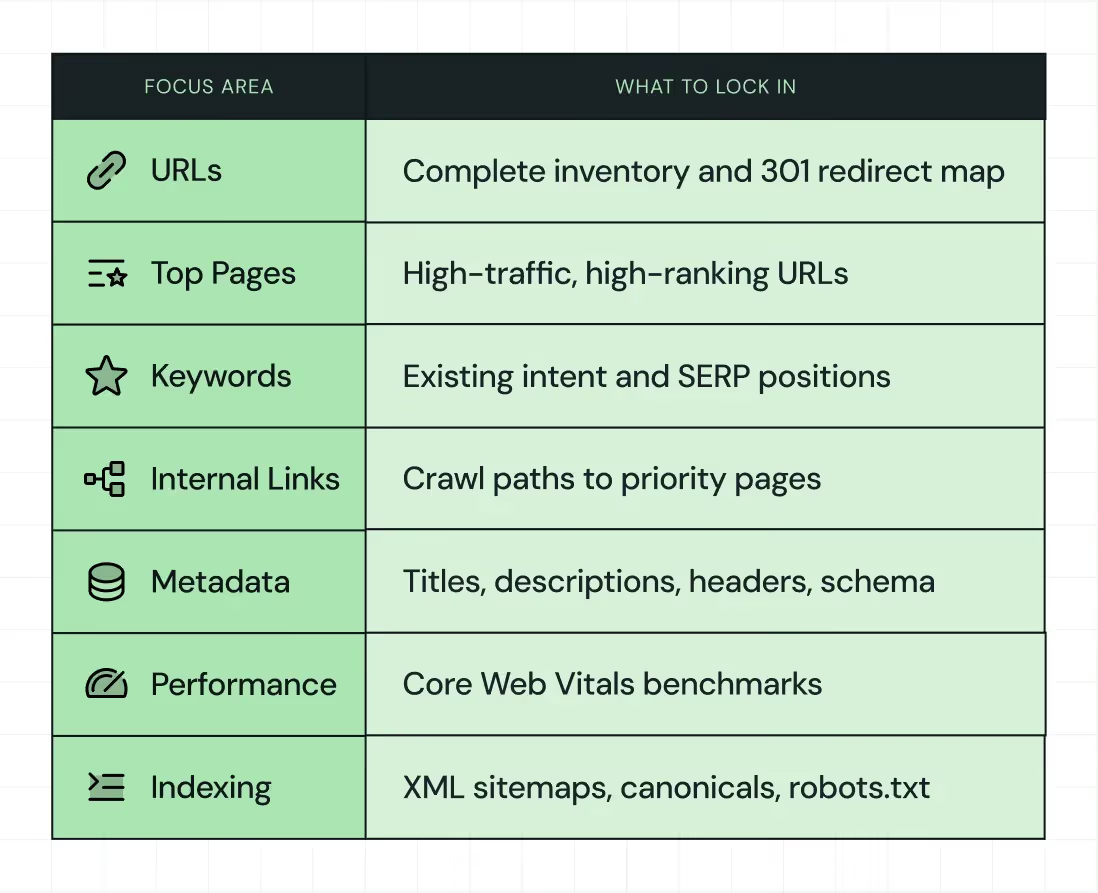
Create a full URL inventory and redirect plan
Since bad migrations are a leading cause of ranking drops, start by cataloging every URL and mapping each to its future destination. Implement 301 redirects and test them thoroughly. In fact, proper 301 redirects can retain 90%+ of link value, thereby preserving SEO authority during structural changes.
At ThunderClap, we executed this for roommaster PMS, a property management platform, during their migration from WordPress to Webflow within six weeks. Their site included 40+ pages and multiple CMS collections for blogs, news, ebooks, guides, templates, case studies, and testimonials.
Here’s what we did:
- Migrated all pages with a structured content hierarchy and consistent H1/H2 usage
- Created reusable forms integrated with Salesforce, UTM tracking, Chili Piper scheduling, and analytics
- Set up 97 page-level and domain-level redirects to preserve SEO integrity
As a result, roommaster’s marketing team now updates pages without developer intervention, scales efficiently, and maintains brand consistency. Qamar Aziz, Webflow Lead at ThunderClap, said,
“By moving to Webflow, we were able to implement global classes and reusable components, so the team could launch new property and campaign pages without risking brand inconsistency.”
Preserve high-performing pages and keywords
Once you secure URLs, focus on retaining high‑traffic and high‑ranking pages. Preserve headings, keyword intent, and structure. Improve clarity and UX without erasing what works. SEO gains come from refinement, not demolition.
Without this, sites often lose a significant portion (almost 90%) of their organic audience post‑launch.
Rebuild internal linking with intent
With key pages preserved, strengthen internal linking so that search engines and users can easily reach important content.
A thoughtful linking structure increases crawl paths and sends clear relevance signals, helping maintain and grow search presence.
Validate metadata and on-page SEO
After linking, migrate and enhance metadata (titles, descriptions, headers, schema). A SEMrush‑aligned process shows that sites retaining proper metadata recover rankings faster than those that don’t.
Properly aligned on‑page elements give search engines context and ensure visibility.
Optimize performance and core web vitals
Website speed impacts rankings and conversions. Compress assets, optimize images, choose a fast hosting provider, and track core web vitals before and after launch.
For example, when we worked on ClearlyRated’s website redesign, the focus was on improving trial signup activation and onboarding clarity.
.avif)
Here’s what we did:
- Conducted messaging audits to clarify the value proposition on signup pages
- Optimized CTAs so users move quickly from awareness to trial
- Redesigned onboarding steps to minimize friction during initial login
- Monitored first-dashboard engagement to measure time-to-value
These updates aligned the website more closely with product onboarding goals. The site became a clearer extension of the product, guiding new users logically and giving the team a framework to evaluate how experience design influences behavior over time.
Validate indexing and technical signals
Finally, check XML sitemaps, robots.txt, canonical tags, and indexing settings. Test before launch, then verify post-launch.
Technical diligence ensures search engines recognize and rank your content correctly.
👉 Suggested read: The B2B Web Design and Development Blueprint: Tips to Win More Clients
3. UX, Messaging & Conversion Checklist for B2B SaaS
This is where website revamps turn into revenue levers. A site that only looks good rarely moves commercial metrics. Experience design should guide decisions, not decorate pages.
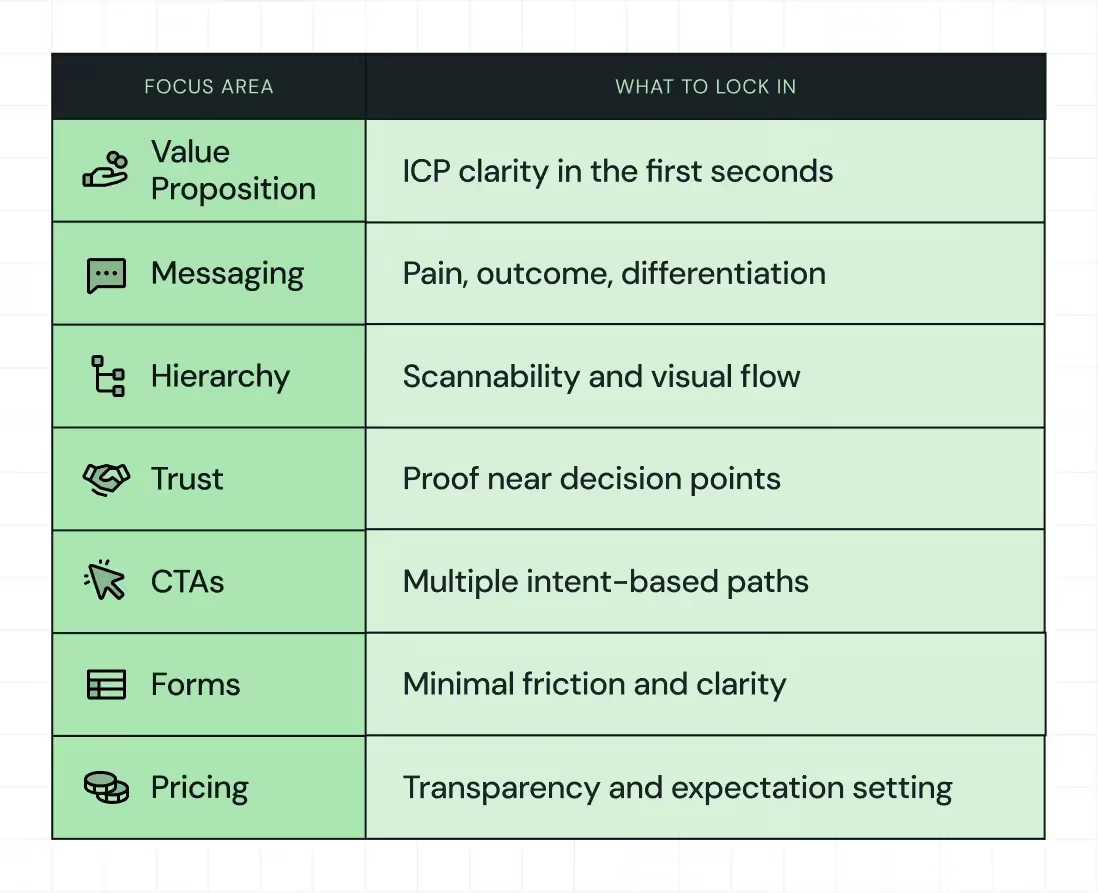
This section forms the heart of your B2B website redesign checklist because lean UX, precise messaging, and conversion architecture differentiate a pretty site from a growth engine.
Clarify the value proposition instantly
Since buyers decide in seconds whether they stay or bounce, your homepage must answer three questions immediately:
- Who is this for?
- What problem does it solve?
- Why should I trust it?
Avoid generic claims and speak directly to the buyer's pain points and outcomes. Research shows that effective messaging that aligns with buyer intent and clarity significantly increases conversion potential, especially in complex B2B environments. B2B organic search continues to drive the majority of high‑intent traffic, with 68 % of B2B website traffic beginning with search queries that signal purchase intent.
When Factors partnered with ThunderClap, the focus was on making the website clear and user-friendly, not just visually appealing. Even though their analytics tool processed complex data, marketers needed a site that felt approachable and trustworthy. We used the “Marketing Compass” concept to position Factors as a guide, helping teams navigate buyer journeys with ease and confidence.
.avif)
Here’s what we did:
- Balanced precision with warmth through hand‑drawn illustrations and contour‑line motifs
- Used a distinct orange‑led palette to stand apart from blue‑heavy, data‑centric competitors
- Structured layouts and hierarchy so the product story was clear and scannable
- Designed interaction patterns that supported understanding, not distracted from core messaging
The result was a website that supported product storytelling, reinforced brand positioning, and set a strong foundation for growth‑focused engagement.
Ayush Barnwal, Partner at ThunderClap, highlights how the redesign created a premium, globally-ready brand for Factors.ai while keeping their existing messaging intact.
👉 Read more: B2B Website Redesign Agencies: Choosing a Partner That Gets SaaS
Improve hierarchy and scannability
With your value proposition articulated, the next priority is making sure buyers see that message. Buyers skim before they commit; if your layout buries meaning, they leave. Clear headings, short paragraphs, and visual rhythm improve engagement.
In fact, simplifying information architecture and visual hierarchy can boost task success rates by 40%, lower bounce rates, and increase session duration, all of which are leading indicators of conversion performance.
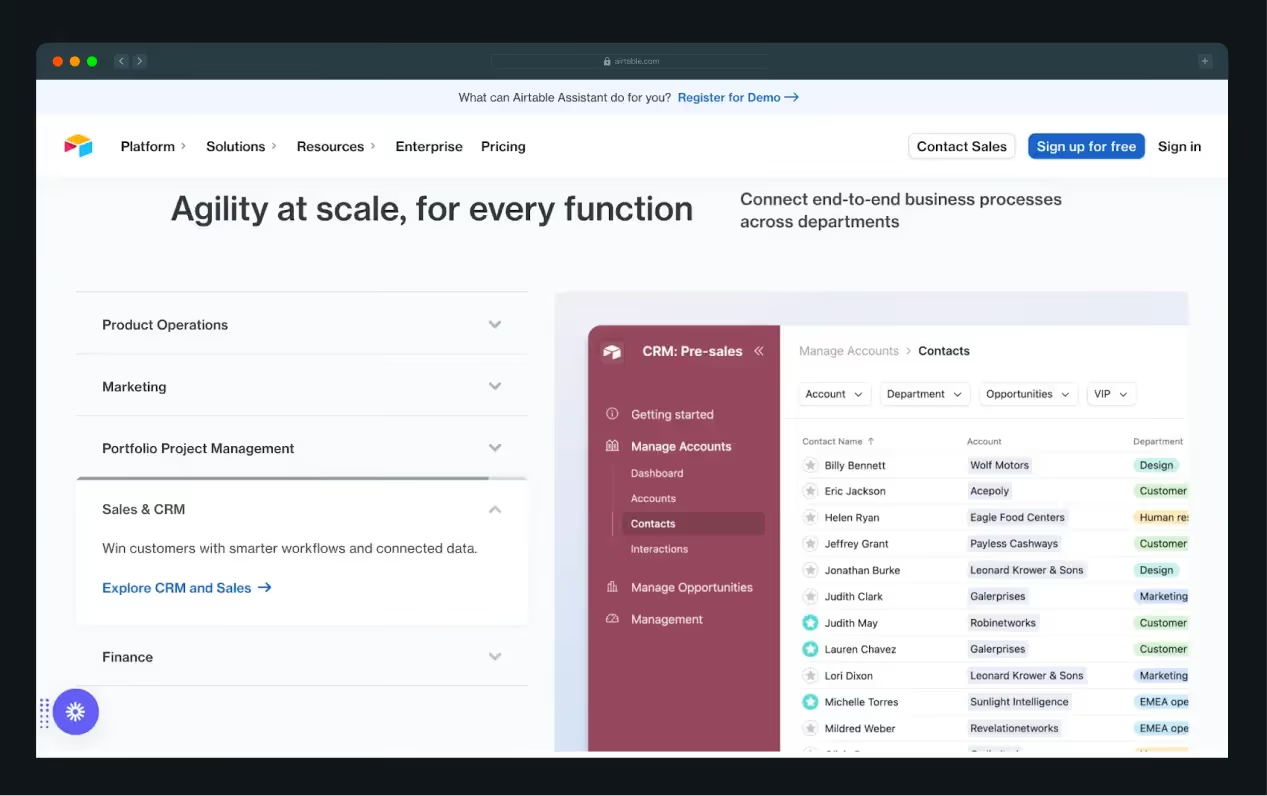
Airtable provides a compelling example of effective visual hierarchy in a B2B SaaS website. Their homepage organizes content into clean, modular sections that highlight key use cases, including Marketing, Product Operations, and Portfolio Project Management.
Each section combines an icon, a clear headline, a concise description, and an in-product visual, allowing users to quickly scan and understand capabilities without reading dense text. The color palette subtly differentiates each section, guiding attention without overwhelming the eye.
This modular design helps users self-identify the features relevant to their needs, improving engagement and reducing friction in the decision-making process.
Add trust signals where decisions happen
Once buyers understand who you are and what you do, they must believe you can deliver. Trust accelerates conversion. Surface logos, testimonials, case studies, compliance badges, and reviews near primary CTAs.
Research shows that aligned SEO and conversion strategies can lift qualified lead submissions by up to 34% and reduce cost‑per‑acquisition by 22% compared to disjointed approaches.
ClearlyRated benefited from this approach. After restructuring key pages and clarifying messaging across marketing, sales, and product teams, they reduced bounce rates and saw higher user engagement across their site.
These results reflect not just better design but better persuasion.
Build a conversion architecture
With trust established, not every visitor will want a demo immediately. A ladder of CTAs helps capture value at every stage. Here’s what you can include:
- Learn More
- View Pricing
- Book a Demo
- Start a Trial.
This layered approach respects intent and reduces friction.
Deductive.ai illustrates this perfectly. During their launch, we tested multiple landing page variations: headlines tailored to different personas, hero sections emphasizing either ROI or workflow efficiency, CTA placements and color variations, and microcopy changes in form fields.
Within weeks, engagement multiplied 10x. Each experiment informed subsequent iterations, creating a self‑sustaining growth engine backed by data.
A LinkedIn post by Harsh Barnwal walks through that process and shows how experiments shaped their conversion journey.
This aligns with trends among high‑growth B2B companies, where 87% run monthly CRO experiments and 72% of SaaS marketers say CRO is more critical to growth than paid advertising.
Clarify pricing and demo flows
Finally, decision friction kills conversions faster than any other single issue. To prevent this from happening, explain demos clearly, make pricing transparent where possible, and reduce form friction with thoughtful microcopy.
In fact, clean, intuitive pricing architecture and friction‑reduced signup paths dramatically improve trial‑to‑paid conversions. One study showed mobile UX improvements alone can increase conversion by up to 28% and retention by 15%.
If pricing is opaque, many buyers move on before reaching your sales team. Make the path from awareness to action as logical and frictionless as possible.
4. Development & CMS Checklist (Built to Scale, Not Just Launch)
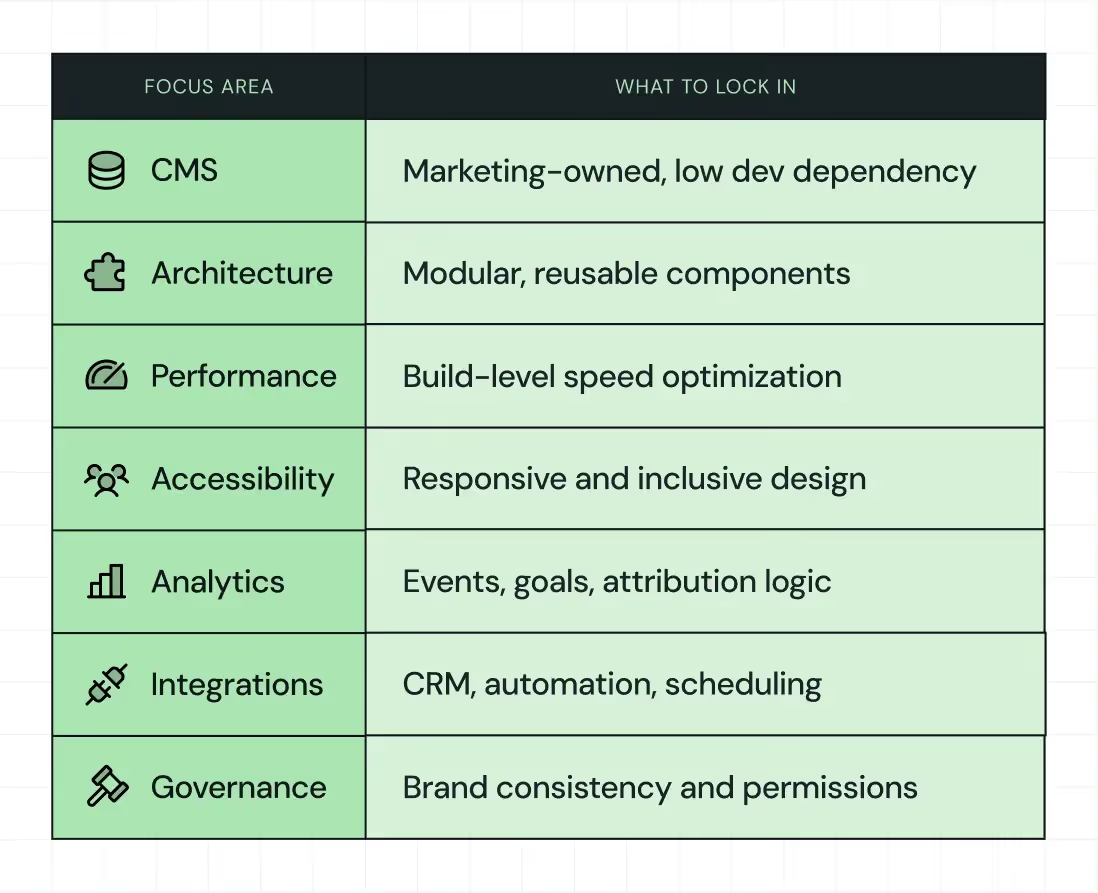
A site that marketing cannot update becomes a challenge, slowing campaigns and frustrating revenue teams. This section focuses on long‑term agility and supports your broader B2B web design and development goals.
Choose a CMS that empowers marketing
Since agility influences speed to market and campaign responsiveness, choose a content management system that empowers marketing without constant developer involvement. In 2025, the CMS landscape still centers on major platforms, with WordPress powering roughly 43% of all websites.
Still, SaaS‑focused systems like Webflow and headless architectures are gaining traction because they reduce dependency on engineers. Marketing teams need systems that enable them to launch, edit, and optimize content at pace.
👉 Also read: Webflow vs WordPress: Which Platform Is Better for Your Business Website in 2026?
Design modular systems, not one‑off pages
Once you have a CMS that supports agility, the next step is designing modular systems that scale with your business. Reusable templates and component libraries allow your product marketing, solutions, and resource teams to assemble pages without reinventing layouts.
Modular design aligns with how modern development teams think about scalable architecture and significantly reduces friction when rolling out new content experiences across launches, campaigns, and feature updates.
{{specficService}}
Optimize performance at the build level
With modular systems in place, you must optimize performance at the build level so scale does not slow experience. Efficient hosting, minimized scripts, and continuous performance testing help ensure fast page loads and high engagement metrics.
In 2026, out‑of‑the‑box performance has become a competitive advantage for CMS platforms, with some systems like Duda achieving more than 80% of sites passing Core Web Vitals benchmarks due to automated optimization features. This shows that fast sites not only improve user experience but also increasingly influence search engine visibility and conversion outcomes.
Ensure accessibility and responsiveness
As performance improves experience, accessibility expands your reach, and reinforces your brand’s commitment to inclusivity and compliance. Build for keyboard navigation, screen readers, and fluid responsive breakpoints across devices.
Accessible design not only helps users with disabilities but also aligns with evolving regulatory expectations and supports broader market penetration.
Set up analytics and events early
Once your site runs efficiently and inclusively, define and implement analytics before launch so you can measure impact from day one. Establish event tracking, goals, and attribution logic early to assess user flows, key conversion points, and content performance.
Early validation of tracking accuracy enables you to iterate quickly and link specific experiences to pipeline outcomes. This measurement framework drives business decisions.
Reduce developer dependency
Finally, reduce developer dependency so marketing can ship without friction. If simple tasks like copy edits or landing page launches require tickets, your CMS fails as enabling infrastructure.
A development ecosystem that supports non‑technical actions frees engineers to focus on high‑value enhancements while letting revenue teams continuously optimize experiences.
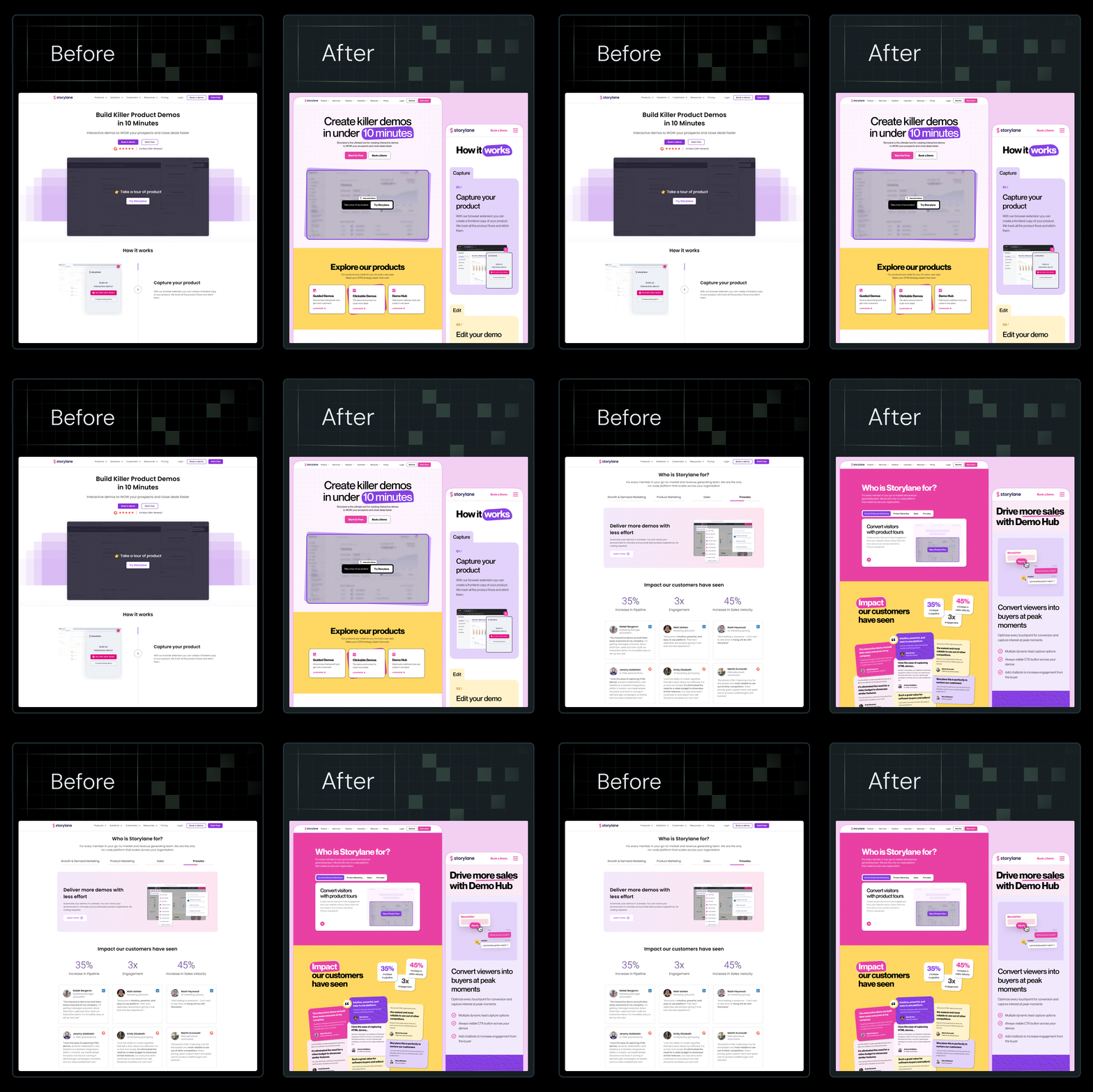
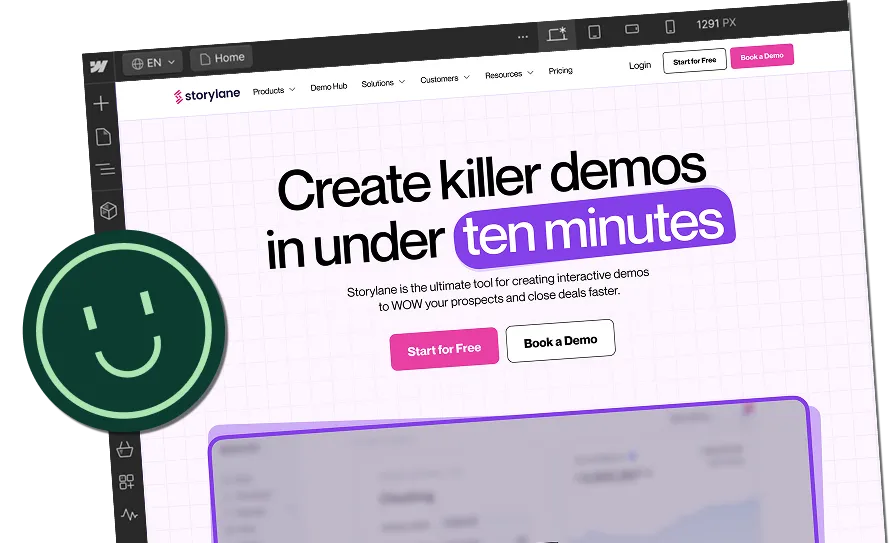
When we redesigned Storylane’s website, we leaned into this alignment. We introduced mood boards, a clean yet playful visual identity, and custom illustrations. The copy remained unchanged, yet impressions rose by 36 %, and demo requests increased by 30%.
Every change supported alignment between marketing and sales. Form submissions flowed directly into CRM pipelines and analytics dashboards allowed RevOps to monitor demo-to-SQL conversions. This integrated approach mirrors what leading B2B companies are doing today.
Here’s a complete breakdown in this LinkedIn post by Kiran Kulkarni, Partner and Head of Growth at ThunderClap, where she shares the detailed process and before-and-after results.
5. Pre-Launch & Post-Launch Testing Checklist
Launch is the starting line of your website’s performance journey. Hence, rigorous testing before and after launch makes the difference between a stagnant site and a revenue-driving digital asset.
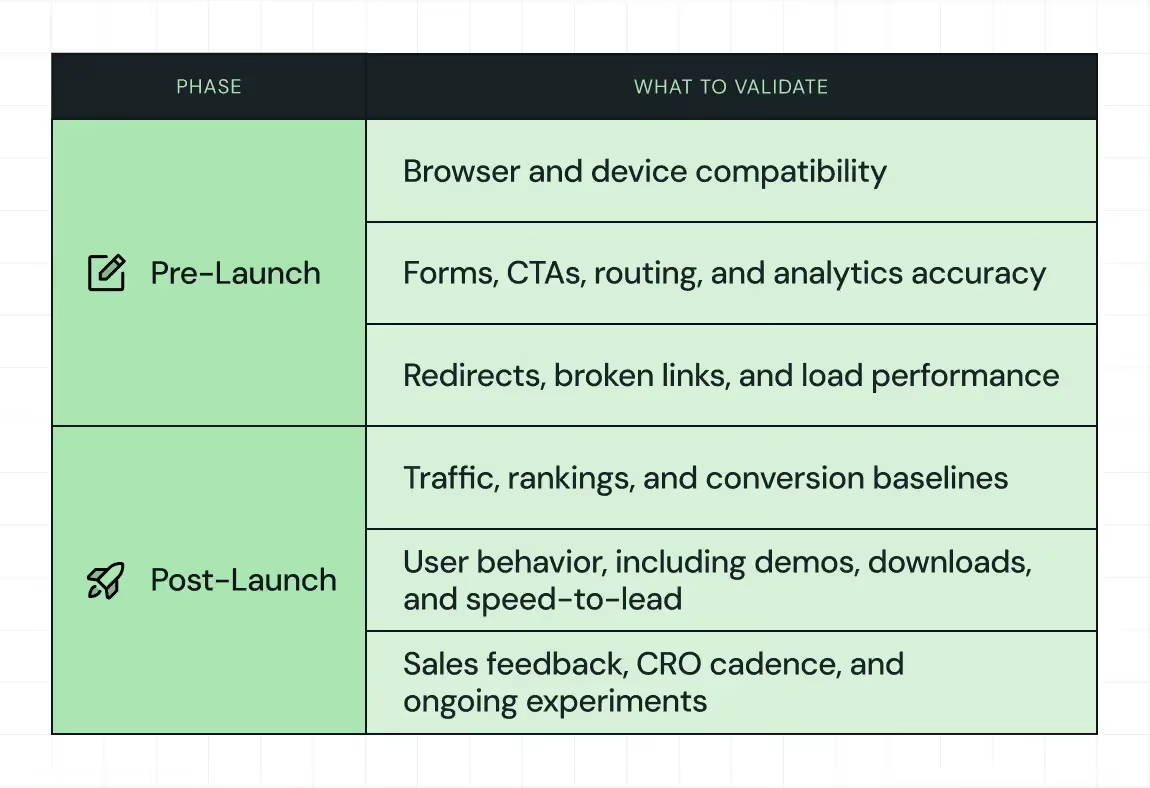
Pre-launch testing
Before your redesigned site goes live, every element must be stress-tested to ensure it performs as intended under real-world conditions.
- Start by testing across browsers and devices to ensure consistent, responsive behavior and eliminate rendering issues
- Validate all forms and CTAs for correct routing, functional triggers, and data capture accuracy
- Confirm that analytics platforms like GA4 or your chosen analytics provider are tracking baseline metrics precisely so you can measure lift or decline post-launch
- Spot check redirects and broken links to prevent user drop-offs and safeguard your SEO equity
- Execute load testing to verify your hosting and CDN configurations handle peak traffic
In 2026, leading marketing voices emphasize that skipping this step invites costly mistakes that slow pipeline velocity and break trust with buyers. The earlier you identify and fix issues, the cheaper and faster the fix becomes. Research from Forbes notes that rigorous pre-launch testing not only avoids embarrassment but also actively reduces long-term costs and improves audience insights.
In practice, we embed this principle into our methodology by validating messaging, UX, and CRO hypotheses before launch, so campaigns enter the market already optimized for conversion.
Post-launch monitoring and iteration
As soon as the site goes live, compare traffic, rankings, and conversion funnels against your baseline metrics. To understand whether users are behaving as expected, track user behavior such as:
- Form fills
- Demo bookings
- Downloads
- Speed-to-lead
Pair this data with direct feedback from sales teams and customers to surface friction points that analytics alone won’t reveal. Establish a regular conversion rate optimization (CRO) cadence where data is reviewed weekly, micro-tests are deployed continuously, and quarterly UX audits refresh strategic priorities.
This discipline mirrors how high-performing B2B teams operate. McKinsey research shows top organizations test three to five design variants per change to identify what actually drives results. Companies that maintain structured experimentation, rather than one-off tests, see conversion uplifts of 22% or more within months.
Tools like Hotjar, VWO, and Google Optimize support this process by turning real user behavior into actionable insights.
A Website Redesign Checklist Is Your Scale Insurance
Redesigns succeed when teams treat websites as systems, not sprints.
A strong checklist protects SEO, improves conversion, and enables scale. It ties redesign outcomes to the pipeline, not aesthetics. In the current market, where the average B2B SaaS site converts only about 1.4% of visitors into leads, scalable design and iterative optimization help you stand out in crowded markets and support real growth.
ThunderClap’s approach reflects this market reality by embedding a conversion-focused strategy, analytics-driven decisions, and a pipeline-first framework into every stage of a redesign. This helps clients achieve notable increases in demo requests, engagement, and lead conversion. As a Webflow Enterprise Partner, our work with over 129 B2B brands, including Amazon, Storylane, Deductive.ai, ClearlyRated, and Factors, shows that treating your website as infrastructure aligns it with revenue goals and accelerates growth.
{{ctaBlock}}
FAQs
1. Why does a website need a redesign checklist?
A redesign checklist keeps teams focused on outcomes instead of visuals. It aligns strategy, UX, SEO, and conversion from the start. ThunderClap uses structured checklists to reduce risk, protect performance, and ensure redesigns support growth rather than subjective design preferences.
2. How do I make sure my SEO is not affected during a website redesign?
Protect SEO by mapping URLs, preserving high-performing pages, implementing proper redirects, and validating technical elements before launch. ThunderClap treats SEO as a core pillar of the redesign, ensuring continuity of traffic and long-term organic growth.
3. What should I test before launching a redesigned website?
Test performance, forms, CTAs, analytics, redirects, and user journeys across devices. ThunderClap teams simulate real buyer behavior before launch to catch friction early and prevent post-launch surprises.



.webp)
Browse Similar Articles





Leading 5 SaaS Branding Agencies in Florida (That Actually Understand SaaS Growth)

.svg)


How to Turn Your B2B Website into a Self-Serve Growth Engine? (PLG Ready in 2026)


9-Step Website Copy Audit Checklist to Improve Conversions (Examples from Top B2B Brands)

.webp)

How to Choose the Right Fintech Web Development Company for Your Business


Top B2B Website Design Principles That Turn Visitors into Qualified Leads

%20Audit%20That%20Actually%20Improves%20Revenue.webp)
How to Do a Conversion Rate Optimization (CRO) Audit That Actually Improves Revenue
Web Design Agency vs. Freelancer vs. In-House: What Actually Works in 2026
5 CRO Agencies in London and How to Choose the Best CRO Agency for Your Business

The Ultimate Fintech B2B Positioning Guide for 2026 (That Actually Drives Conversions)
Mapping the B2B Buyer Journey to Improve Conversions Across Every Touchpoint
.webp)
7 Best Website Maintenance Companies in India for Growth-Led B2B Teams (2026)

.webp)


8 Best Healthcare Website Design Agencies for HIPAA-Compliant Sites in 2026



How to Find the Best Web Design Company in Houston, Texas for B2B Brands (6 Best Picks)

Positioning That Wins: How to Make Complex B2B Products Clear and Compelling
The Step-by-Step Website Redesign Process B2B Teams Use to Increase Conversions (Without Killing SEO and Pipeline)


7 Best Video Production Agencies for SaaS Product Walkthroughs and Feature Videos


How to Choose the Best B2B Website Maintenance Company: 9 Questions to Ask Before You Hire One





How to Choose a Web Design Company in San Francisco in 2026 (with Examples)

10 Best Web Design Companies in Florida in 2026 and How to Choose the Right One

How to Use Brand Storytelling on Your Website to Close More B2B Deals and Build Buyer Trust

SaaS CRO Best Practices: What High-Growth Brands Do Differently to Win Conversions


How a Rebranding Agency Can Redefine Your B2B SaaS Identity and Boost Pipeline

B2B Marketing Trends in 2026 That Directly Influence Pipeline and Revenue

Top 7 Video Marketing Agencies Driving B2B SaaS Brand Awareness in 2026

Why Partnering with a B2B Brand Positioning Agency Accelerates Market Differentiation
.avif)
9 Best Webflow Development Agencies in India for 2026 (In-Depth Review)

10 Product Marketing Companies Powering the Fastest-Growing SaaS Brands in 2026
Website Copywriting Services vs In-House: What's Right for Your Business?


How to Choose a Marketing Agency That Understands B2B SaaS Growth Metrics


How to Choose a Video Marketing Agency That Understands B2B Storytelling

Outsourcing Web Design: Cost-Benefit Analysis for Mid-Market & Enterprise Brands

From Leads to Lifetime Value: How Growth Marketing Agencies Scale SaaS Revenue
Build a B2B Website Strategy That Aligns with Sales and Marketing Goals

Webflow vs WordPress: Which Platform Is Better for Your Business Website in 2026?
Fintech Web Design That Builds Trust: 8 UX Principles Every Fintech Site Needs

Optimizing for Intent: How B2B Website Messaging and UX Changes Help Capture Top-Funnel Buyers



12 Best B2B Web Development Agencies in the US to Build Scalable Websites

From Audit to Action: 8-Step Process to Optimize Your B2B Website Strategy for 2026 Buyers

How to Design a High-Converting Landing Page from Scratch (2026 Edition)

From Click to Customer: Proven Landing Page Conversion Optimization Techniques

How to Write Website Copy That Converts: A Step-by-Step Guide for 2026


How to Optimize a Landing Page for Maximum ROI: A Step-by-Step Breakdown


AI Landing Pages That Convert: 7 Design Principles Every AI Platform Should Follow
From Traffic to Pipeline: B2B Website Growth Strategy for Scaling Teams


B2B Website Optimization Strategy: Speed, UX, SEO, and CRO in One Playbook




Interested in seeing what we can do for your website?



.webp)
