















5 Common Challenges of Web Development And How Webflow Solves Them


Web development is not a linear process. You'll often need to make countless iterations and tackle multiple challenges before finally launching a website. This includes issues like heavy dependency on web developers and higher production costs, as well as more granular issues like managing cross-platform compatibility and creating responsive designs.
However, by shifting to no-code website development platforms like WebFlow, you can tackle these issues and make website development a lot less complicated. And in this article, we tell you exactly this.
We discuss the 5 major challenges you might encounter while developing a website using traditional website builders like WordPress and how WebFlow solves them.
5 Major Web Development Challenges And How Webflow Solves Them
Here are the 5 major web development challenges and how WebFlow helps you tackle these:
Challenge 1: High dependency on web developers
Traditional web development requires help from professional developers with extensive coding knowledge, including front-end and back-end management. This means your team needs to seek the help of coders to make minor tweaks. This leads to lengthier development cycles and higher production costs as you always need to wait for the developer's availability to get things done.
How WebFlow helps to overcome this challenge?
As a no-code platform, WebFlow is accessible to all, from professional web developers to amateurs with no coding skills. With its drag-and-drop interface and a visual editor that reflects changes immediately, even members from non-technical teams like marketing and design can design and create websites easily.
In other words, since you don't always need the help of a coder to make iterations, WebFlow website development takes less time than traditional web development methods. With faster turnarounds and fewer developers in the scene, the production costs also reduce considerably.
Here's an example from John-Henry Scherck, a growth and SEO consultant on the change he experienced after moving to WebFlow from a traditional website builder:
"Webflow just lets me do what I want to do. No need to push to staging, no need to call a developer friend to code up a mock. With Webflow, I can actually just do everything myself with confidence." (Source)
Challenge 2: Cross-browser compatibility issues
Running cross-browser compatibility tests is essential to ensure your website is primed for different browsers. Your website visitors bounce if it fails to perform consistently across popular web browsers such as Google Chrome, Mozilla Firefox, Safari, and Microsoft Edge. This, in turn, hurts your SEO performance, as with greater inconsistencies, there is a higher chance of visitors bouncing due to poor user experience.
How WebFlow helps to overcome this challenge?
Unlike other website builders like WordPress, WebFlow has built-in cross-browser support to ensure uniform and consistent performance across major website browsers. They auto-generate HTML, CSS, and JavaScript to be compatible with different browsers.
In other words, WebFlow automatically detects and resolves web browser issues in fonts, interactivity, and performance, saving you from having to manually check them. WebFlow's responsive design takes it up a notch, showing you how your website looks in different browsers in real time.
Here's how ThunderClap's website appears on Chrome and Safari respectively. The website looks almost identical in Chrome (image 1) and Safari (image 2) even if there's a minor font difference. Safari performs anti-aliasing or smoothing the edges of the text for a smoother appearance, causing the text to look slightly different from other browsers. However, it doesn't affect user experience in any way.
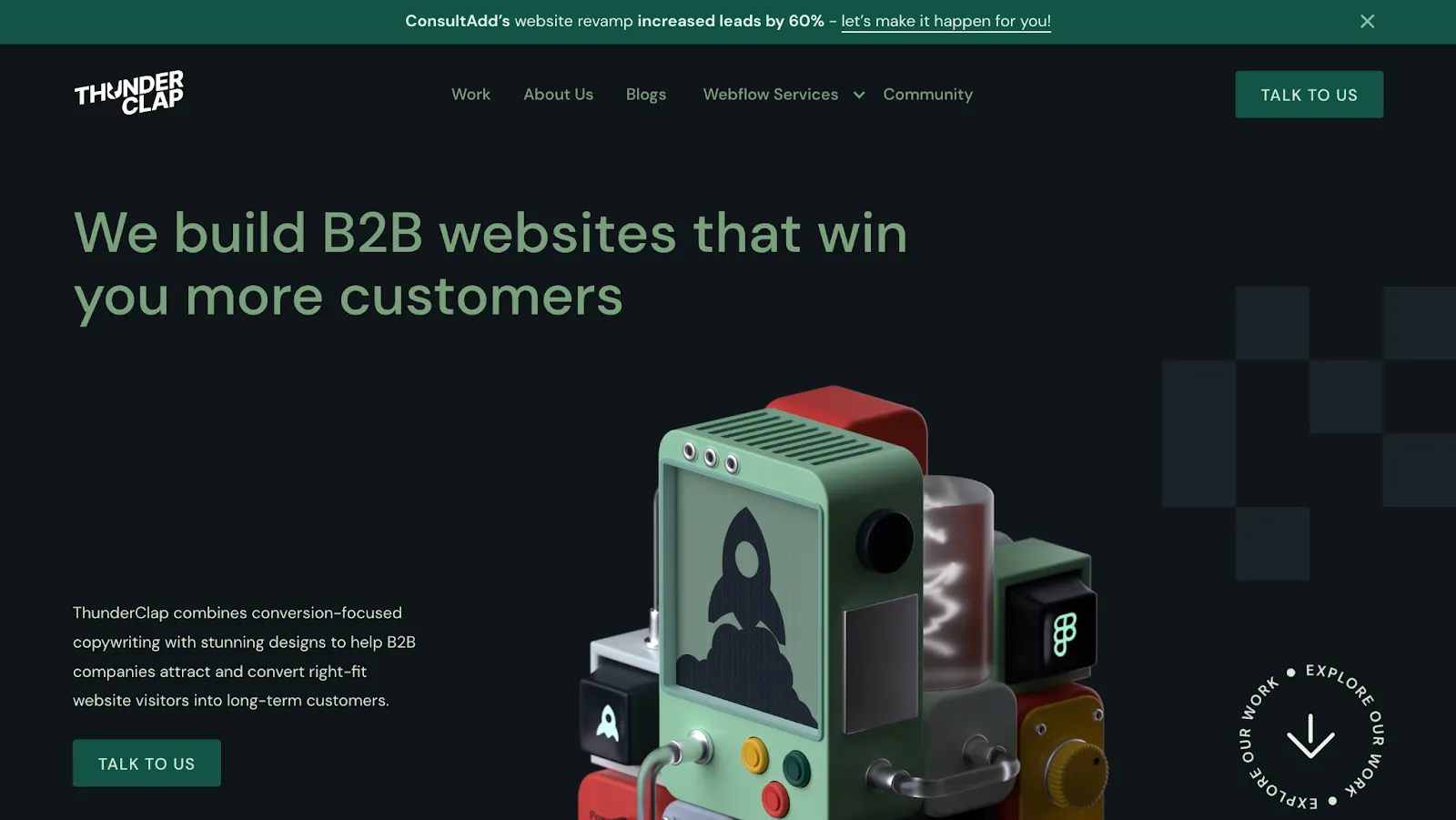
Image 1: ThunderClap.[com] as it appears on Google Chrome
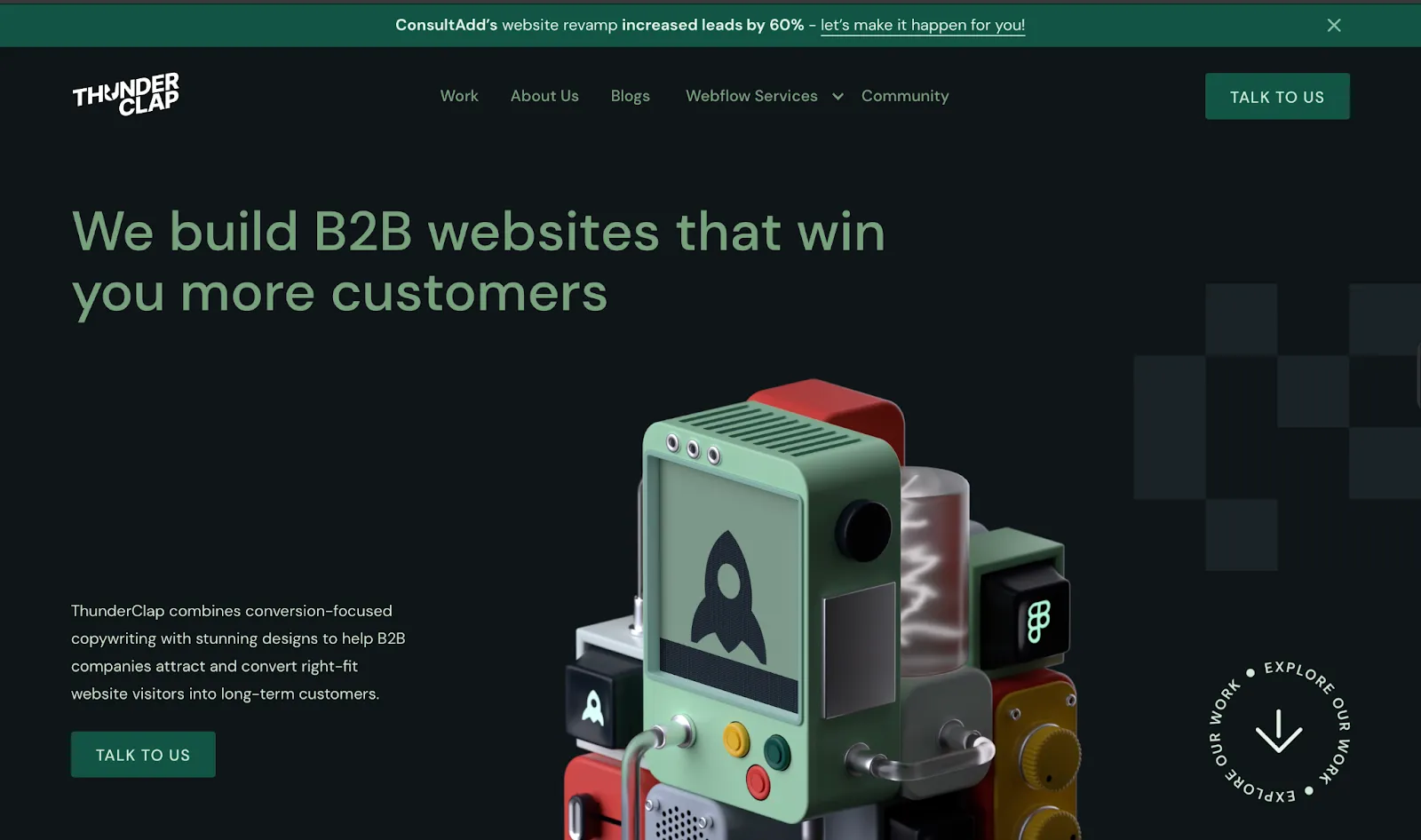
Image 2: ThunderClap.[com] as it appears on Safari
Note: While WebFlow handles most of the cross-browser compatibility issues, it is still important to conduct compatibility tests, especially if the website contains embedded custom codes or has a complex structure in general. Some of the testing tools WebFlow suggests include BrowserStack and Browserling.
Challenge 3: Responsive Design Inconsistencies
With 64% of the total internet users around the globe being mobile users and 35% being desktop users, device optimization is an indispensable step during web development.
Even though website development platforms like WordPress offer responsive templates, you might still need to manually optimize your website for different devices in case of multiple plugins or outdated templates. This is a time-consuming process, but ignoring this step might cost you your website rankings and credibility.
How WebFlow helps to overcome this challenge?
WebFlow offers built-in responsive tools like custom breakpoints, Flexbox, and Grid Layout to simplify website optimization for different devices. It offers custom breakpoints or screen sizes for mobiles (width:0-479 px), tablets (width:768-991px), and desktops (> 992px), letting you resize screens without coding. For best results, start with desktop breakpoints and cascade down to other smaller devices.
Similarly, with FlexBox, you can control how text and other elements are arranged on different screens. With the help of it, you can stack text horizontally or vertically and add custom spacing without coding.
The Grid Layout, on the other hand, lets you include more intricate layouts like pricing pages, feature sections, etc. It also lets you assign specific locations for different elements and ensure design consistency across devices.
{{specficBlog}}
Hello Folk's homepage is a great example of WebFlow's responsive design and the intuitive user experience it delivers. The website applies layout scaling to ensure the text spreads on bigger devices and sits close together on smaller devices for better readability and efficient use of screen space.
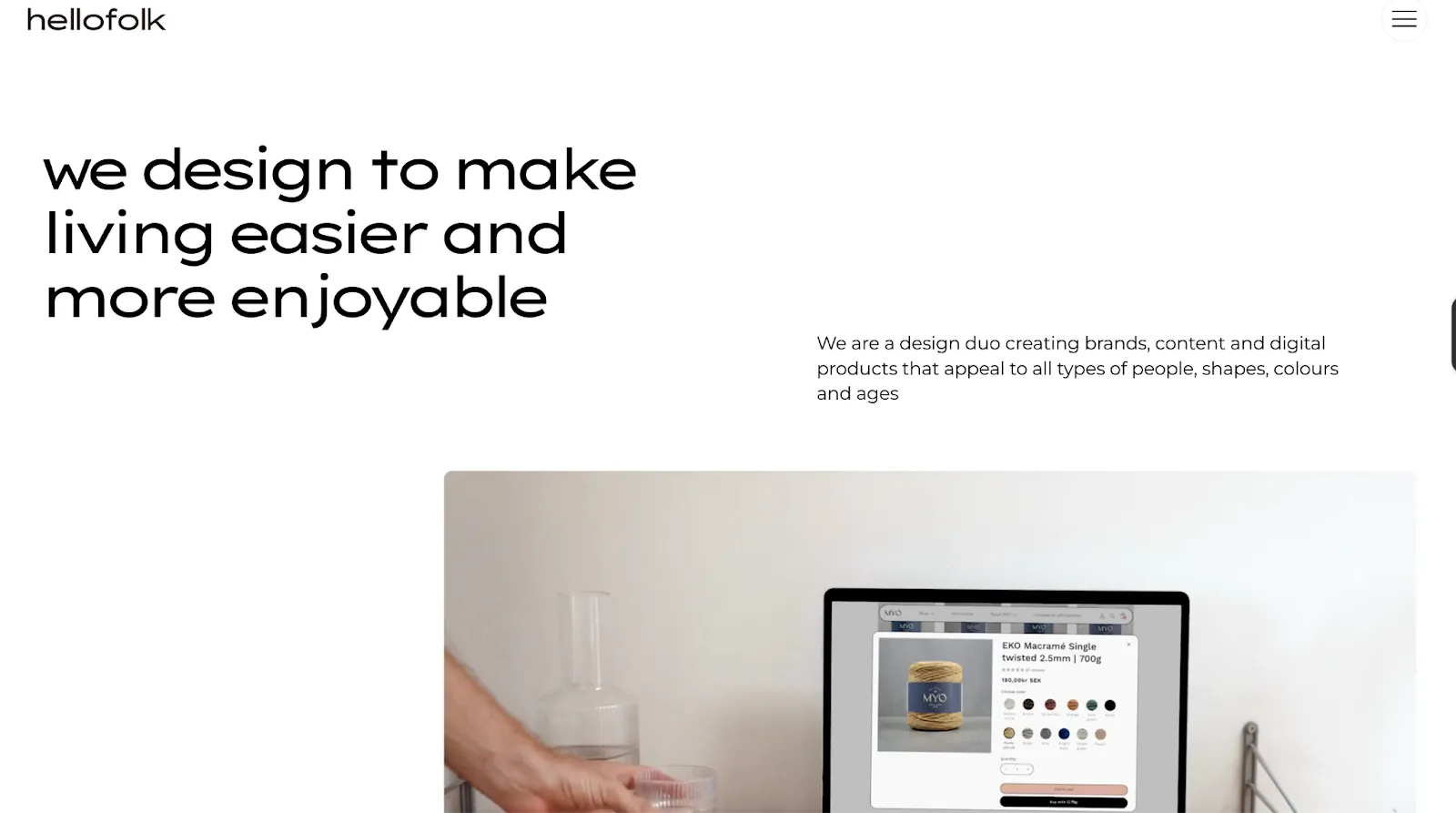
HelloFolk’s homepage on a desktop
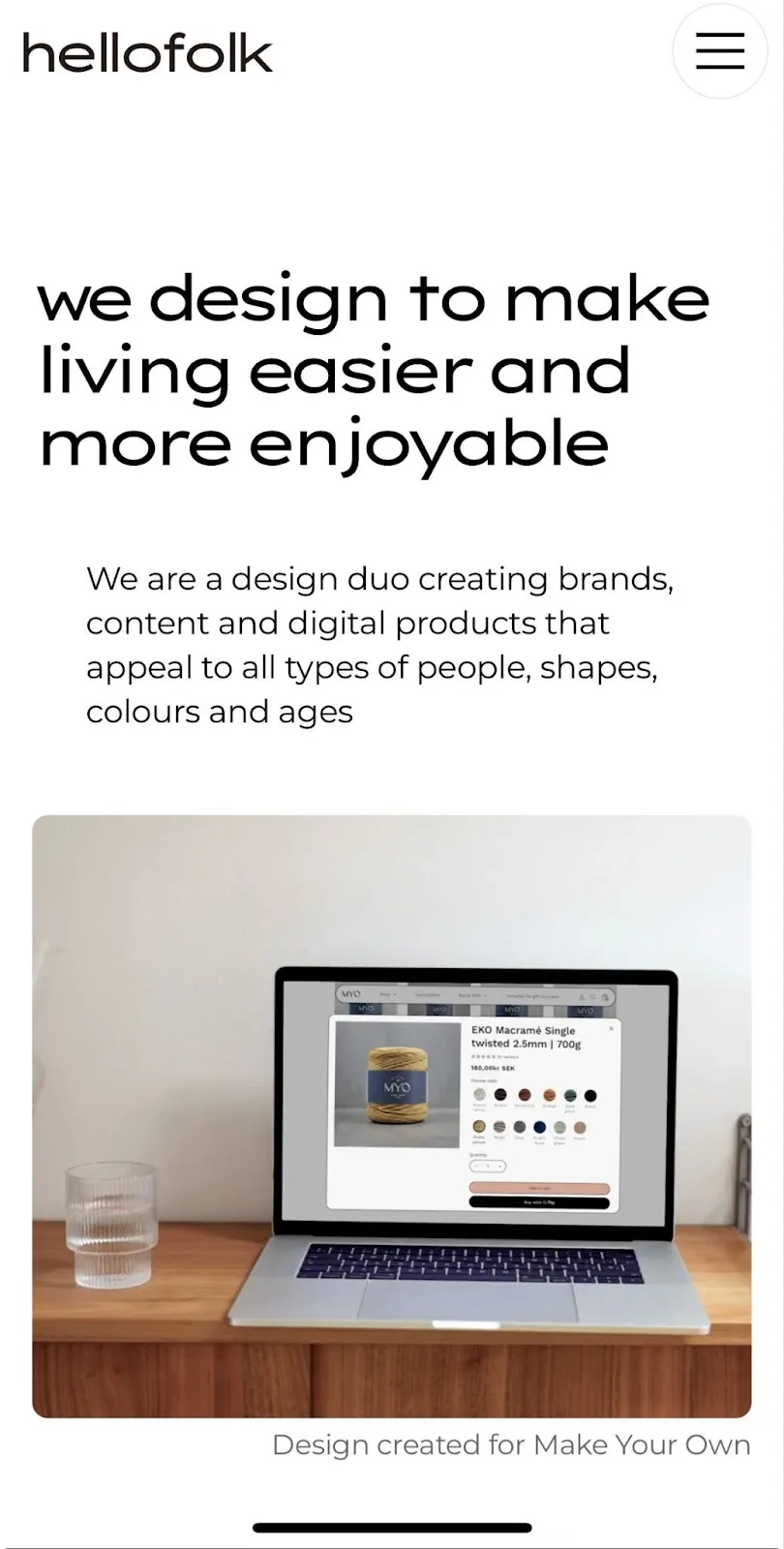
HelloFolk’s homepage on a mobile device
Challenge 4: Security Risks
Traditional website development using platforms like WordPress requires you to manage everything related to security on your own. This includes buying SSL certificates and plugins for firewalls, spam protection and backup.
On top of all that, you should seek help from a developer to conduct regular security audits and ensure all your plugins are updated to avoid security risks. This makes traditional development platforms a bad choice for founders or teams with non-technical backgrounds.
John-Henry Scherck accurately describes the plight of a non-techy WordPress user in an article for WebFlow: "Every time a new version of WordPress came out, I had to hold my breath, hit the update button, and hope that my site wouldn't break." (Source)
How WebFlow helps to overcome this challenge?
Security is not an add-on feature when it comes to WebFlow. The platform offers built-in security features to avoid any potential cyber threats. The platform is SOC 2 compliant, offers SSL certificate and DDos and malware protection for all websites. It also conducts regular security checks and updates for smooth functioning.
With built-in features for backups, uptime monitoring, and security updates, the platform requires minimal to no plugins. This reduces security risks to a great extent because outdated plugins are responsible for most cyber attacks.
In other words, by using a website builder like WebFlow, you can skip the risky task of handling the security of your website and focus on things that matter the most.
Challenge 5: Complicated Debugging Process
Debugging during traditional website development is risky and time-consuming. Syntax errors, such as a tweak in a line of code, might cause a whole section or layout to crash. Also, with no provision for version control or previews, you'll have to shuttle between the code editor, browser and debugging tools multiple times to fix the bugs.
This becomes a lot more complicated when multiple coders with different coding styles are involved. For example, if one developer names the hero section '.hero-section' and the other names it '.banner-image,' it can cause class inconsistencies and bloated code.
How WebFlow helps to overcome this challenge?
As a no-code website development tool with a visual design interface, WebFlow eliminates the risk of syntax errors and the need for debugging. Every design edit you make in the visual editor automatically converts to clean lines of code and gets reflected on the staging link. This means that, unlike WordPress, you can preview edits in real-time without refreshing the page.
It also offers version control to restore previous versions of the website with ease. WebFlow follows class naming conventions to prevent style inconsistencies and easier collaboration. In addition, they also let multiple collaborators work on the same website in real time and offer suggestions as comments.
What Next? Creating Your Own WebFlow Website Vs Outsourcing Website Development?
With its no-code visual design interface, WebFlow is a beginner-friendly tool that lets you build websites effortlessly. However, just like any other platform, it has a learning curve and might require a series of trials and errors before you finally get it right.
To avoid this, you can outsource it to WebFlow website development agencies. These agencies are experts in WebFlow web development and know how to tackle common challenges associated with it effortlessly with minimal supervision from your side. Most of these agencies also offer maintenance packages to ensure your websites are always primed for peak performance.
{{specficService}}
Looking for a great website development partner for your needs?
ThunderClap might be your answer!
ThunderClap is a premium WebFlow Web design and development agency that caters to high-growth B2B brands like Storylane, Deductive.ai and RazorPay. As a WebFlow enterprise partner, we are vetted by WebFlow for their expertise in handling enterprise-level WebFlow website building, revamps and management.
We have a panel of expert developers, designers and strategists to handle every challenge that comes your way during website development. To know how exactly we can help you, book a call with us right away!



.webp)
Browse Similar Articles



Leading 5 SaaS Branding Agencies in Florida (That Actually Understand SaaS Growth)

.svg)


How to Turn Your B2B Website into a Self-Serve Growth Engine? (PLG Ready in 2026)

9-Step Website Copy Audit Checklist to Improve Conversions (Examples from Top B2B Brands)

.webp)

How to Choose the Right Fintech Web Development Company for Your Business

Top B2B Website Design Principles That Turn Visitors into Qualified Leads
%20Audit%20That%20Actually%20Improves%20Revenue.webp)
How to Do a Conversion Rate Optimization (CRO) Audit That Actually Improves Revenue
Web Design Agency vs. Freelancer vs. In-House: What Actually Works in 2026

5 CRO Agencies in London and How to Choose the Best CRO Agency for Your Business

The Ultimate Fintech B2B Positioning Guide for 2026 (That Actually Drives Conversions)
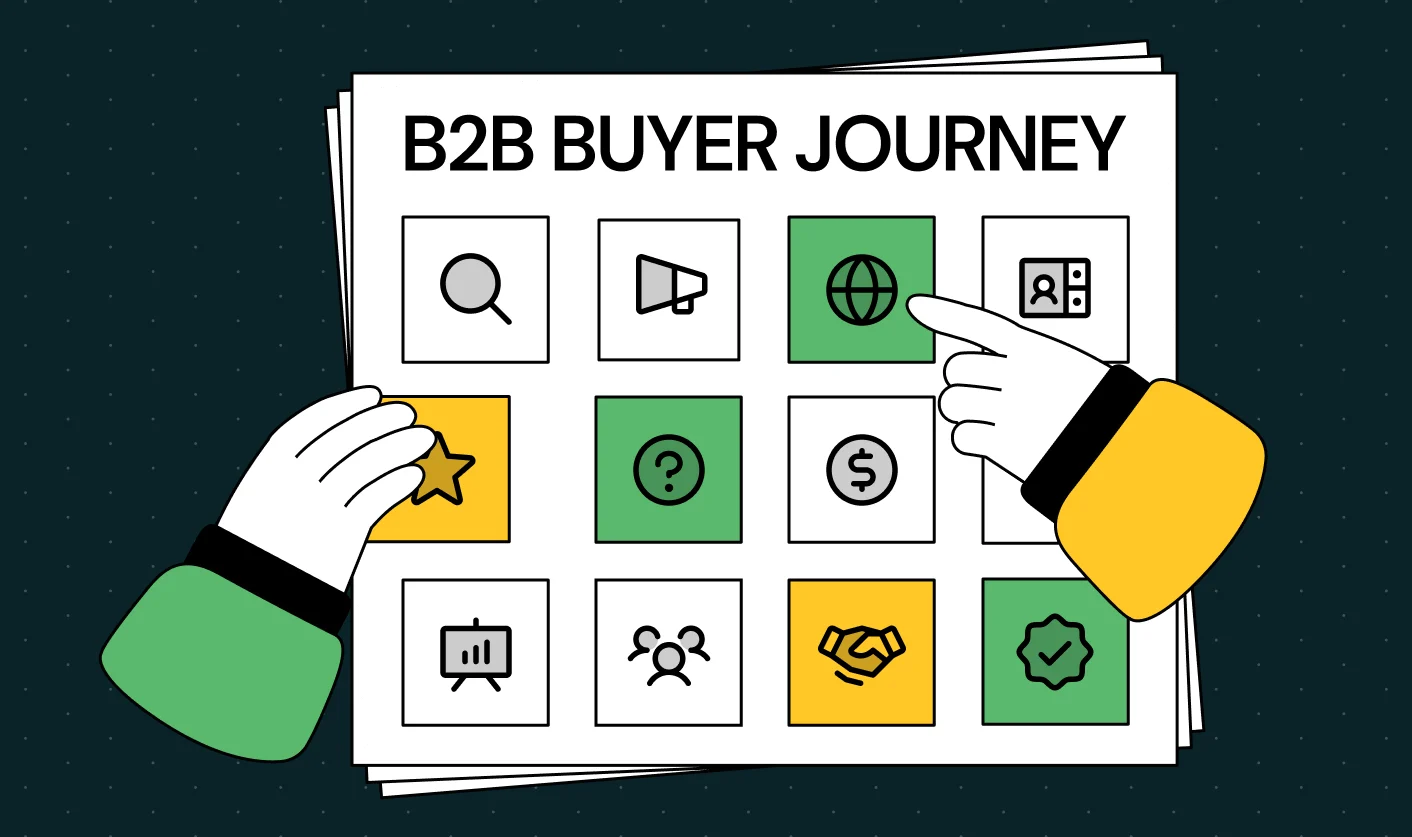
Mapping the B2B Buyer Journey to Improve Conversions Across Every Touchpoint
.webp)
7 Best Website Maintenance Companies in India for Growth-Led B2B Teams (2026)

.webp)

8 Best Healthcare Website Design Agencies for HIPAA-Compliant Sites in 2026

How to Find the Best Web Design Company in Houston, Texas for B2B Brands (6 Best Picks)
Positioning That Wins: How to Make Complex B2B Products Clear and Compelling
The Step-by-Step Website Redesign Process B2B Teams Use to Increase Conversions (Without Killing SEO and Pipeline)
7 Best Video Production Agencies for SaaS Product Walkthroughs and Feature Videos

How to Choose the Best B2B Website Maintenance Company: 9 Questions to Ask Before You Hire One



How to Choose a Web Design Company in San Francisco in 2026 (with Examples)

10 Best Web Design Companies in Florida in 2026 and How to Choose the Right One

How to Use Brand Storytelling on Your Website to Close More B2B Deals and Build Buyer Trust

SaaS CRO Best Practices: What High-Growth Brands Do Differently to Win Conversions

How a Rebranding Agency Can Redefine Your B2B SaaS Identity and Boost Pipeline

B2B Marketing Trends in 2026 That Directly Influence Pipeline and Revenue

Top 7 Video Marketing Agencies Driving B2B SaaS Brand Awareness in 2026
Why Partnering with a B2B Brand Positioning Agency Accelerates Market Differentiation

The Complete Website Redesign Checklist for B2B SaaS Teams Ready to Scale
.avif)
10 Best Webflow Development Agencies in India for 2026 (In-Depth Review)

10 Product Marketing Companies Powering the Fastest-Growing SaaS Brands in 2026
Website Copywriting Services vs In-House: What's Right for Your Business?

How to Choose a Marketing Agency That Understands B2B SaaS Growth Metrics

How to Choose a Video Marketing Agency That Understands B2B Storytelling
Outsourcing Web Design: Cost-Benefit Analysis for Mid-Market & Enterprise Brands

From Leads to Lifetime Value: How Growth Marketing Agencies Scale SaaS Revenue
Build a B2B Website Strategy That Aligns with Sales and Marketing Goals
Webflow vs WordPress: Which Platform Is Better for Your Business Website in 2026?
Fintech Web Design That Builds Trust: 8 UX Principles Every Fintech Site Needs
Optimizing for Intent: How B2B Website Messaging and UX Changes Help Capture Top-Funnel Buyers

12 Best B2B Web Development Agencies in the US to Build Scalable Websites

From Audit to Action: 8-Step Process to Optimize Your B2B Website Strategy for 2026 Buyers
How to Design a High-Converting Landing Page from Scratch (2026 Edition)
From Click to Customer: Proven Landing Page Conversion Optimization Techniques

How to Write Website Copy That Converts: A Step-by-Step Guide for 2026

How to Optimize a Landing Page for Maximum ROI: A Step-by-Step Breakdown

AI Landing Pages That Convert: 7 Design Principles Every AI Platform Should Follow
From Traffic to Pipeline: B2B Website Growth Strategy for Scaling Teams




Interested in seeing what we can do for your website?



.webp)
