
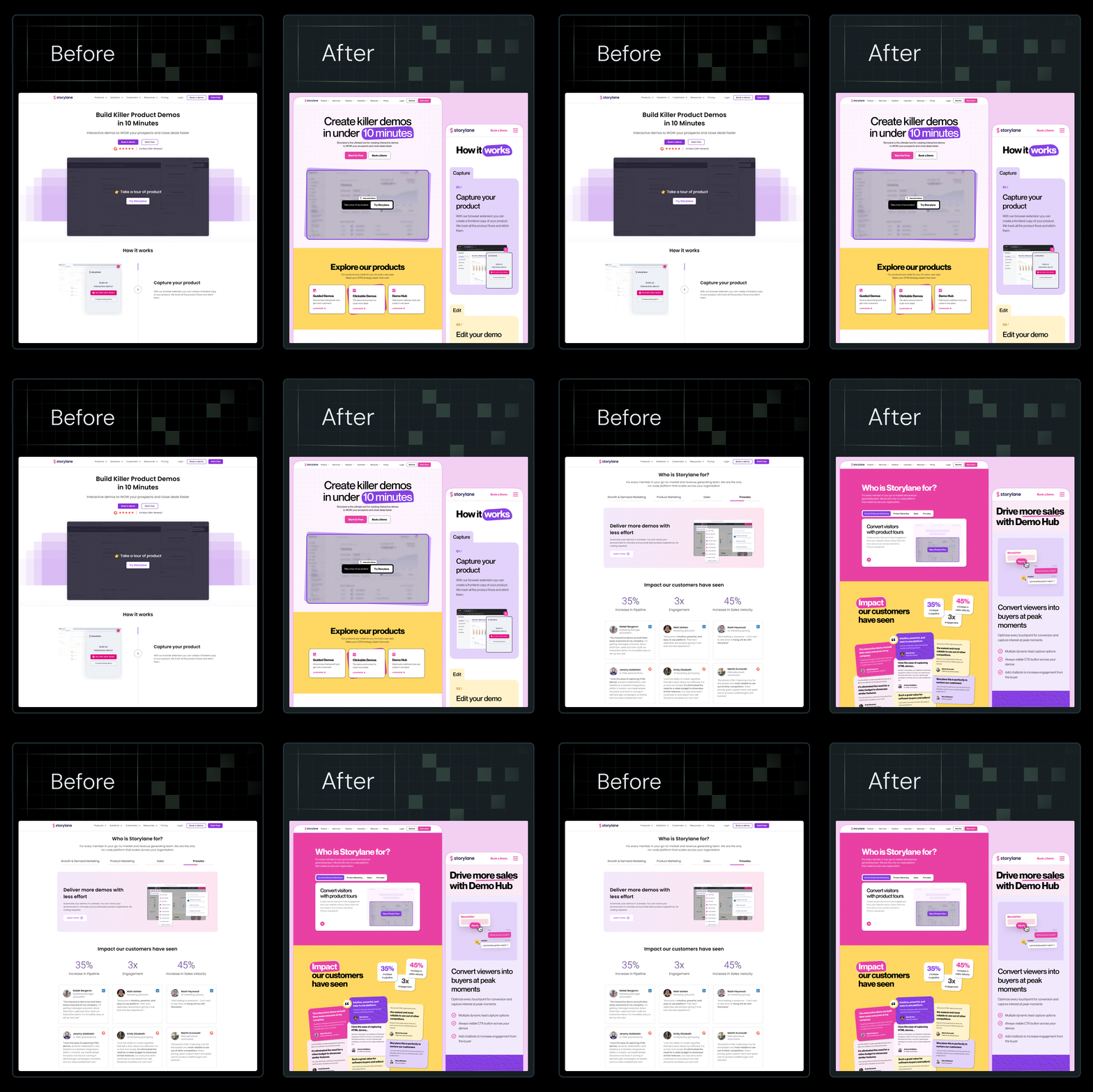














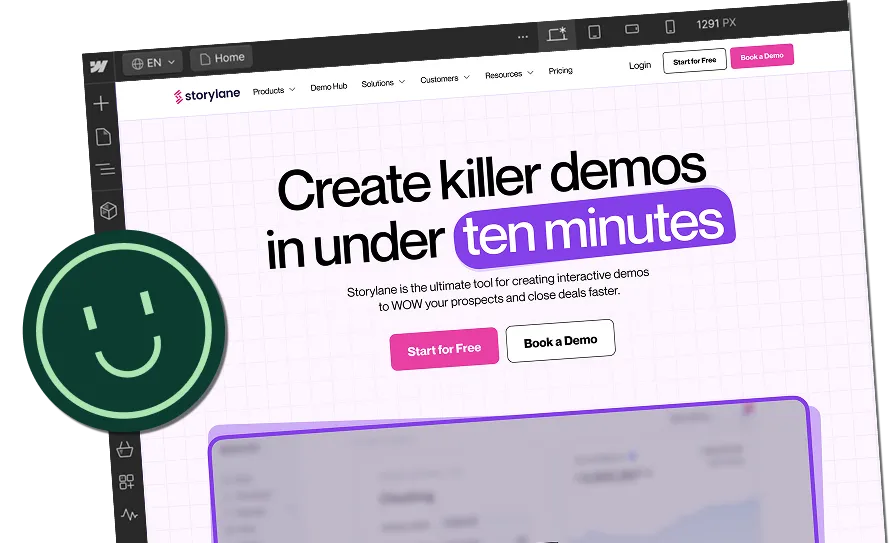

12 Website Design Elements Every High-Converting Site Needs


You've spent months briefing designers, reviewing mockups, and getting stakeholder sign-off. The site launched on time, looks polished, and everyone internally loves it.
Six months later, your paid campaigns are burning budget, bounce rates haven't moved, and the leads coming through are either thin on quality or not coming through at all.
This is the most common and most expensive mistake web design buyers make: commissioning a site that was built to win internal approval rather than convert the visitors you're paying to attract. A high bounce rate means your messaging isn't landing. Low lead quality means your forms and CTAs aren't qualifying intent. Poor conversion despite solid traffic means the design is working against your funnel, not with it.
The fix isn't a rebrand or another redesign brief. It's understanding which specific design elements drive conversion and making sure every one of them is built into your site from the start.
This guide breaks down 12 website design elements that high-converting SaaS sites have in common, drawn from real projects, not design theory.
TL;DR
- Most SaaS websites look polished but fail to convert because design is treated as a visual exercise rather than a revenue system.
- The key elements of conversion-focused website design include visual hierarchy, value proposition clarity, CTA strategy, trust signals, and performance, which work together as a system rather than independently.
- Visual hierarchy, above-the-fold messaging, and CTA design are the three highest-leverage elements for immediate conversion gains.
- Trust signals, including client logos, testimonials, and case study outcomes, reduce the perceived risk that stops qualified visitors from taking action.
What are Website Design Elements (and Why Do They Matter for Conversions)?
Website design elements are the visual and functional components that determine how a website looks, feels, and guides user behavior. They include your color palette, typography, layout structure, graphic elements, UI/UX patterns, white space, imagery, and conversion mechanics like CTAs and forms.
Most teams treat these as visual decisions. They're not. Each one is a prompt that pushes the visitor toward a decision. For example:
- Color tells the eye where to look.
- Typography signals whether something feels credible or not.
- Layout answers a silent question: What should I do next?
When these signals do not work together, something subtle breaks. The visitor hesitates, which is what kills conversions before your message even lands.
High-performing SaaS companies understand this differently. They see design elements as a connected system that turns traffic into a pipeline. According to Conviva’s 2025 State of Digital Experience Report, poor digital experiences have a direct impact on revenue. In fact, 55% of consumers do not complete a purchase, 50% switch to a competitor, and 39% cancel a subscription. These gains do not come from making things look better. They come from removing confusion, building trust, and making the next step feel clear and safe. Every website interaction either builds momentum toward action or introduces doubt that pulls the visitor away.
What Makes a Website High-Converting?
Decisions.
High-converting websites are built on how decisions are shaped. Every element has a job, and that job is tied to how a visitor decides what to do next.
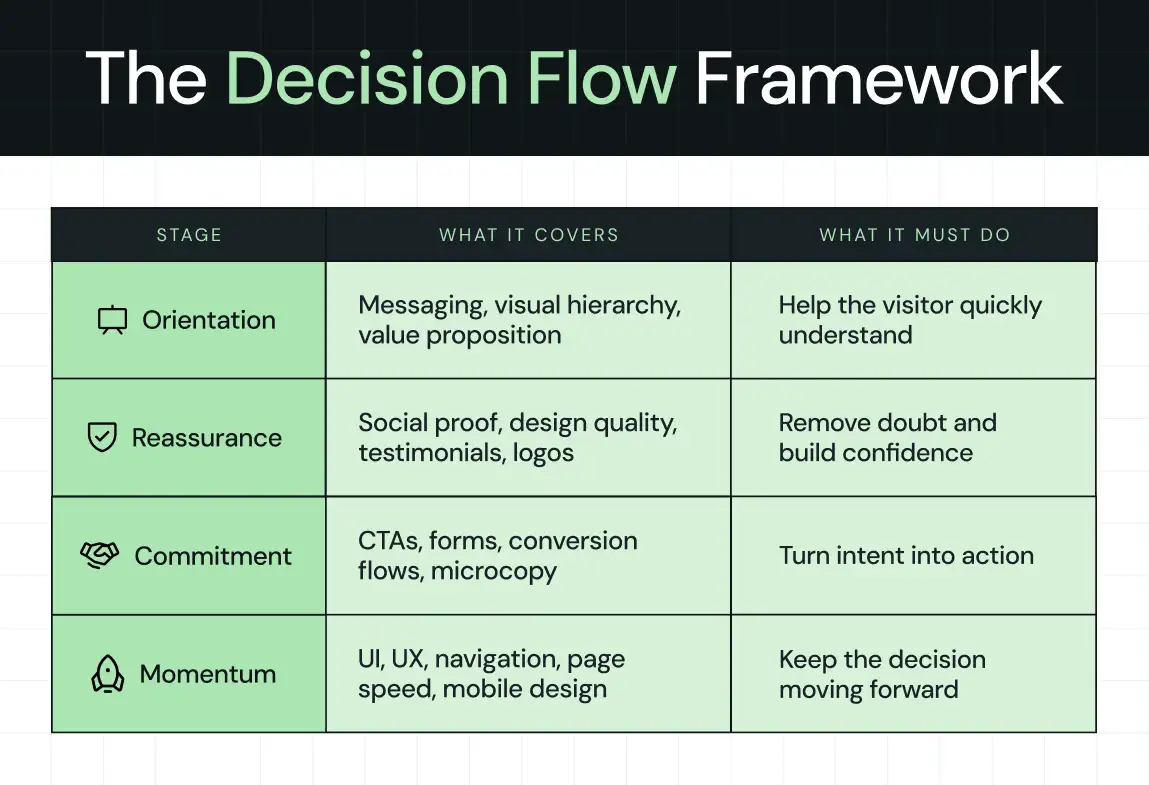
Before getting into the specific elements, here's the framework we use at ThunderClap to evaluate and build conversion-ready SaaS websites: The Decision Flow Framework.
Here’s what it covers:
1. Orientation
Can I understand what this is and why it matters right now?
This is where messaging, visual hierarchy, and your value proposition do their work. If a visitor cannot quickly place themselves and your product in context, nothing else matters.
2. Reassurance
Is this credible and relevant to someone like me?
This is where social proof, design quality, testimonials, and recognizable signals reduce doubt. The visitor is not looking for hype. They are looking for reasons not to dismiss you.
3. Commitment
Is it worth taking the next step?
This is where CTAs, forms, and conversion flows turn passive interest into action. Small details matter here because friction and hesitation show up at the exact moment intent is highest.
4. Momentum
Is anything slowing me down or making this harder than it should be?
This is where UI, UX, navigation, speed, and mobile design either support the decision or quietly erode it.
Every design decision maps to one of these stages. If something is not helping a visitor move through this flow, it is working against you.
Which Website Design Elements Actually Improve Conversions?
The 12 elements below are drawn from real SaaS website projects. Each one has a measurable impact on visitor behavior and reflects a specific layer of the Decision Flow Framework above.
1. Visual hierarchy (guiding attention to action)
Visual hierarchy is the order in which your visitor's eye moves across the page. It determines what they see first, what they read second, and crucially, what they act on. Most websites get this wrong by design. That is, every section competes for attention equally, so nothing wins.
Eye-tracking research from the Nielsen Norman Group identified two dominant scanning patterns for web content: the F-pattern and the Z-pattern.
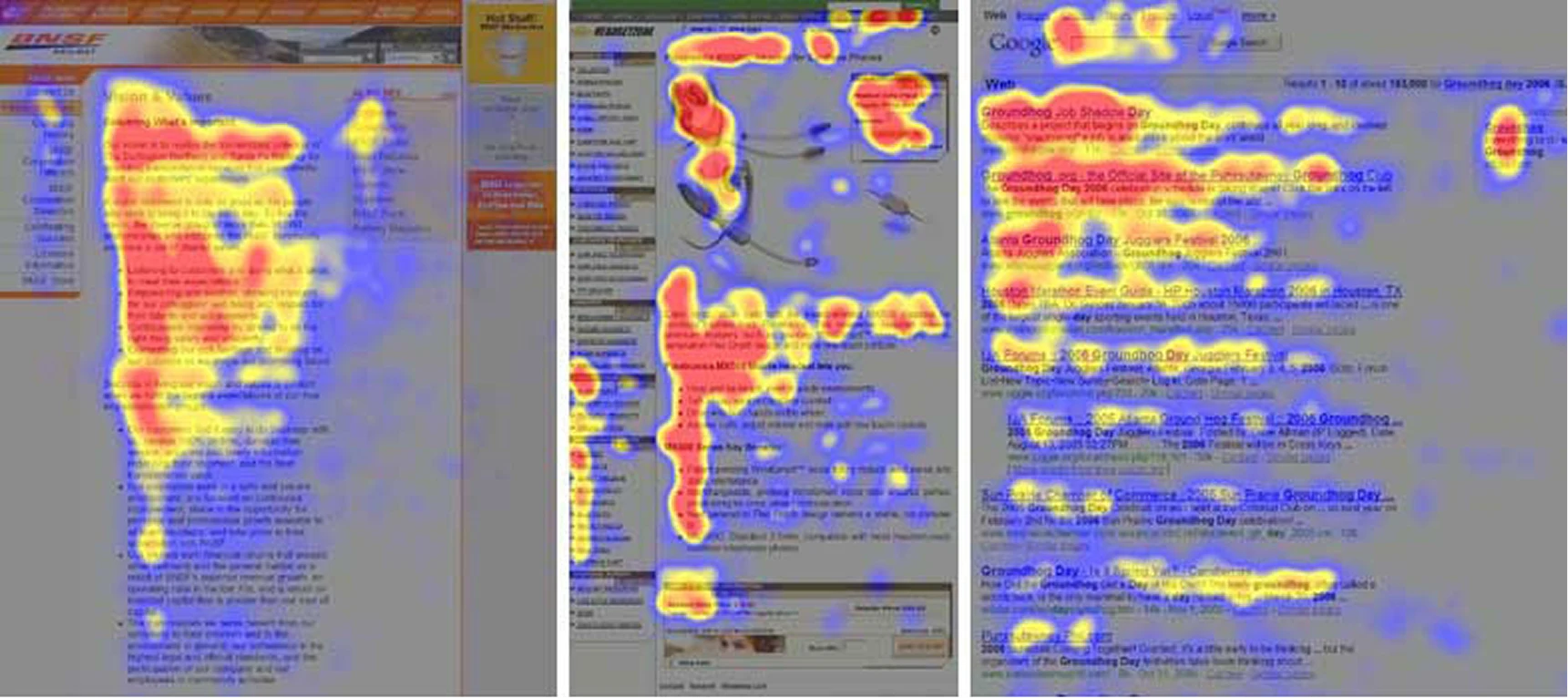
- The F-pattern dominates on text-heavy pages like blogs and pricing breakdowns. Here, users read the top line, scan down the left edge, then pick up anything that catches their eye horizontally.
- The Z-pattern is what users follow on visual-first pages like homepages and landing pages, scanning from top-left to top-right, then diagonally down to the bottom-left, finishing at the bottom-right. This is exactly where a CTA should sit.
This study tells you exactly where to place your headline, product visual, social proof, and call to action. If your most important content falls outside these natural scan paths, it simply doesn't get read.
For example, when ThunderClap redesigned the landing page for Factors.ai, the challenge wasn't the product, as it already had depth and genuine value. The challenge was clarity.
.webp)
Visitors couldn't understand what Factors did quickly enough, which made the product feel heavier than it actually was.
We rebuilt the page with a clear visual hierarchy that told a story step by step:
- Why fragmented signals are a problem
- How Factors solves it
- Proof of success through testimonials and client logos
We placed the headline, "Know how your buyers move. Run campaigns that win", precisely where the eye lands first. The layout guided visitors through each decision point without demanding they work for the answer.
As Ayush Barnwal, Partner at ThunderClap, noted, the redesign helped Factors establish a premium, globally ready brand that converted at the clarity level its product deserved.
What your visitors see first determines what they do next. Design the order of attention deliberately, and conversion follows naturally.
2. Clear value proposition above the fold
You have roughly 5 seconds to answer 3 questions for each new visitor.
What is this?
Who is it for?
Why should I care?
If your above-the-fold section can't answer all three, clearly and without scrolling, you lose them. Not necessarily to a competitor. Just to distraction and doubt.
This is one of the most common gaps in SaaS websites.
The homepage headline is either too clever to be clear, too broad to be relevant, or too feature-focused to feel like it solves anything real. Visitors don't convert when they're confused. They leave.
Unbounce's analysis of 41,000 landing pages found that copy written at a 5th-to-7th-grade reading level converts at 12.9%, while professional-level, jargon-heavy copy converts at just 2.1%, a difference of over 500%. This data doesn't suggest you should dumb things down, but simply that clarity is worth far more than cleverness.
When Zamp, a sales tax compliance platform, partnered with us, they were competing in a crowded market dominated by massive, well-funded incumbents like Avalara and TaxJar. Zamp possessed a genuinely excellent product with 99.9% filing accuracy, a two-hour onboarding process, and lightning-fast support response times.
However, the existing brand lacked the confidence to communicate those strengths effectively.
We rebuilt the brand from scratch to reflect the software's true quality. In fact, we focused on several core updates:
- Targeted messaging built specifically to resonate with corporate finance leaders and key decision-makers
- A reorganized website architecture featuring persona-driven user paths that naturally guided visitors toward booking a demo
- A premium visual identity utilizing clean typography hierarchy and balanced visual elements
- Transparent pricing and managed-service highlights are placed directly on the front page to establish trust early
The strategy succeeded because Zamp now looks and sounds like a legitimate category leader. Backed by more than $30 million in funding and top G2 rankings, the updated brand gives buyers a clear reason to trust the company before they ever jump on a sales call.
3. Strategic CTA design
Most SaaS websites have CTAs. Very few have strategic CTAs.
There's a meaningful difference between placing a button on a page and engineering a CTA that converts.
The gap lives in three places: Placement, Copy, and Contrast.
- Placement determines whether your CTA is seen. CTAs above the fold convert significantly better than those buried below content. Sticky CTAs, meaning the ones that follow users as they scroll, perform especially well on mobile, where 52.27% of global web traffic now originates.
- Copy is where most teams lose the most conversions. Generic CTA language like "Submit," "Learn More," or "Get Started" gives the visitor ...well, nothing. Action-oriented copy tied to a specific outcome gives them a reason. For instance, changing the pronoun alone, from "Start your free trial" to "Start my free trial," has been shown to lift click-through rates by up to 90%. The word "my" creates a sense of ownership and immediacy that "your" simply doesn't.
- Contrast is the visual execution. A CTA that dissolves into the background is invisible. High-contrast button colors (the ones that stand out clearly from the surrounding design without clashing with the brand palette) direct the eye precisely where you need it. Research from 1.2 million A/B tests found that red and orange buttons generate 32–40% higher click rates compared to other colors in many contexts, though the right choice always depends on the surrounding design system.
For middle-of-funnel (MOFU) visitors who aren't ready to buy but are genuinely interested, softer CTAs convert better than hard sells. A CTA like "Get a free website teardown" is designed precisely for this stage. It offers specific, immediate value without asking for a purchase commitment.
Monday.com is a masterclass in CTA architecture at scale. They place multiple CTAs above the fold, each aligned to a different user intent.
.webp)
The primary "Get Started" button uses a high-contrast color that's impossible to miss. A secondary "Request a demo" CTA sits alongside it, capturing visitors who aren't ready for self-serve. Scroll-triggered sticky CTAs keep the action accessible throughout the page without interrupting the reading experience. The result is a conversion system, not just a page with buttons.
4. Conversion-focused color palette
Color is the fastest design signal your visitor processes. Before they read a word or understand your product, color has already told them whether to trust you, pay attention, and use your CTA.
A HubSpot study found that changing a CTA button from green to red increased conversions by 21% in A/B testing. Similarly, eye-tracking research shows that users spend 42% more time engaged with colorful designs than with monochrome ones, and high-contrast elements receive 23% more clicks than low-contrast ones. These are the kind of gains most companies spend months chasing in other channels.
For SaaS, the color palette serves two conversion jobs simultaneously:
- The first is brand consistency. This means colors that feel coherent across every touchpoint build familiarity, and familiarity builds trust.
- The second is directional contrast. That is, using a distinct accent color specifically for CTAs and conversion elements so they stand out from everything else on the page.
When your CTA button shares the same color family as your hero background, it disappears. When it contrasts sharply, it commands attention.
Accessibility is the third consideration teams routinely overlook. Roughly 8% (1 in 12) of men have some form of color vision deficiency, which means a red-on-green or similarly low-contrast design locks out a meaningful portion of your audience. In fact, a 2025 research found that high-contrast, accessible color schemes perform 15% better in bright mobile environments.
NativeMSG shows color working as a strategic tool rather than a stylistic one. When we redesigned their website, the product was genuinely strong, but the existing design didn't reflect its market leadership in RCS messaging.
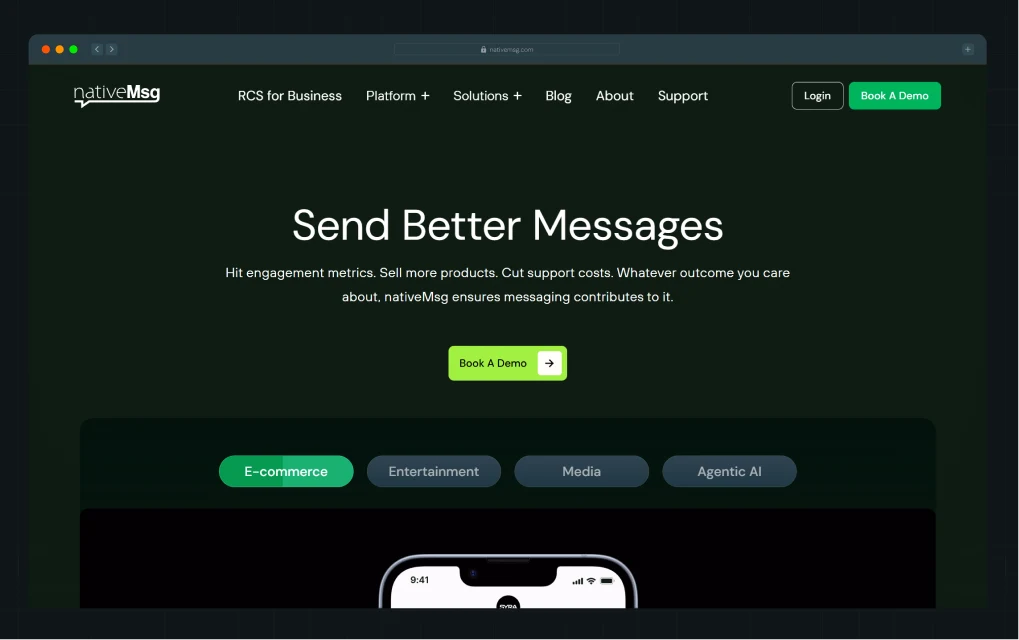
We chose a green-focused color palette deliberately, wherein green signaled clarity, growth, and differentiation in a category dominated by blue and grey. The visual system, inspired by their logo, layered structure, and reliability, is integrated into every screen.
Your color palette isn't a brand decoration. It's a conversion system with a visual identity attached.
{{specficBlog}}
5. Typography that improves readability and trust
Typography is one of the most underestimated conversion levers in SaaS website design. Most teams spend hours on their color palette and minutes on their fonts. The result is a site that looks polished from a distance but loses visitors the moment they try to read it.
In fact, readable typography improves comprehension and time on site, and both of those metrics correlate directly with conversion rates.
Typography in conversion design operates at three levels:
- Font pairing shapes personality and trust before a single word is read. A heavy, geometric sans-serif paired with a clean body font reads as confident and modern. A serif paired with a neutral sans-serif reads as authoritative and established. The pairing communicates brand character faster than copy does.
- Hierarchy tells visitors what to read in what order. Your H1 should be impossible to miss. Your H2s should feel like natural resting points as the eye moves down the page. Body copy should feel easy, not like an effort. When typographic hierarchy is weak, visitors scan randomly and miss the most important content.
- Readability is the baseline requirement for everything else. A line length between 50 and 75 characters is the proven comfort zone for continuous reading. Body text below 16px on desktop creates unnecessary strain. Left-aligned text is the most accessible choice for long-form content. When typography is readable, visitors stay longer, and when they stay longer, they convert at higher rates. Typography that serves the reader, not the brand, is what actually builds trust.
Pink Chili is a marketing agency built for Gen Z, and its website behaves exactly like one. It’s bold, unapologetic, and driven almost entirely by typography. With minimal reliance on imagery, the entire experience leans on type to carry both personality and clarity.
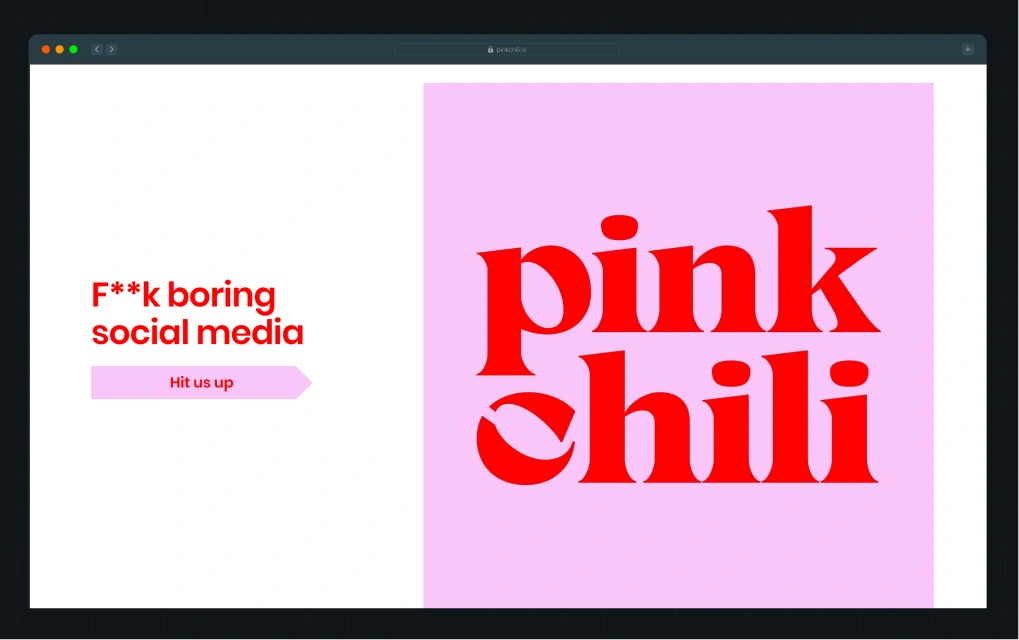
The brand name appears in an oversized, high-contrast cherry-red serif, set against a soft lavender background. The scale is aggressive, taking up most of the screen, ensuring immediate visual dominance. The serif itself has thick strokes and sharp curves, giving it a playful yet confident personality that aligns with a Gen Z audience.
What stands out is how intentional every typographic decision feels. Font size, kerning, line height, and color are all doing real work, guiding the eye, structuring the content, and maintaining rhythm across sections. Even with heavy copy, the site never feels overwhelming. It feels designed to be read.
6. UI/UX design that removes friction
Users don’t convert if they can’t find what they’re looking for, which usually comes down to navigation. If it’s unclear or poorly structured, people drop off before they even understand your product.
Your navigation needs to be intuitive. Labels should make sense instantly, and the structure should match how users think, not how your product is organized internally.
Segment does this well. Their navigation is built around user intent, not generic labels. Instead of just “Features” or “Pricing,” they use “Solutions” organized by persona, so different users can quickly find what’s relevant. “AI Solutions” speaks to a high-interest category, while “Case Studies” helps build trust without forcing users to search for proof.
.webp)
This structure removes decision fatigue. Users don’t have to guess where to go next. The dropdowns add another layer of clarity with short descriptions and clear typography, making everything easy to scan.
The experience stays consistent as you scroll. The sticky navigation keeps the primary CTA visible, so users can take action the moment they’re ready.
On mobile, this matters even more. Navigation needs to be simple, thumb-friendly, and easy to interact with. When users don’t have to think, they move faster. And when they move faster, they convert more.
7. High-impact imagery and graphic elements
Stock photos, such as the smiling team in an open-plan office, the handshake over a laptop, the abstract globe made of lines of connection, are a conversion liability. However, visitors have simply trained their brains to ignore them. These images communicate nothing and cost you the attention you could be using for real conversion work.
Authentic visuals perform very differently. For example, genuine photos can increase trust scores by up to 65% and improve conversion rates by nearly 35%, compared to generic, overly polished stock imagery. User-generated content (UGC) showing the product in a real-world context converts at rates 29% higher than product-only imagery. The pattern holds across industries, where authenticity in visuals builds the trust that copywriting often can't.
Modern web design elements have moved decisively toward contextual storytelling through visuals. The best SaaS landing pages in 2026 use the product UI as the hero image, surrounded by minimal text that frames what the user sees. They use annotated visuals that walk the visitor through a workflow without requiring them to read three paragraphs. Additionally, they use before/after graphics that make the problem and the solution immediately obvious.
When NativeMSG partnered with us, a core challenge was that prospects didn't understand what RCS messaging could actually do, as the site relied on feature lists rather than outcome visuals.
We built 40+ visual mockups with real message examples so visitors could understand the product's capabilities in minutes, not after a demo call. The visual system became the primary conversion tool, turning a complex technical explanation into an immediate, intuitive understanding.
As Ayush put it:
“Our visual-first approach helped people understand the product in minutes.”.
According to Kiran Kulkarni, Partner and Head of Growth at ThunderClap, the revamp helped NativeMSG turn their education challenge into a conversion asset, driving a more qualified pipeline from visitors who, on first contact, finally understood the product.
8. Trust signals (social proof, testimonials, and logos)
Generic testimonials like “Great product” or “5 stars” don’t build trust. They get ignored. What actually works is social proof that highlights the business impact, speed, and relevance.
Most SaaS pages do not focus on these elements. They show intent, but not proof.
Trust signals are what close that gap, and the data on how much they move conversions is unambiguous. For example:
- Products with five or more reviews are 270% more likely to be purchased than products with no reviews.
- Video testimonials increase conversion rates by 80% over text-only testimonials.
- Websites featuring user-generated content see 29% higher conversion rates than those without.
- 92% of buyers hesitate to take action when no reviews or proof points are present.
This means the absence of trust signals is itself a conversion problem, not just a missed opportunity.
For B2B SaaS, the trust signal hierarchy looks like this, from highest to lowest conversion impact:
- Detailed case studies with quantifiable ROI metrics
- Video testimonials from recognizable brands
- Client logos from companies your target audience respects
- Star ratings from third-party platforms like G2 or Clutch
- Proof metrics like "Used by 50,000+ teams"
The placement of these signals is as important as their presence. Testimonials work best near CTAs. Security badges and compliance logos belong near forms and payment pages. Proof metrics carry the most weight in the hero section, where they set the tone of credibility for everything that follows.
A good example of this is how we structure our own landing page.
.png)
Instead of pushing testimonials into a separate section, the proof appears directly within the flow of the landing experience. (Well, we do have a separate web page that showcases our work, in case you want to check it out!)
Right next to the hero, there is a detailed customer testimonial. It is specific, outcome-driven, and attributed to a real person from a recognizable company. The user does not need to search for validation. It is already there, at the exact moment they are forming an opinion.
When proof appears early and naturally, it reduces hesitation before it builds. Plus, it answers the question users are already asking:
“Does this actually work for someone like me?”
9. Fast loading speed and performance design
🧠Did You Know: Pages that load in one second have conversion rates 2.5 to 3 times higher than pages that take five seconds.
Google's research shows that 53% of mobile visitors abandon a page that takes more than 3 seconds to load. For every additional second of load time beyond that threshold, bounce probability increases by more than 30%. A one-second delay can reduce conversions by up to 7%.
For a SaaS company spending $50,000 a month on paid acquisition, a three-second load time is costing real, measurable revenue every single day.
Speed becomes a design issue the moment design choices start degrading performance. Uncompressed hero images, excessive animations built in JavaScript instead of CSS, third-party scripts loading on every page, heavy custom fonts without proper caching…and the list goes on…these are design decisions that look beautiful in a static mockup and perform poorly in the real world.
Performance design means making speed a creative constraint from the start. It means choosing lightweight animation libraries, optimizing images before they reach the CMS, using system fonts where custom fonts aren't essential, and testing load times on mobile connections.
The 88.5% of web designers who cite slow loading as the primary reason visitors leave are describing a design culture that treats performance as someone else's concern. In conversion-focused web design, performance belongs to everyone on the team.
10. Mobile-first responsive design
Over 50% of B2B buyers now engage with vendor content on mobile. If your site does not work well on small screens, you are losing opportunities before users even see your offer.
ClickUp is a strong example of a mobile-first experience that preserves the core functionality of its desktop site.
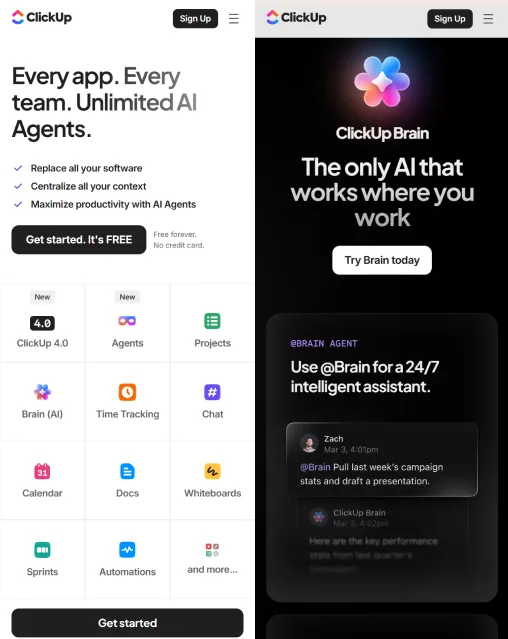
The mobile homepage keeps CTA buttons fixed at the bottom of the screen, uses a clean one-column layout, and turns longer sections into expandable accordions.
It works because:
- Large buttons make it easy to tap without mistakes
- The visual hierarchy stays clear even on small screens
- Key actions stay visible without forcing users to scroll back and forth
11. Conversion forms (structure, fields, UX)
Sign-up forms are one of the biggest conversion drop-off points in SaaS. Most brands lose qualified users here because they ask for too much information too early. Every extra field adds friction and reduces the chance of completion.
The most effective SaaS products reduce this problem by simplifying the first step.
Apollo.io, Notion, and Slack all start with minimal input forms, often just a single email field. The goal here is to get users into the product or funnel as quickly as possible.
Here’s why this approach works:
- Fewer fields reduce decision fatigue
- The first step feels effortless, which increases completion rates
- Users are more likely to continue once they have already started
Progressive profiling improves this further by collecting user information over time instead of all at once. This keeps the initial interaction simple while still building a complete user profile in the background.
Social login also reduces friction. It removes the need to create and remember another password, making the action feel like access rather than registration.
.webp)
A strong example is Apollo’s signup flow. The entry point uses a single email field placed directly after a clear call to action. The layout is clean, with strong visual hierarchy and minimal distractions. Errors are handled in-line, and the experience is optimized for mobile as well.
The effectiveness comes from simplicity. The form asks for just enough to start, not everything required to finish.
12. CMS and scalability
If your marketing team needs a developer to change a headline, update a testimonial, or add a new landing page, your website is a dependency. Every waiting period is one where underperforming copy stays live, slow pages stay slow, and leads that could have converted don't convert.
A modern headless CMS, such as Webflow, Sanity, Contentful, or similar, lets marketing and growth teams control the site without writing code. Pages can be duplicated, CTAs can be swapped, A/B tests can be launched, and new campaign landing pages can go live in hours rather than weeks.
Simultaneously, scalability in design means the website grows with the company. A SaaS company at Series A has different pages, different proof points, and different buyers than the same company at Series B. The design system should accommodate that evolution without requiring a full rebuild every 18 months. Reusable components, modular page templates, and a consistent design language make this possible. The alternative is a bespoke site built in a locked environment, which means starting from scratch every time the business changes direction or adds a product line.
When ThunderClap builds websites, post-launch ownership is a first principle. The team that briefed on the project should be able to run the site after launch. That independence is what makes the ROI of a well-designed website compound over time rather than degrade the moment the agency relationship ends.
{{specficService}}
How Do These Design Elements Work Together?
No single element on this list converts visitors on its own.
- Visual hierarchy places the right content where the eye lands.
- The value proposition gives that content meaning.
- The CTA turns that meaning into an action.
- The form captures the lead.
- The CMS makes it possible to improve every piece of that system next week.
The conversion path for a typical SaaS website looks like this:
Paid ad → Landing page (clarity + hierarchy) → CTA click (design + copy) → Form (UX + length) → Thank you page (trust + next step)
Every element in that chain is a design decision, and a weak link at any point drops the conversion rate for every strong element before it. This is why treating design elements of a website as a checklist doesn't work. A perfect CTA on a page with no clear value proposition converts no one.
At ThunderClap, we design conversion systems. The visual, the message, the mechanics, and the experience are built to work together from the first wireframe. The integration is what produces results that hold up beyond launch day.
Checklist: How to Evaluate Your Website Design?
Use this quick audit to identify where your current site is breaking the conversion chain. Go through each question honestly.
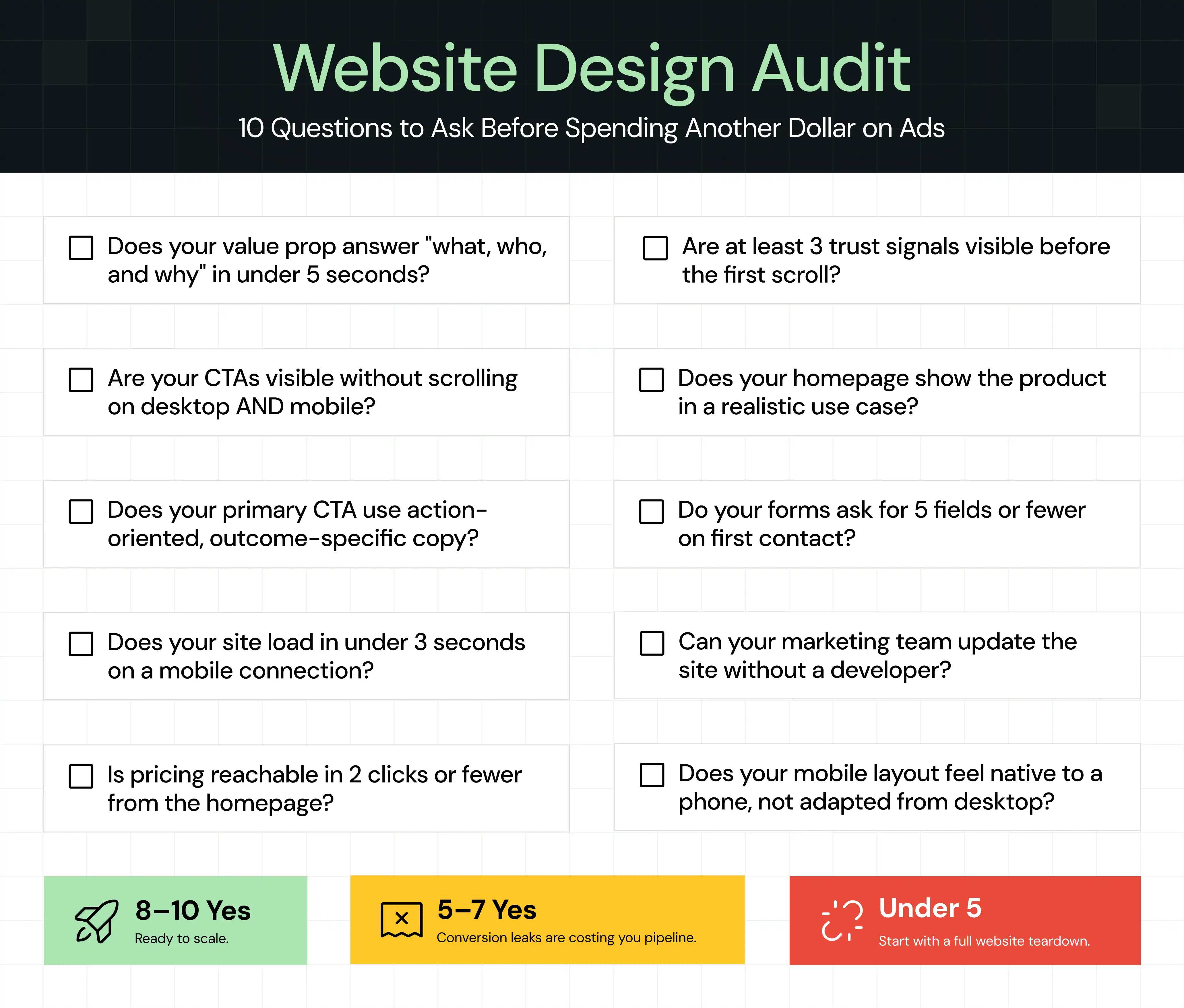
If you answered "no" to three or more, your website has conversion gaps that aren't going to close on their own. [Get a free website teardown from ThunderClap and find out exactly where you're losing leads →]
When Should You Invest in Conversion-Focused Website Design?
Not every company needs a full website overhaul right now. But there are specific signals that tell you the current site is actively costing you revenue, and that waiting costs more than acting.
- High traffic, low conversions: If your traffic is growing but demo requests, trial sign-ups, or lead form submissions aren't following, the website is the constraint.
- Rebranding or entering a new market: When your positioning changes, your website needs to adapt. A site that communicates last year's product to last year's buyer is a credibility problem with new prospects.
- Paid acquisition is increasing: Every dollar you spend on paid ads drives traffic to your website. If the site doesn't convert, you're paying for traffic that leaves. Before scaling paid spend, validate the landing experience's conversion rate.
- Sales is doing the website's job: If your sales team spends significant time in discovery calls explaining what the product does, something a well-designed homepage should have already communicated, the site is creating friction in the pipeline.
How Does ThunderClap Approach Website Design Differently?
Most design engagements start with visual references and end with a handoff. What you get is a site that looks like the inspiration deck you shared and behaves like a brochure after launch.
ThunderClap's approach starts with strategy. Before a single wireframe is drawn, here’s what we do:
- Audit the existing site for conversion gaps
- Review the messaging against what target buyers actually respond to
- Map the conversion flows the design needs to support
The visual work follows the strategic work, not the other way around.
The process is transparent at every stage. Clients see the thinking behind each design decision, not just the output. For example, when a CTA is placed above the fold, there's a reason backed by behavioral data. When a typography pairing is chosen, it connects to readability research and brand positioning. The best part is that post-launch ownership is built into every project.
{{ctaBlock}}
FAQs
1. What are design elements in web design?
Design elements in web design are the visual and structural components that shape how a visitor experiences your site. They include typography, color palette, layout, imagery, white space, CTAs, and navigation. Together, these elements control how visitors read, trust, and take action on your pages.
2. How does design impact website conversion rates?
Design directly controls whether visitors understand your offer, trust your brand, and know what to do next. Research found that a well-designed UI can lift conversions by up to 200%, and optimized UX can push that to 400%. Poor design creates friction that turns qualified visitors into lost leads before they ever reach a CTA.
3. Why are CTAs important for conversions?
CTAs are the bridge between a visitor's interest and your conversion goal. Without a clear, well-placed, and action-oriented CTA, visitors who are ready to act have no obvious path forward.
4. What is the difference between UI and UX in web design?
UI (User Interface) refers to the visual design of a page, including colors, typography, buttons, and layout. UX (User Experience) encompasses how a visitor moves through the site, including the navigation logic, the flow from page to page, and how easy it is to complete an action. Great UI attracts attention. Great UX turns that attention into a conversion.
5. Can a website redesign hurt SEO?
A redesign can temporarily affect rankings if URLs change without proper redirects, page speed drops, or content is removed. A well-executed redesign that maintains URL structure, improves Core Web Vitals, and preserves high-performing content typically improves SEO over time rather than damaging it.
6. How long does it take to design a high-converting website?
A conversion-focused SaaS website typically takes a few weeks to a couple of months from strategy to launch, depending on the scope of pages, the complexity of the design system, and how quickly feedback cycles move. Most teams see statistically significant conversion gains within 8 to 12 weeks of the new site going live.



.webp)
Browse Similar Articles



Leading 5 SaaS Branding Agencies in Florida (That Actually Understand SaaS Growth)
.svg)


How to Turn Your B2B Website into a Self-Serve Growth Engine? (PLG Ready in 2026)

9-Step Website Copy Audit Checklist to Improve Conversions (Examples from Top B2B Brands)

.webp)

How to Choose the Right Fintech Web Development Company for Your Business
Top B2B Website Design Principles That Turn Visitors into Qualified Leads
%20Audit%20That%20Actually%20Improves%20Revenue.webp)
How to Do a Conversion Rate Optimization (CRO) Audit That Actually Improves Revenue
Web Design Agency vs. Freelancer vs. In-House: What Actually Works in 2026
5 CRO Agencies in London and How to Choose the Best CRO Agency for Your Business
The Ultimate Fintech B2B Positioning Guide for 2026 (That Actually Drives Conversions)
Mapping the B2B Buyer Journey to Improve Conversions Across Every Touchpoint
.webp)
7 Best Website Maintenance Companies in India for Growth-Led B2B Teams (2026)

.webp)
8 Best Healthcare Website Design Agencies for HIPAA-Compliant Sites in 2026

How to Find the Best Web Design Company in Houston, Texas for B2B Brands (6 Best Picks)
Positioning That Wins: How to Make Complex B2B Products Clear and Compelling
The Step-by-Step Website Redesign Process B2B Teams Use to Increase Conversions (Without Killing SEO and Pipeline)
7 Best Video Production Agencies for SaaS Product Walkthroughs and Feature Videos
How to Choose the Best B2B Website Maintenance Company: 9 Questions to Ask Before You Hire One
How to Choose a Web Design Company in San Francisco in 2026 (with Examples)

10 Best Web Design Companies in Florida in 2026 and How to Choose the Right One
How to Use Brand Storytelling on Your Website to Close More B2B Deals and Build Buyer Trust
SaaS CRO Best Practices: What High-Growth Brands Do Differently to Win Conversions
How a Rebranding Agency Can Redefine Your B2B SaaS Identity and Boost Pipeline
B2B Marketing Trends in 2026 That Directly Influence Pipeline and Revenue

Top 7 Video Marketing Agencies Driving B2B SaaS Brand Awareness in 2026
Why Partnering with a B2B Brand Positioning Agency Accelerates Market Differentiation

The Complete Website Redesign Checklist for B2B SaaS Teams Ready to Scale
.avif)
9 Best Webflow Development Agencies in India for 2026 (In-Depth Review)

10 Product Marketing Companies Powering the Fastest-Growing SaaS Brands in 2026
Website Copywriting Services vs In-House: What's Right for Your Business?

How to Choose a Marketing Agency That Understands B2B SaaS Growth Metrics


How to Choose a Video Marketing Agency That Understands B2B Storytelling

Outsourcing Web Design: Cost-Benefit Analysis for Mid-Market & Enterprise Brands

From Leads to Lifetime Value: How Growth Marketing Agencies Scale SaaS Revenue
Build a B2B Website Strategy That Aligns with Sales and Marketing Goals
Webflow vs WordPress: Which Platform Is Better for Your Business Website in 2026?
Fintech Web Design That Builds Trust: 8 UX Principles Every Fintech Site Needs
Optimizing for Intent: How B2B Website Messaging and UX Changes Help Capture Top-Funnel Buyers


12 Best B2B Web Development Agencies in the US to Build Scalable Websites

From Audit to Action: 8-Step Process to Optimize Your B2B Website Strategy for 2026 Buyers
How to Design a High-Converting Landing Page from Scratch (2026 Edition)
From Click to Customer: Proven Landing Page Conversion Optimization Techniques

How to Write Website Copy That Converts: A Step-by-Step Guide for 2026

How to Optimize a Landing Page for Maximum ROI: A Step-by-Step Breakdown


AI Landing Pages That Convert: 7 Design Principles Every AI Platform Should Follow
From Traffic to Pipeline: B2B Website Growth Strategy for Scaling Teams

B2B Website Optimization Strategy: Speed, UX, SEO, and CRO in One Playbook



Interested in seeing what we can do for your website?



.webp)
