















CRO Audit: 14 Conversion Rate Optimization Issues to Fix in 2026



Have you ever wondered why your website traffic keeps growing, yet your conversions barely move? Many B2B and SaaS companies invest heavily in SEO, paid advertising, content marketing, and lead generation campaigns, only to discover that more visitors do not automatically translate into more customers.
A conversion rate optimization (CRO) audit helps uncover the hidden problems, usability issues, and conversion barriers that prevent prospects from taking action. In many cases, businesses have significant untapped revenue opportunities they don't even realize.
The impact of even a small improvement can be substantial. In fact, a 1-point lift in B2B website conversion can cut customer acquisition cost by 15–25%. For a site with 10,000 monthly visitors and a $500 average contract value, moving from 1% to 2% conversion adds $50,000 in annual revenue, without spending another dollar on traffic.
While every website requires a unique optimization strategy, it's equally important to identify the common conversion issues that may already be hurting performance. This guide covers 14 of the most common issues found in CRO audits for B2B and SaaS websites, organized by their position in the funnel, from first impressions to post-form submission.
TL;DR
- Most CRO problems stem from unclear messaging, weak trust signals, and broken funnel logic. Design is the last thing to fix.
- A proper conversion rate optimization audit uses behavioral analytics, heatmap analysis, and session recordings to diagnose data issues. Running tests before diagnosing is the most common and expensive CRO mistake.
- Every percentage-point increase in conversion rate improves the return from your existing traffic sources, including paid, organic, and referral channels.
What Is a Conversion Rate Optimization (CRO) Audit?
A conversion rate optimization (CRO) audit is a structured evaluation of how well your website turns visitors into leads, customers, or subscribers. It examines the entire conversion journey, from the first page a visitor lands on to the final form submission, and pinpoints the factors that limit performance.
Here is what a complete audit covers:
- Funnel mapping and behavioral data analysis: To understand where visitors enter, progress, and abandon the conversion journey
- Heatmap analysis and session recording review: To identify user behavior patterns and pain points
- UX and usability analysis: To evaluate navigation, page structure, and user experience
- Messaging and trust signal audit: To determine whether key information is presented clearly and at the right stage of the decision-making process
- Conversion path evaluation: To identify barriers that prevent visitors from taking action
The outcome is a prioritized list of issues, along with their likely causes, potential business impact, and recommended solutions.
However, as Talia Wolf, CEO of Getuplift, points out, not all CRO audits are equally useful. Many fail because they ignore the real-world constraints of a business, including technical limitations, team structure, and strategic priorities.
Any B2B or SaaS site with 1,000+ monthly visitors and conversion rates below the industry benchmark should run one, especially after a website redesign, product repositioning, pricing update, or a significant change in target audience.
One more thing worth saying: a CRO audit will sometimes tell you that your conversion problem is not a CRO problem at all. In some cases, the audit may reveal problems related to traffic quality, offer-market fit, pricing, or audience targeting.
How is a CRO audit different from A/B testing?
A/B testing and CRO audits are inherently different concepts. A/B testing compares two versions of a single page element to find out which one performs better. A CRO audit comes first and decides which elements deserve a test at all. An A/B test asks, “Which version wins?” A CRO audit asks, “What stops visitors from converting in the first place?”
Teams that jump straight to testing often burn weeks on low-impact changes like button colors while the real leak sits on the pricing page or inside the form. Running A/B tests without first understanding the underlying issues leads to wasted time, inconclusive results, and missed opportunities. Use the audit to find the problem and the A/B test to prove the fix.
{{specficBlog}}
How Do You Run a Conversion Rate Optimization Audit? (Step-by-Step Process)
If your website is attracting traffic but failing to generate the leads, signups, or sales you expect, a CRO audit can help uncover the reasons why.
The step-by-step process below explains how to conduct a comprehensive CRO audit and can serve as a conversion rate optimization audit checklist for evaluating your own website.
Step 1: Define your conversion goals and funnel stages
Before analyzing data, establish clear SMART conversion goals:
- Specific: Define a clear goal, such as reducing cart abandonment by 15%.
- Measurable: Ensure progress can be tracked through analytics and reporting tools.
- Achievable: Set ambitious yet realistic targets based on available resources and constraints.
- Relevant: Align objectives with broader business goals and priorities.
- Time-bound: Establish a clear timeframe for achieving the desired outcome.
Without this clarity, data is uninterpretable. User journey mapping at this stage means drawing out every path a visitor can take from first touch to conversion, so you know which pages to audit and in what order.
Step 2: Set up behavioral analytics and data collection tools
The quality of your audit depends on the quality of your data. Use Google Analytics 4 to track funnel performance and conversion paths. Supplement this with tools such as Hotjar or Microsoft Clarity to analyze heatmaps, session recordings, click behavior, and scroll patterns.
Run data collection for a minimum of two to four weeks before pulling insights. The goal is not perfect data, but usable data that helps you make decisions quickly. As noted by Dr. Sebastian Wernicke in a LinkedIn post, the value of data depends entirely on context, not on how “clean” or complete it is.
Step 3: Identify drop-off points across the conversion funnel
Review funnel reports, exit pages, form abandonment rates, click maps, and scroll-depth data to determine where visitors leave the conversion journey.
For example, if most visitors never scroll beyond the first screen of a landing page, the headline, value proposition, or page layout may not be engaging enough to encourage further exploration. The conversion funnel data shows where users leave, while behavioral data helps explain why.
Step 4: Audit messaging, trust signals, and UX as separate lenses
This is what separates a real conversion rate optimization audit from a surface-level design review. Run three parallel audits on the same pages, starting with:
- Messaging: Does the page answer visitor questions in the right order?
- Social proof and trust signal placement: Is your credibility content at the right pain points, or buried on a page no one visits?
- UX: Are there structural or technical barriers between the visitor and the CTA?
Each area highlights different problems, and mixing them up leads to fixing the wrong issue.
Step 5: Prioritize issues by impact, then run A/B tests
Not every issue will have the same impact on conversion performance. The ICE (Impact, Confidence, Ease) framework can prioritize what to fix first.
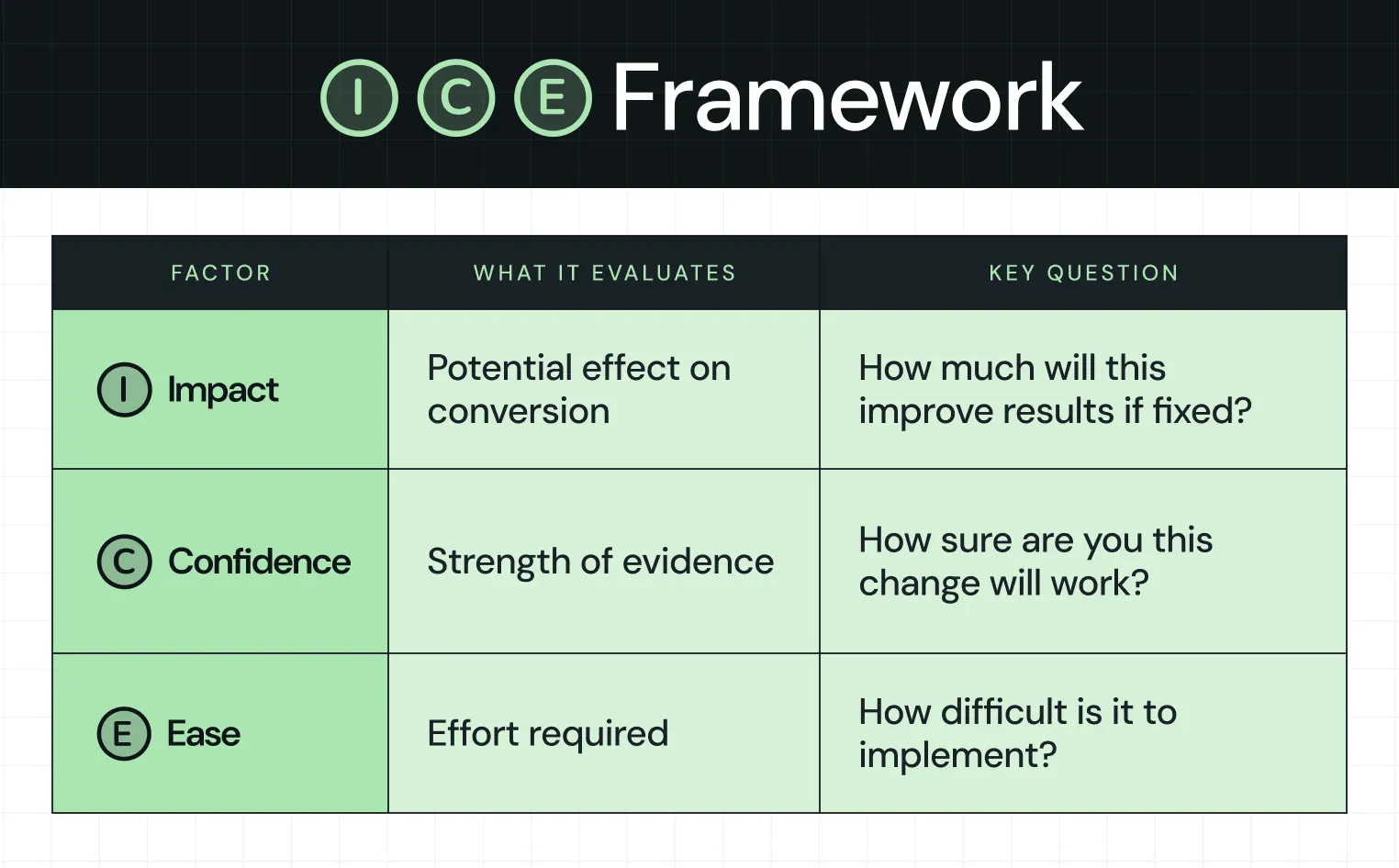
Prioritize pages with high traffic and below-average conversion rates first.
Once you have your prioritized list, run A/B Testing on the top fixes. Testing should follow diagnosis, not replace it.
What are the 14 Most Common Issues Found in a CRO Audit for B2B and SaaS Websites?
There are several mistakes found in a CRO audit, including confirmation bias and unaddressed validity threats that distort data accuracy. Let’s take a look at 14 of the most critical ones.
Group 1: First impression issues: Where most conversion rate drop-offs begin (Issues 1–5)
These issues cause visitors to leave before they engage. You usually see them first in scroll depth analysis data. They’re high-impact and rarely caused by design alone.
Issue 1: Unclear value proposition: When visitors can’t tell what you sell or who it’s for
Your hero headline and subheadline need to answer three questions immediately:
- What is this
- Who is it for
- Why should I care
Most B2B homepages fail all three. When users cannot answer those three questions in the first few seconds, they leave before reaching any other element on the page. The damage shows up as higher bounce rates on your homepage and key landing pages. Heatmaps show low scroll depth, and session recordings show visitors exiting within the first few seconds. Most B2B pages force visitors to infer value rather than make it obvious.
A strong example of this shift comes from a rebrand of Factors.ai. Before the repositioning, the website described the product in terms like dashboards, integrations, buyer signals, and attribution. While accurate, the product felt interchangeable with other analytics tools, so visitors had no clear reason to remember it.
The repositioning anchored the narrative around a single idea, the Marketing Compass. This metaphor reframed the product as a source of clarity and direction in a fragmented attribution landscape, not just another analytics dashboard.
That idea carried through the experience:
- Watchtower-inspired visuals reinforced clarity and oversight
- A sharper homepage headline communicated the outcome directly: “Know how your buyers move. Run campaigns that win.”
- Consistent design and messaging tied the system together
As Kiran Kulkarni, Partner & Head of Growth at ThunderClap, shared on LinkedIn, the Factors rebrand was a full-circle moment:
Factors.ai now commands a brand narrative that buyers connect with, a visual identity they remember, and a positioning story that makes the product feel like the obvious choice in its category.
Issue 2: Hero section targeting the wrong audience
Session recordings show users leaving the homepage even when traffic comes from clearly targeted ads or campaigns. This usually means your hero message is too generic and doesn’t align with the visitor's intent.
Read your homepage hero headline out loud. Could it describe any company in your category, or is it specific enough that only your ideal customer would nod? If your answer is honest, this is the issue.
Behavioral analytics reveals the mismatch.
As Ayush Barnwal, Founder at ThunderClap, shared on LinkedIn, nativeMsg saw the same issue during a website revamp. Campaign traffic entered the site but left quickly because the message did not align with the audience's intent. The targeting worked, but the homepage failed to convert that attention into engagement.
In nativeMsg’s case, restructuring messaging around audience-specific pages improved clarity and helped turn campaign traffic into meaningful engagement. The homepage shows this approach today. Visitors pick their use case (e-commerce, entertainment, media, or agentic AI) right from the hero, and the Solutions menu splits pages by industry and by role.
Steve Lys, Head of Marketing at nativeMsg, said that ThunderClap delivered “consistent timeline execution and unmatched reliability throughout the website revamp process.”
Issue 3: Page load speed: How every extra second cuts conversions before visitors see your page
When your pages load slowly, you lose conversions before engagement even begins. A PageSpeed score below 70 or poor Core Web Vitals usually confirms this.
In fact, a 1-second delay reduces conversions by 7%, and 53% of mobile visitors abandon pages that take more than 3 seconds to load. Your internal team rarely feels this because you visit the site on fast connections with cached sessions. Your visitors do not. Behavioral analytics by device and geography often reveal where load time quietly breaks the funnel.
Issue 4: No clear visual hierarchy: CTAs competing with each other
If your heatmaps show 30% of clicks going to navigation links and only 8% to your primary CTA, your hierarchy is broken.
Every page needs one primary goal. When CTAs compete for attention like demo requests, newsletter signups, resource downloads, and chat widgets, users face too many choices. They often resolve that friction by doing nothing. Scroll depth analysis and click tracking confirm this pattern. Users scroll, hover, and leave without taking action.
As Paul Boag shared on LinkedIn, landing pages often fail when multiple CTAs compete with no clear hierarchy. He highlighted a case where “Request a Demo,” “Discuss Your ROI,” and “Explore the Platform” created decision paralysis, even when some options led to the same outcome.
The issue was not a lack of intent but an excess of choices and weak visual prioritization.
Issue 5: Mobile conversion rate issues your desktop analytics are hiding
Nearly 49% of B2B buyers research products on their phones during work hours. Mobile-responsive websites convert 30% better than non-responsive ones, yet most funnels still break on small screens.
To check your own numbers, go to GA4 > Reports > Acquisition > Traffic Acquisition, then add Device Category. Session recordings on mobile usually reveal the gap, including users struggling with small tap targets, CTAs pushed below the fold on 375px screens, intrusive popups, and forms that force pinch-to-zoom.
Group 2: Consideration and trust issues: Why interested visitors still don't convert (Issues 6–10)
These issues stop visitors who are already interested but not yet convinced.
Issue 6: Weak or misplaced social proof: A critical trust signal failure
There is a difference between social proof that exists and social proof that works. “Great agency to work with” rarely influences skeptical B2B buyers because it provides no evidence of business impact. Buyers respond to outcomes, not opinions.
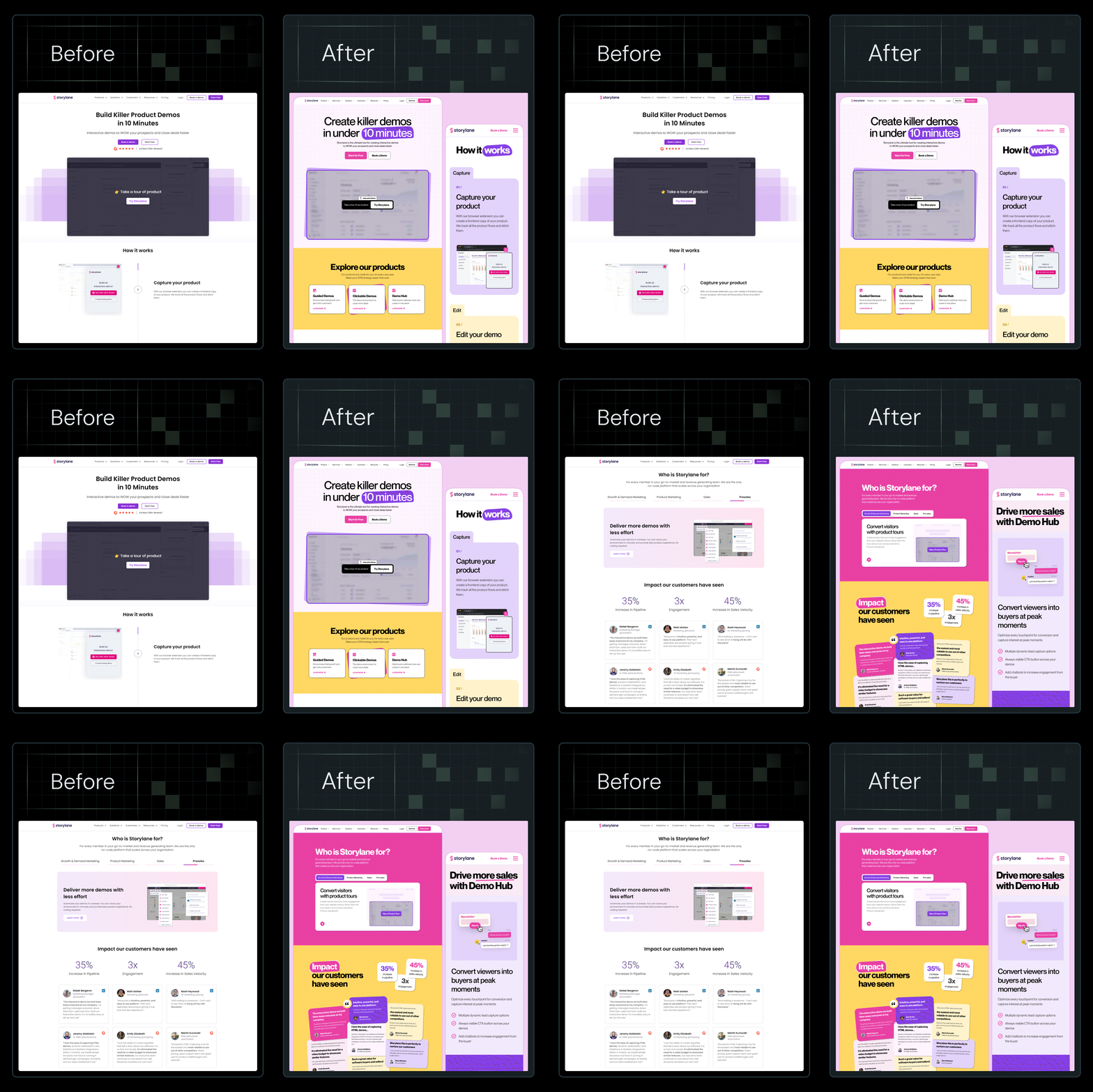
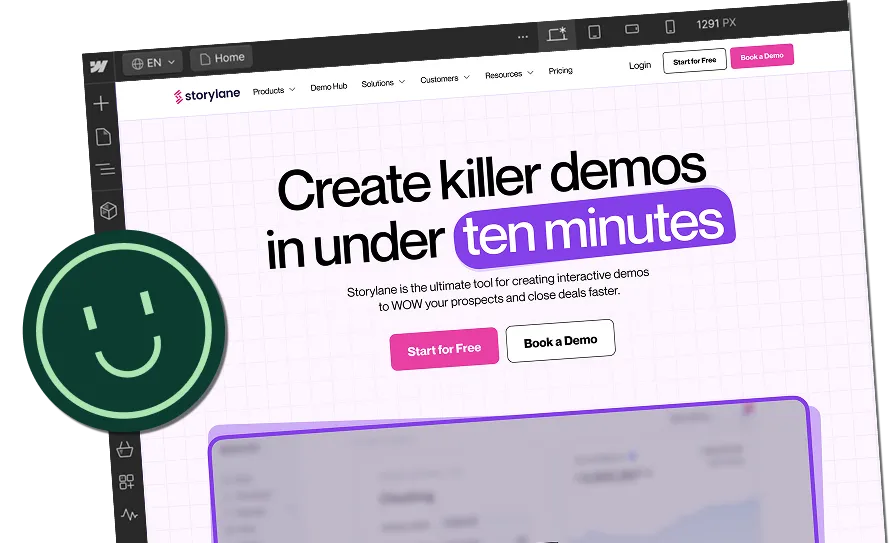
We saw this firsthand with Storylane. When Madhav Bhandari, Head of Marketing at Storylane, told us, "We like the website copy, don't change a thing," we agreed. The messaging was already working. The challenge was execution. The site looked early-stage, lacked visual consistency, and buried key differentiators. Visitors had to hunt for proof before they could trust the claims.
.webp)
We kept every word of the copy and rebuilt how the page proved it:
- Third-party validation moved into the hero. The “#1 Rated on G2 in demo automation” badge now sits in the first screen, in the same view as the “Book a demo” CTA.
- Recognizable logos came up front. A “Trusted by 5,000+” strip of enterprise customer logos sits directly below the navigation, before the visitor scrolls.
- Outcome stats replaced adjectives. Numbers like “10 mins to publish your first demo” give buyers measurable proof at the exact moment they decide whether to click.
After the redesign, Storylane reported a 30% increase in demo requests and a 36% increase in website impressions. Those results carry far more weight than a generic testimonial because they demonstrate measurable business impact.
Issue 7: Not answering visitor objections before they become reasons to leave
A qualified prospect arrives with a short list of concerns:
- Is it too expensive?
- How long will implementation take?
- Will it actually work for my use case?
If your website does not address those questions proactively, visitors leave to look elsewhere for answers and often do not return.
Session recordings often show users spending time on pricing, comparison, or FAQ pages before exiting. This behavior signals missing information at the point of decision.
Effective objection-handling copy addresses these concerns directly on key pages. For example:
- "Most clients are live within 8 weeks"
- "No long-term contracts — cancel any time"
- "Built for [specific ICP], not general-purpose teams"
Each statement removes a specific source of hesitation and builds confidence in the buying decision.
Issue 8: Pricing page drop-off: The highest-exit page in most conversion funnels
A pricing page exit rate above 70%, combined with short time-on-page and session recordings showing visitors leaving without scrolling, is often a sign that the page is creating uncertainty rather than helping visitors make a decision.
In most cases, the problem is not the price itself. Visitors cannot determine which plan fits their needs, what value each tier delivers, or whether their concerns have been addressed.
Some SaaS brands go a step further and replace static pricing tables with interactive calculators, one of the five tactics covered in our guide to SaaS CRO best practices.
Issue 9: Case studies that show outcomes but not the process that drove them
Low organic traffic to case study pages, combined with session recordings showing users rarely navigating to them from product or homepage pages, can indicate that your case studies are not building enough trust.
Many companies showcase results but skip over how those results were achieved. While outcomes generate interest, buyers in the consideration stage want to understand the process behind them.
For example, ThunderClap’s conversion rate optimization work for ConsultADD, an HR consultancy, shows what a process-led case study looks like. The page walks buyers through every stage of the story:
- Problem: ConsultADD relied on its website for leads, but the messaging spoke to job candidates, not the hiring companies that buy its services. Many pages saw only 0–5 users, and visitors stayed just 11–16 seconds.
- rocess: The team audited site structure, GA data, and competitors. Next, it refocused messaging on hiring companies, removed redundant pages, and redesigned the site with segmented forms and clear copy for decision-makers.
- Result: Average engagement rose from 11 seconds to 72 seconds, and conversions went up by 50–60%.
A prospect reading this page learns more than the outcome. They see the diagnosis, the decisions, and the sequence, and that gives them a reason to believe the same approach could work on their own site.
Issue 10: Missing trust signals at the exact point of conversion
At the moment of conversion, visitors need reassurance that they are making a safe decision. Yet many websites place trust signals on separate pages instead of near the action they want users to take. Without supporting evidence, even interested prospects may hesitate to submit a form or book a demo.
Three micro-trust signals often work well at this moment. These include “Trusted by 129+ B2B brands.” “No long-term contract.” A single recognizable client logo with a name.
For example:
.webp)
{{specficService}}
Group 3: Conversion action issues: The final funnel stage where fixes drive immediate results (Issues 11–14)
These issues happen at the final step, where intent is already high.
Issue 11: CTA copy that kills conversions: Describing actions instead of outcomes
High CTA visibility paired with low click-through rates often signals a messaging problem rather than a design problem. Many websites use generic CTAs such as "Contact Us" or "Learn More," which describe the action but not the value visitors will receive.
B2B buyers are evaluating outcomes, not buttons. A CTA that communicates a clear benefit gives prospects a stronger reason to take the next step, and benefit-driven copy sits at the core of most CTA best practices for B2B websites. For example, "See what's costing you conversions," "Get your free website audit," or "Book a 20-minute strategy call" set a clear expectation of value before the click.
Issue 12: Too many form fields: How friction destroys conversion rate
Session recordings often show visitors starting a form but abandoning it before completion. Form analytics can reveal exactly which fields are causing the highest drop-off.
Research consistently shows that each additional form field reduces conversion rate by an average of 4.1%. Similarly, 1,500 B2B decision-makers found that the average form abandonment rate is 67.8% when more than 7 fields are requested. Each additional field increases effort and raises the chance that even qualified prospects leave before submitting. Behavioral analytics tools such as Hotjar can help identify where that hesitation occurs.
Issue 13: No urgency framing: Why motivated visitors still do not convert
High time-on-page combined with low conversion rates often indicates that visitors are interested but do not feel a compelling reason to act now. Many intend to return later, but most never do.
In B2B, urgency should not rely on fake countdown timers or manufactured pressure. Effective urgency highlights the cost of delaying a decision while maintaining trust.
Here are examples that work:
- "Every month your conversion rate stays flat, your CAC climbs."
- "We take on a limited number of new audits per month."
- "Most clients who run this audit see lift within 60 days, so starting earlier matters."
Issue 14: Weak Post-submission experience: Why demo no-shows and stalled trials start on your thank-you page
Demo show-up rates below 70% or trial activation rates below 40% often indicate problems after conversion rather than before.
Many companies focus heavily on getting the form submission, but pay little attention to what happens next. Yet the thank-you page, confirmation email, and onboarding sequence play a major role in determining whether prospects attend a demo, activate a trial, or continue engaging with your product. This is also one of the most overlooked stages in the user journey.
Interesting read: From Audit to Action: 8-Step Process to Optimize Your B2B Website Strategy for 2026 Buyers
Conversion Rate Optimization Audit Checklist and Template (All 14 Issues)
Use the table below as a working conversion rate optimization audit template and checklist for your own site. Each row maps to one of the 14 issues covered above, along with the funnel stage, diagnostic signal, and highest-priority fix.
In most cases, addressing a handful of these issues will have a greater impact than a complete website redesign.
When Should You Run a CRO Audit Yourself vs. Hire a Specialist?
While some companies can improve conversions in-house, others reach a point where the best conversion rate optimization audit services deliver a faster and more measurable return. The right approach depends on your traffic volume, team expertise, and business goals.
DIY CRO audit: When it makes sense
- Your website is relatively small, with straightforward conversion goals.
- You have analytics, heatmaps, and session recordings in place, and someone on the team can interpret the data.
- You need directional insights rather than statistically significant conclusions.
- You have two to three weeks to work through all 14 conversion rate optimization audit steps in this guide.
When to partner with a CRO specialist
- Your website attracts meaningful traffic, but conversion rates remain below expectations.
- Internal optimization efforts have stalled, and you need an outside perspective.
- You want to run statistically valid A/B tests rather than simple experiments.
- The issue appears to involve positioning, messaging, or offer clarity rather than UX alone.
- You are looking for an ongoing conversion rate optimization system rather than a one-time round of fixes.
Many conversion problems originate above the design layer. A page can look polished, load quickly, and still underperform because the messaging fails to communicate value, build trust, or address buyer objections.
If that's the challenge you're facing, a CRO audit should evaluate not only user behavior and funnel performance but also positioning, messaging, and conversion strategy. At ThunderClap, we identify the highest-impact conversion leaks, prioritize fixes based on potential business impact, and show you where prospects drop off.
{{ctaBlock}}
FAQs
1. What should be included in a CRO audit?
A CRO audit should cover your full conversion funnel, behavioral analytics data (heatmaps, session recordings, scroll depth), messaging and trust signal review, technical performance, and a prioritized list of fixes. Each issue needs a severity rating, a diagnostic signal, and a specific recommended action.
2. How often should businesses perform a CRO audit?
Run a full audit quarterly and a lighter version, covering your top five pages, after any major site change or traffic shift. CRO increases when you treat it as an ongoing system rather than a one-time project.
3. What are the most common issues uncovered during a CRO audit?
The most common issues are an unclear value proposition above the fold, weak or misplaced social proof, too many form fields, and CTA copy that describes actions instead of outcomes. These four issues alone account for the majority of conversion drop-off on B2B and SaaS websites.
4. How do you identify conversion leaks on a website?
You can identify conversion leaks by combining funnel data from Google Analytics 4 with behavioral data from heatmap and session recording tools. You can also look for pages with high traffic and low conversion, exit pages that should not be exit pages, and CTAs with high visibility but low click-through. Then, trace each pattern back to a specific cause.



.webp)
Browse Similar Articles





Leading 5 SaaS Branding Agencies in Florida (That Actually Understand SaaS Growth)

.svg)

How to Turn Your B2B Website into a Self-Serve Growth Engine? (PLG Ready in 2026)

9-Step Website Copy Audit Checklist to Improve Conversions (Examples from Top B2B Brands)

.webp)

How to Choose the Right Fintech Web Development Company for Your Business

Top B2B Website Design Principles That Turn Visitors into Qualified Leads
%20Audit%20That%20Actually%20Improves%20Revenue.webp)
How to Do a Conversion Rate Optimization (CRO) Audit That Actually Improves Revenue
Web Design Agency vs. Freelancer vs. In-House: What Actually Works in 2026
5 CRO Agencies in London and How to Choose the Best CRO Agency for Your Business

The Ultimate Fintech B2B Positioning Guide for 2026 (That Actually Drives Conversions)
Mapping the B2B Buyer Journey to Improve Conversions Across Every Touchpoint
.webp)
7 Best Website Maintenance Companies in India for Growth-Led B2B Teams (2026)

.webp)
8 Best Healthcare Website Design Agencies for HIPAA-Compliant Sites in 2026


How to Find the Best Web Design Company in Houston, Texas for B2B Brands (6 Best Picks)
Positioning That Wins: How to Make Complex B2B Products Clear and Compelling
The Step-by-Step Website Redesign Process B2B Teams Use to Increase Conversions (Without Killing SEO and Pipeline)
7 Best Video Production Agencies for SaaS Product Walkthroughs and Feature Videos

How to Choose the Best B2B Website Maintenance Company: 9 Questions to Ask Before You Hire One


How to Choose a Web Design Company in San Francisco in 2026 (with Examples)

10 Best Web Design Companies in Florida in 2026 and How to Choose the Right One

How to Use Brand Storytelling on Your Website to Close More B2B Deals and Build Buyer Trust

SaaS CRO Best Practices: What High-Growth Brands Do Differently to Win Conversions


How a Rebranding Agency Can Redefine Your B2B SaaS Identity and Boost Pipeline

B2B Marketing Trends in 2026 That Directly Influence Pipeline and Revenue

Top 7 Video Marketing Agencies Driving B2B SaaS Brand Awareness in 2026

Why Partnering with a B2B Brand Positioning Agency Accelerates Market Differentiation

The Complete Website Redesign Checklist for B2B SaaS Teams Ready to Scale
.avif)
10 Best Webflow Development Agencies in India for 2026 (In-Depth Review)

10 Product Marketing Companies Powering the Fastest-Growing SaaS Brands in 2026
Website Copywriting Services vs In-House: What's Right for Your Business?

How to Choose a Marketing Agency That Understands B2B SaaS Growth Metrics


How to Choose a Video Marketing Agency That Understands B2B Storytelling

Outsourcing Web Design: Cost-Benefit Analysis for Mid-Market & Enterprise Brands

From Leads to Lifetime Value: How Growth Marketing Agencies Scale SaaS Revenue
Build a B2B Website Strategy That Aligns with Sales and Marketing Goals

Webflow vs WordPress: Which Platform Is Better for Your Business Website in 2026?
Fintech Web Design That Builds Trust: 8 UX Principles Every Fintech Site Needs
Optimizing for Intent: How B2B Website Messaging and UX Changes Help Capture Top-Funnel Buyers

12 Best B2B Web Development Agencies in the US to Build Scalable Websites

From Audit to Action: 8-Step Process to Optimize Your B2B Website Strategy for 2026 Buyers
How to Design a High-Converting Landing Page from Scratch (2026 Edition)

From Click to Customer: Proven Landing Page Conversion Optimization Techniques

How to Write Website Copy That Converts: A Step-by-Step Guide for 2026

How to Optimize a Landing Page for Maximum ROI: A Step-by-Step Breakdown


AI Landing Pages That Convert: 7 Design Principles Every AI Platform Should Follow
From Traffic to Pipeline: B2B Website Growth Strategy for Scaling Teams




Interested in seeing what we can do for your website?



.webp)
