















The Ultimate 12-Step Website Audit to Improve Conversions in 2026



Your traffic might look healthy while your site quietly loses leads due to broken tracking, slow pages, or messaging that hasn't kept pace with shifting B2B marketing trends. A website audit is a structured review of your security, tracking, SEO, performance, content, and conversion paths, built to show you what's costing you traffic and pipeline.
If you're wondering how to conduct a website audit and why you should treat it as a recurring habit, this guide walks through the same 12-step process that ThunderClap uses across B2B engagements.
TL;DR
- A website audit covers security, tracking, SEO, performance, UX, content, and conversion, not just visual design.
- Run a full audit every 6 months or immediately after a redesign, CMS migration, or unexplained traffic drop.
- Knowing how to do a website audit and why you should, helps you identify technical issues, improve search visibility, enhance user experience, and increase conversions.
When to Run a Website Audit (and How to Plan it Around Your Goals)
Run a full audit every 6 months at minimum. Treat a CMS migration, a major algorithm update, a redesign, or an unexplained traffic drop as automatic triggers, don’t wait for your next scheduled review.
Your starting point should also depend on what you’re actually trying to fix. If lead volume is the problem, start with Steps 9 and 10 (UX and conversion) before working backward into the technical steps. If organic visibility is the problem, start with Steps 3 through 6 (crawlability, speed, mobile, on-page). If you’re scoping a full redesign, run all 12 steps in order, since that’s the only way to see how the technical, content, and design findings overlap.
Step 1: Audit your website’s security and HTTPS
The first step in how to do a website audit properly is locking down security. Check for:
- SSL certificate validity, with no expiry within 30 days
- Mixed-content errors (HTTP assets loading on an HTTPS page)
- Outdated CMS plugins with known vulnerabilities
- Flagged issues in Google Search Console’s Security Issues report
A broken or expired certificate blocks secure crawling, throws browser trust warnings that send visitors back to search results, and quietly corrupts the analytics data that every later step depends on.
Run SSL Labs for certificate health, check Search Console’s Security Issues report, and use Sucuri SiteCheck for malware and blacklist status. Aim for zero mixed-content warnings and a clean security report.
Time and effort: About 1–2 hours. High technical lift, typically owned by a web developer or IT/security lead.
A Reddit user on r/cybersecurity asked how to verify their website's security after firing a developer they suspected of making unauthorized changes. One of the top users advised revoking all former developer access, rotating passwords and API keys, reviewing server logs and website code for unauthorized changes, running malware and vulnerability scans, and engaging a third-party security expert if needed.
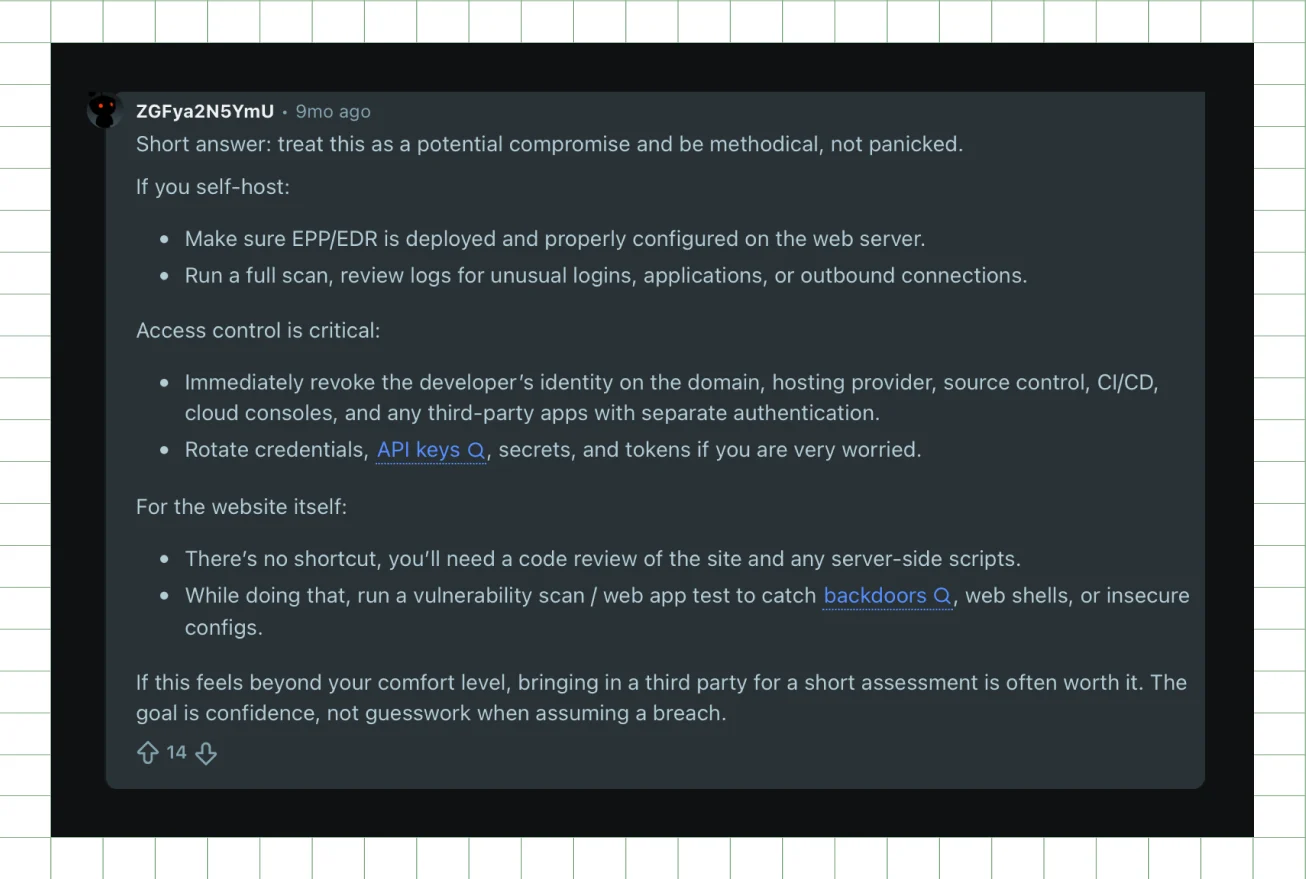
This reinforces the importance of a security audit as the first step in any website audit, not just after a suspected breach, but as part of routine maintenance. Next, you should verify that your measurement layer records what happens on it.
Step 2: Audit your analytics and tracking setup
Before evaluating your website's performance, make sure you're collecting accurate data. Review your GA4 configuration and GTM container health, and verify that key conversion events, such as demo requests, form submissions, and CTA clicks, are firing correctly.
This step lays the foundation for every insight that follows. If a demo request event isn't tracked properly, you'll have no reliable way to measure whether your website is generating leads. Likewise, inaccurate tracking can distort engagement metrics, making it difficult to identify genuine UX, content, or SEO issues.
As Sadman Shahadat, Founder & Head of Digital Analytics at NexaMetrics, notes, incomplete event tracking creates blind spots throughout the customer journey, making it difficult to identify where users drop off or which website changes actually improve conversions.
Time and effort: About 2-3 hours. Medium technical lift, typically owned by your marketing ops or analytics lead.
Use GA4 DebugView to monitor events in real time, GTM's Preview mode to validate tag logic, and Hotjar or Microsoft Clarity to confirm user interactions through heatmaps and session recordings. Your goal is to ensure that every primary conversion event fires once, that duplicate pageviews are eliminated, and that heatmaps are active on your highest-traffic landing pages.
Once you've verified that your analytics accurately reflect user behavior, you can confidently evaluate the rest of your website. The next step is ensuring search engines can properly discover and index the pages you're now tracking.
Step 3: Audit your technical SEO and crawlability
If you're learning how to do an SEO audit of a website, start by evaluating its crawlability. Review your mobile indexation status, XML sitemap, robots.txt file, canonical tags, redirect chains, and any 4xx or 5xx error pages, especially after an SEO website migration.
This step determines whether search engines can find and index your pages. If crawlability issues go unnoticed, they waste crawl budget, create confusion over which page should rank, and push important pages out of search results.
Time and effort: About 3-4 hours. Medium technical lift, typically owned by your SEO specialist.
Run a full crawl with Screaming Frog, check Search Console's Coverage report, and pull a crawl health score from Ahrefs. Aim for fewer than 5% of pages returning 4xx or 5xx errors, no redirect chains longer than two hops, and zero unintentionally noindexed pages.
After confirming your pages are crawlable and indexable, the next step is checking whether your website loads fast enough to keep visitors engaged after they arrive from search.
Step 4: Audit your page speed and Core Web Vitals
The next step is to check your Core Web Vitals scores (LCP, CLS, and INP), server response time, render-blocking resources, and the performance gap between desktop and mobile.
Time and effort: About 4-6 hours to run and review. Medium lift upfront, usually owned by your dev team for the fixes that follow.
This is where website performance directly affects both search visibility and user experience. Core Web Vitals are a confirmed Google ranking signal. More importantly, pages that load in over 3 seconds lose 53% of mobile visitors, according to Google. For B2B websites, that means fewer opportunities to turn traffic into a pipeline.
Arjen Karel, creator at CoreDash RUM, notes that a perfect Lighthouse score doesn't always reflect the experience of real users.
He recommends reviewing real-user metrics, such as the Chrome UX Report (CrUX), alongside lab data to get a more complete picture of website performance.
Run PageSpeed Insights on your homepage, top landing pages, and highest-traffic blog posts. Use GTmetrix for waterfall analysis and Lighthouse in Chrome DevTools to identify performance issues. Target LCP under 2.5 seconds, CLS under 0.1, and INP under 200 milliseconds across desktop and mobile.
Once your pages load quickly, the next step is evaluating how well they work on mobile devices, where usability issues often extend beyond speed alone.
Step 5: Audit your mobile usability
The next part of your website audit focuses on how your site performs across mobile devices. Review responsive web design and layout behavior across screen sizes, font readability, horizontal scroll issues, and tap target sizing.
Time and effort: About 2-3 hours. Medium lift, typically owned by your designer or front-end developer.
Google indexes the mobile version of your site first, so mobile issues directly affect how your entire site ranks. B2B buyers increasingly research on mobile, so a broken experience breaks trust before a conversation even starts. Getting the website design elements right protects that trust.
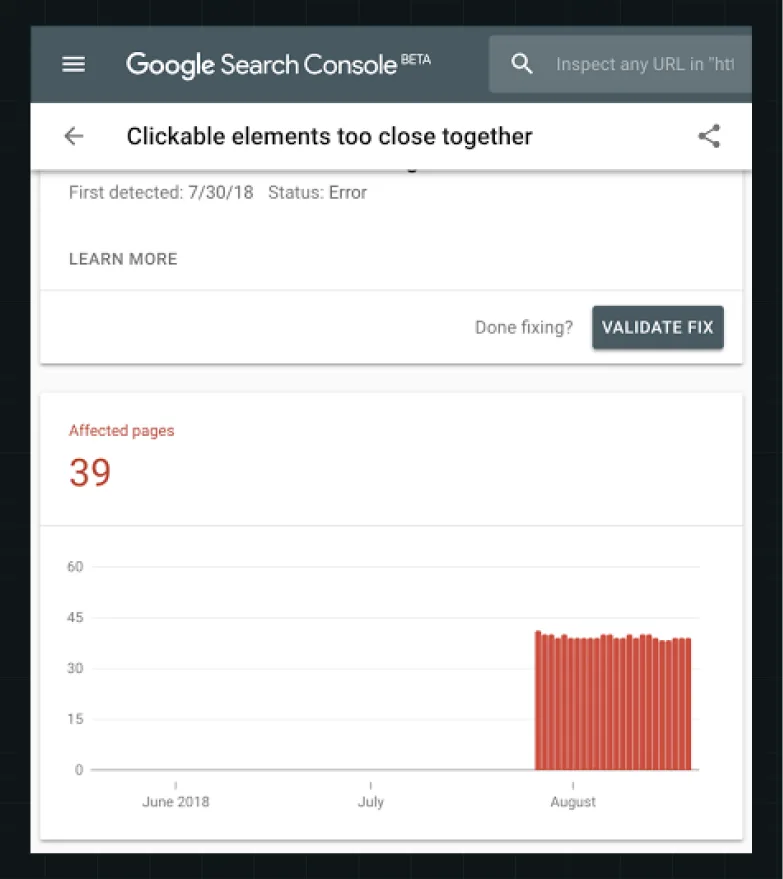
Note: Historically, Google flagged these issues in a dedicated Search Console Mobile Usability report. While Google has since retired that specific report interface, fixing these errors remains critical.
Aim for zero tap-target errors and no horizontal scroll under a 375px viewport. Since standalone testing tools have changed, use this modern toolkit for cross-device QA:
- Chrome DevTools & Lighthouse: For live mobile emulation and layout audits.
- URL Inspection Tool (Search Console): To check how Googlebot renders your mobile pages.
- BrowserStack: For testing across actual iOS and Android devices.
With security, tracking, crawlability, speed, and mobile confirmed, shift focus to the page level next.
Step 6: Audit your on-page SEO
Once the technical foundation is in place, the next part of your website audit focuses on how individual pages are optimized for search engines and users. Review title tags, meta descriptions, header hierarchy, keyword-to-page alignment, internal linking, and any duplicate content that causes multiple pages to compete for the same search terms.
Time and effort: About 4-6 hours for a full pass. Medium lift, typically owned by your content or SEO team.
Learning how to do a website content audit also means identifying gaps that affect visibility and user experience. Missing H1s, weak title tags, and orphaned pages with no internal links are common on B2B websites that have grown over time. On larger sites, these small inconsistencies can spread across hundreds of pages, making it harder for search engines to understand which pages deserve to rank.
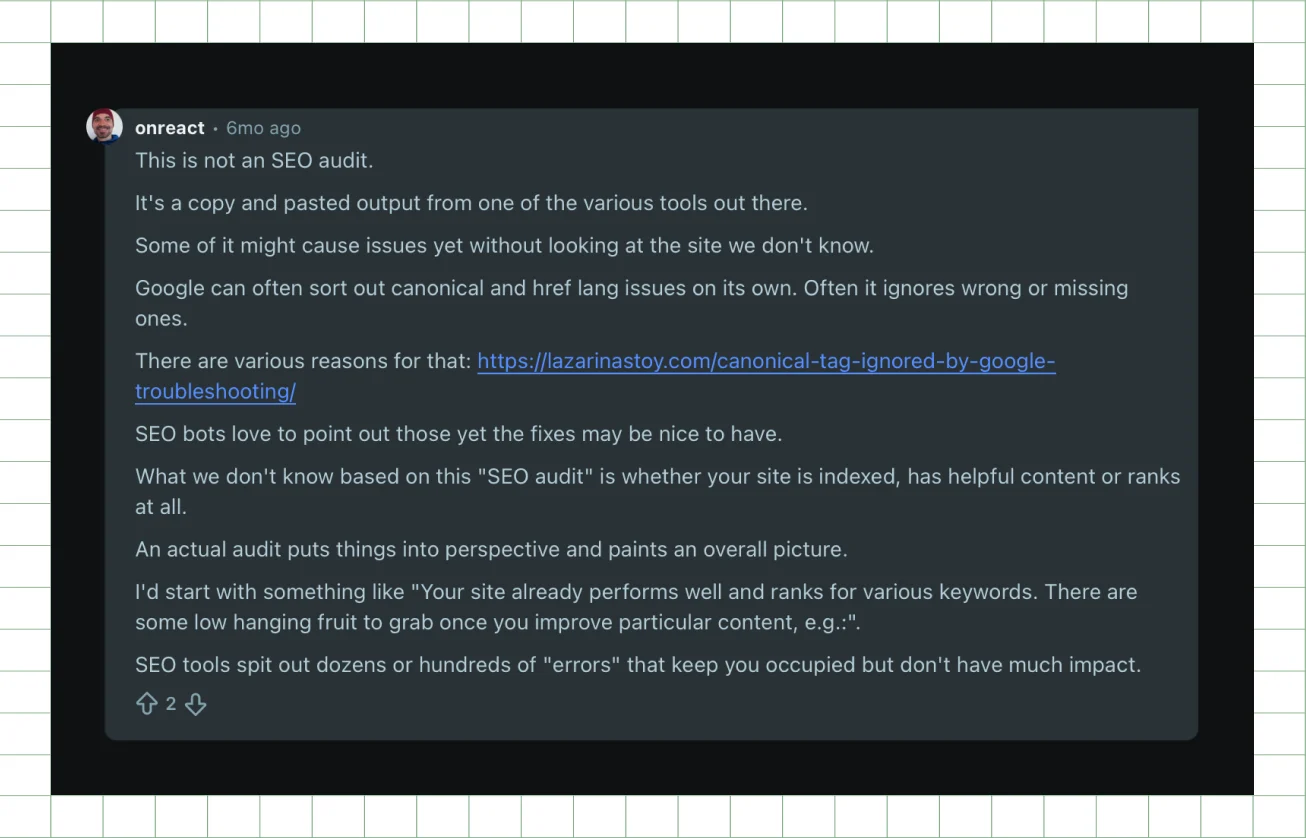
A discussion on r/TechSEO highlighted a common mistake with website audits: treating every tool-generated warning as an urgent issue. While SEO crawlers can uncover problems we mentioned above, an effective audit requires understanding which issues actually impact visibility and rankings.
Export title tags and header data in bulk with Screaming Frog, run Semrush's On-Page SEO Checker, and analyze internal linking through Ahrefs' Site Explorer. Aim for every indexed page to have a unique title tag under 60 characters, a unique meta description under 155 characters, and a clear heading structure with one primary H1.
With your page structure optimized, the next step is to review the content itself to determine whether your pages address user intent and support conversions.
{{specficBlog}}
Step 7: Audit your website content
Running a proper content review means learning how to do a website content audit the way B2B teams should. Start with a full inventory of existing pages, identify outdated content, and uncover pages that compete for the same keywords or fail to support buyer intent.
Content that doesn't match visitor intent, or that says too little to build authority, suppresses rankings domain-wide. A common challenge on B2B websites is content written around the product instead of the people searching for solutions. Stronger brand storytelling can improve messaging, but it needs to be structured around buyer needs, questions, and decision-making stages first.
Time and effort: About 1-2 days depending on site size. High lift, typically owned by your content strategist or editor.
ThunderClap uncovered this challenge during a website audit for Paytient. Although Paytient offered a healthcare payment solution designed to make care more accessible, the website content was primarily structured around existing members instead of employers and benefits decision-makers. The audit found that the value proposition was buried beneath product explanations and lengthy FAQ sections, making it harder for potential buyers to understand the solution and take the next step.
Based on these findings, we helped reorganize the website's information architecture, refine the messaging, and restructure content around buyer needs. The updated experience brought key information to the forefront, supported different stages of the buyer journey, and created a clearer path to conversion.
Pull a content inventory using Screaming Frog, map keyword-to-page assignments in Semrush, and review GA4 engagement metrics to identify your bottom-performing 20% of pages. If you're learning how to do a website content audit, use 300 words as a minimum benchmark for indexable pages, and review any page that receives more than 500 monthly impressions at least once a year to keep the content accurate and relevant.
With content gaps identified and addressed, the next step is to review your backlink profile to understand how external websites influence your search authority.
Step 8: Audit your backlink profile and domain authority
Backlinks remain an important Google ranking signal, but low-quality or irrelevant links can weaken your SEO performance. A backlink audit helps identify outdated links, unnatural anchor text patterns, toxic backlinks, and opportunities to build stronger authority.
Time and effort: About 2-3 hours to pull and review the report. Medium lift, typically owned by your SEO or link-building specialist.
Review your referring domains, backlink quality, anchor text distribution, toxic links, and link gaps compared with competitors. Use tools like Ahrefs' Backlink Profile and Link Intersect reports, and Semrush's Backlink Audit tool.
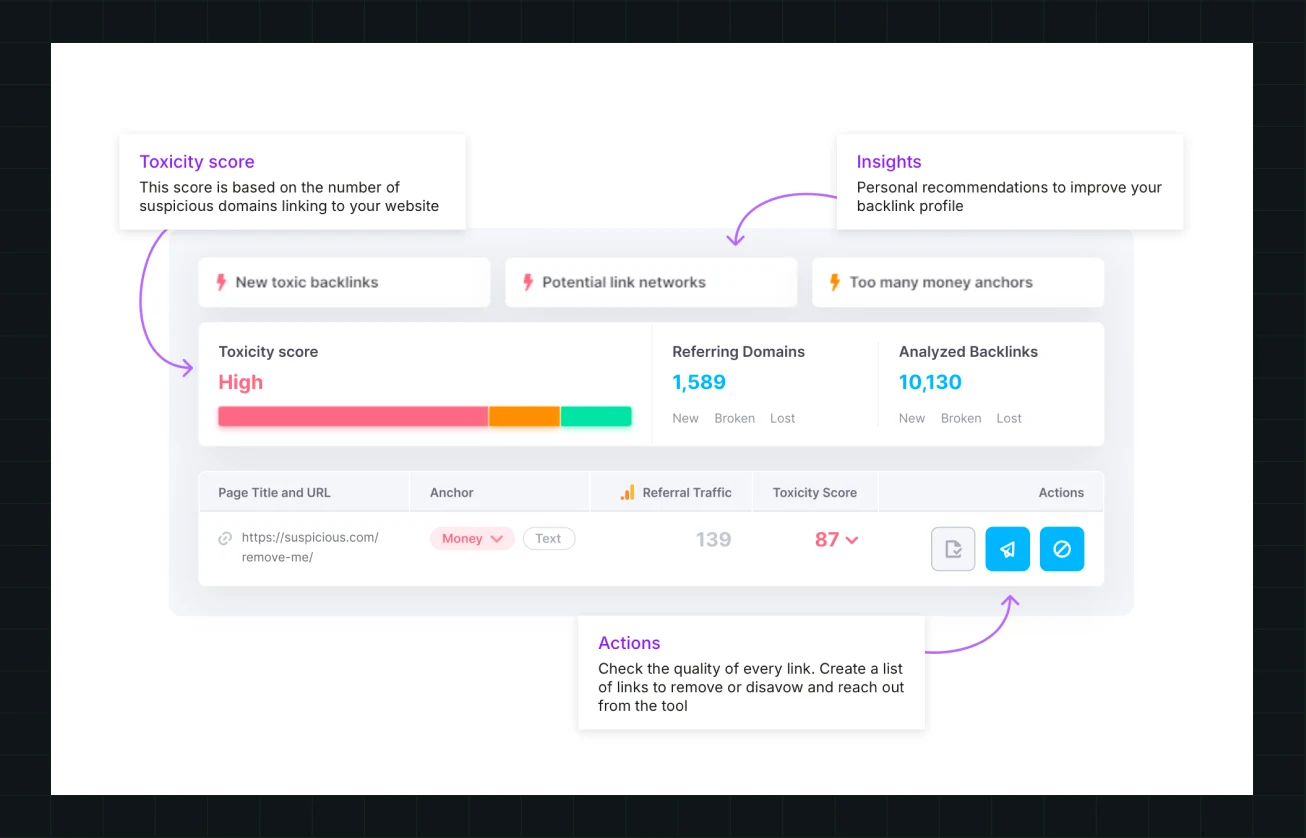
Semrush's Toxicity Score helps categorize backlinks by risk:
- Toxic (60–100): Potentially harmful links from spammy, penalized, or irrelevant sources.
- Potentially toxic (45–59): Links requiring further review.
- Non-toxic (0–44): Links that appear healthy and relevant.
To conduct a backlink audit using Semrush, start by setting up the Backlink Audit tool, reviewing your referring domains and Toxicity Score, analyzing suspicious links, and creating an action plan to remove harmful backlinks while monitoring your overall link profile growth.
After reviewing off-page signals, the next steps focus on how users interact with your website, starting with navigation and usability.
Step 9: Audit your website design and UX
A website design and UX audit reveals whether users can find the information they need and move smoothly toward conversion. Start by mapping the navigation depth, checking whether key pages are reachable within 3 clicks, and identifying friction points using behavioral data. Check visual consistency too, spacing, typography hierarchy, and whether your design system holds up across templates, since design and UX problems usually show up together, not separately.
Time and effort: About 1 day. High lift, typically owned by your UX designer or product team.
For example, Spacewalk's website was functional but no longer matched the company's evolving positioning. A UX and messaging audit found that the site focused on product features without clearly communicating its differentiation in the crowded cybersecurity market. Enterprise buyers struggled to understand the platform's broader vision, while gaps in information architecture left key audiences, such as incident response consulting firms, without dedicated paths.
Based on these findings, ThunderClap revamped the website to clarify Spacewalk's category, strengthen the "Beyond the SOC" narrative, align messaging with the buyer journey, and create dedicated experiences that attract qualified enterprise prospects. The same approach applies to any UX audit, which involves identifying where users get stuck, understanding why those friction points exist, and redesigning the experience around how buyers actually evaluate solutions.
Across the B2B websites we’ve audited, one pattern repeats more than any other: feature pages that list capabilities without mapping them to a specific buyer’s use case consistently show the highest exit rates and the lowest time on page. The fix isn’t more content, it’s reordering what’s already there around the question a buyer is actually asking at that stage.
Use tools like Hotjar for heatmaps and GA4 Explore reports for path analysis. Review your highest-intent pages for drop-offs, confusing journeys, and CTA visibility across desktop and mobile.
You now know how users move through the site. Next, find out why they're not converting once they get there.
Step 10: Audit your conversion rate and CTA effectiveness
A conversion audit goes beyond checking whether a button works. Here’s the process we run at ThunderClap:
- Map every CTA across your top 10 pages
- Check contrast and placement against the fold
- Review form fields against a simple rule (name, email, company, and one more field maximum for most B2B forms)
- Time how long it takes a cold visitor to understand your offer from the hero section alone.
If it takes longer than 5 seconds, that’s your first fix.
Time and effort: About 1 day. High lift, typically owned by your CRO specialist or growth marketer.
Effective conversion rate optimization starts with clarity, not with a redesign. A website can pass every technical and UX check yet still fail to convert, because design and copy work together. Strong positioning often does more for conversion than visual polish does, which is why we run messaging and design audits together rather than separately. For a deeper look at how landing pages specifically convert, see our breakdown of landing page design agencies and what separates a page that converts from one that doesn’t.
As Jenny Cross, Founder and CEO of Two Tone Creative, noted on LinkedIn, visitors scan rather than read, giving you roughly three seconds to answer who you are and whether you can help.
AI tools scanning the same page now work just as fast, with even less patience for unclear brand messaging.
Use GA4 conversion events, Hotjar form analytics, and A/B testing tools like VWO or Convert to improve high-traffic pages. Your primary CTA click rate should be 3% or higher on the homepage, and your hero section should communicate its value within 5 seconds. The best B2B website designs to increase conversion make their message clear quickly and guide visitors toward action.
UX and conversion are now audited. The final layer to review is how search engines understand your website: structured data.
Step 11: Audit your structured data and schema markup
Structured data is the final layer of a technical SEO audit. It helps search engines understand your website content and determine how pages should appear in search results. A structured data review checks key schema types such as:
- Organization
- FAQPage
- BreadcrumbList
- Article
It also identifies issues such as missing fields, invalid markup, or incorrect nesting.
Time and effort: About 2-3 hours. Low-medium technical lift, typically owned by your developer or technical SEO lead.
As part of an SEO audit, schema validation ensures that search engines and AI platforms can accurately interpret your content. Proper markup supports better visibility across search experiences, including Google AI Overviews and other AI-driven search tools.
Use the Google Rich Results Test, validator.schema.org, and Search Console’s Enhancements reports to identify and resolve structured data issues. Proper schema implementation helps search engines understand your site and improves the technical foundation of your website audit.
All 11 audit areas are complete. The final step turns these findings into a clear action plan your team can execute.
Step 12: Audit your accessibility
Check for color contrast ratios that meet WCAG 2.1 AA (4.5:1 for normal text), descriptive alt text on every meaningful image, keyboard-only navigation across your key pages, visible focus states on interactive elements, and ARIA labels on custom components like dropdowns and modals.
Time and effort: About 3-4 hours for a baseline scan. Medium lift, typically owned by your developer or accessibility reviewer.
Accessibility gaps exclude real users and carry legal exposure under ADA and WCAG-based lawsuits, which have risen steadily for companies with public-facing websites. They also overlap with SEO, since many accessibility fixes (alt text, heading structure, semantic HTML) are the same signals search engines use to understand a page.
Run axe DevTools for an automated scan, then test keyboard navigation manually by tabbing through your top five pages without touching a mouse. Aim for zero critical WCAG 2.1 AA failures on key pages.
Time and effort: 3–4 hours. Medium technical lift, typically owned by a developer or accessibility specialist. [confirm with team]
All 12 audit areas are now complete. The next step turns these findings into something your team can actually execute.
Prioritize Your Findings and Build an Action Plan
A website audit only creates value when findings turn into action. Build a prioritization framework using an impact-versus-effort matrix, separate quick wins from larger structural changes, and establish a regular audit cadence to track progress.
Many teams finish an audit with a long list of issues but no clear path forward. They either try to fix everything at once and lose momentum or leave the recommendations untouched. A structured action plan transforms audit findings into a roadmap, helping teams focus on changes that improve website performance and business outcomes.
Ayush Barnwal, Founder of ThunderClap, highlighted a similar challenge after leading more than 88 website redesigns. Redesigns often fail not because of execution but because the brief focuses on surface-level goals like refreshing messaging rather than addressing diagnosed problems such as buyer drop-offs, unclear positioning, or competing CTAs.
Prioritized findings help turn those insights into a brief that teams can execute.
Technical SEO issues from the earlier audit stages can often be handled internally by teams with the right tools and resources. The challenge usually appears when UX, conversion, and messaging issues overlap. At that stage, ongoing support from a website maintenance agency can help turn recommendations into consistent improvements.
Classify findings into Quick Wins (one week), Sprint Items (one quarter), and Structural Changes. For larger initiatives, evaluate priorities against expected impact and realistic website redesign costs before committing resources.
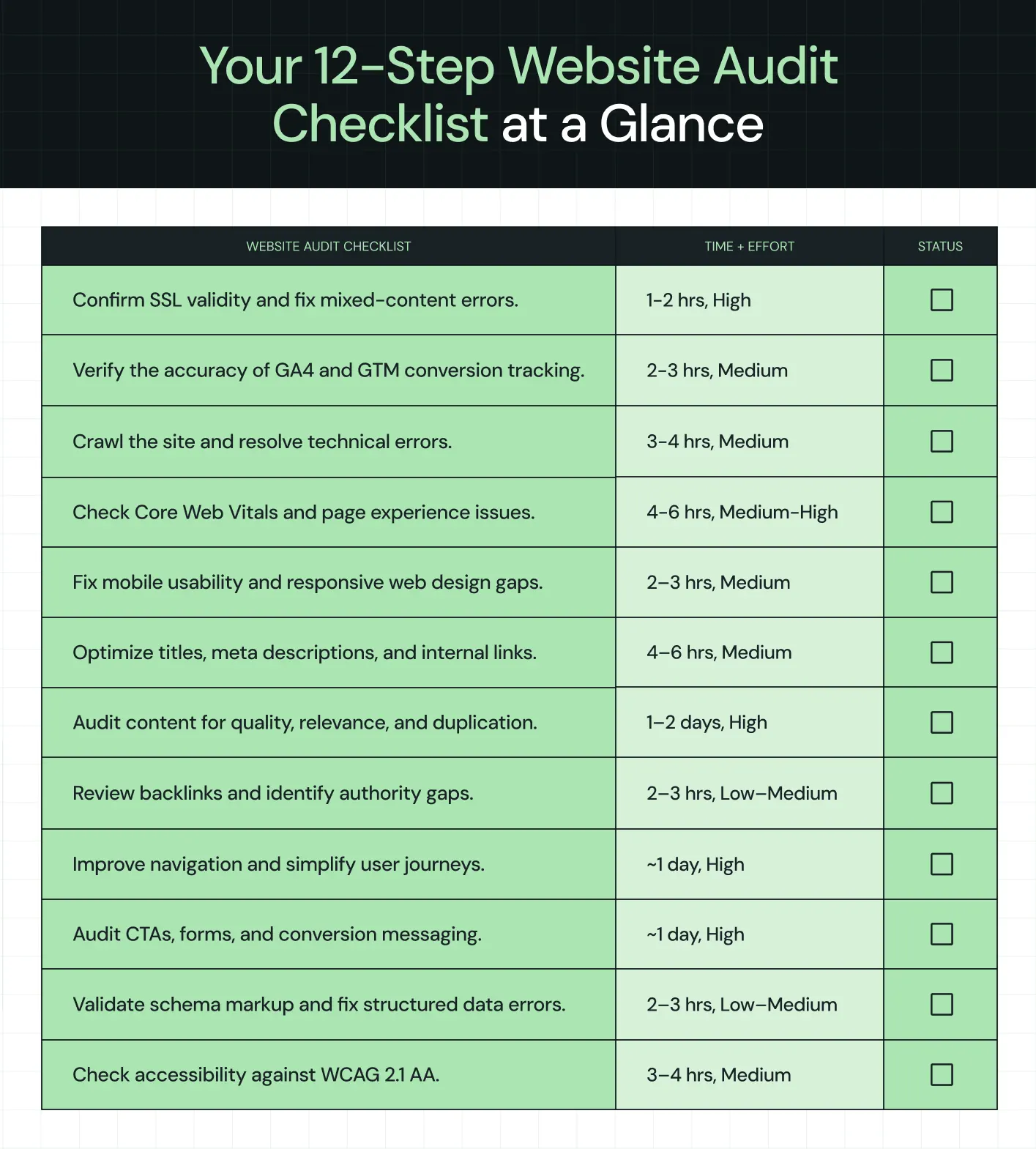
Your 12-Step Website Audit Checklist at a Glance
Save this reference for every future audit, or pair it with a fuller website redesign checklist for B2B SaaS teams once findings point toward a rebuild.
Here's how to do a website audit and why you should keep this list handy.
Bonus Read: How to Choose the Right Web Design Partner for Your B2B or SaaS Website
What to Do After Your Website Audit
Completing an audit only matters if findings lead to action. Most teams run the audit, generate a long list, and lose momentum within weeks, the same gap that keeps website maintenance companies in business long after launch.
We've audited and rebuilt 129+ B2B websites, and we can distinguish between audit findings that actually improve pipeline performance and minor issues that create distraction without meaningful impact. Our website redesign process carries findings through to execution.
Run end-to-end in-house; this process typically spans security, analytics, SEO, design, content, and development, roughly 4–5 days of focused work across six or seven different roles. Our team runs the same 12 steps as a single coordinated process, not a relay between departments, which is usually where the time gets lost.
The pattern repeats across our client work. During a website audit for Zamp, we uncovered a broken conversion funnel that prevented visitors from reaching the "Book a Demo" goal, as well as a fragmented brand experience due to inconsistent design and messaging. Both issues were addressed through the redesign, creating a stronger digital foundation that supported the company's next phase of PR and growth campaigns.
{{ctaBlock}}
FAQs
1. How often should you perform a website audit?
You should perform a full audit every 6 months and immediately after a migration, an algorithm update, a redesign, or a traffic drop. Treat those triggers as non-negotiable, since waiting for the next scheduled review lets a fixable problem compound into lost rankings.
2. What should be included in a website audit checklist?
A complete website audit checklist should include security, analytics, technical SEO, page speed, mobile usability, on-page SEO, how to do a website content audit, backlinks, how to do a website UX audit, conversion, and structured data.
3. Can a website audit improve search engine rankings?
Yes, a website audit improves search engine rankings when your fixes target the right mechanisms. Crawl fixes improve indexation, better Core Web Vitals address performance-related ranking factors, and knowing how to do an SEO audit of a website helps identify opportunities like schema implementation that can support rich results and stronger visibility in search experiences. At ThunderClap, we use website audits to uncover these technical and content opportunities, then translate findings into practical improvements that strengthen search performance and support broader business goals.
4. Should I perform a website audit myself or hire an agency?
You should perform a website audit yourself if your team has the technical SEO expertise and the right tools to handle security, tracking, crawlability, speed, mobile, and on-page checks. The gap usually appears when findings span multiple disciplines at once, with UX, conversion, messaging, and design issues surfacing together. At that point, partnering with an experienced web design agency like ThunderClap becomes the better option.



.webp)
Browse Similar Articles





Leading 5 SaaS Branding Agencies in Florida (That Actually Understand SaaS Growth)

.svg)


How to Turn Your B2B Website into a Self-Serve Growth Engine? (PLG Ready in 2026)


9-Step Website Copy Audit Checklist to Improve Conversions (Examples from Top B2B Brands)

.webp)

How to Choose the Right Fintech Web Development Company for Your Business

Top B2B Website Design Principles That Turn Visitors into Qualified Leads


%20Audit%20That%20Actually%20Improves%20Revenue.webp)
How to Do a Conversion Rate Optimization (CRO) Audit That Actually Improves Revenue
Web Design Agency vs. Freelancer vs. In-House: What Actually Works in 2026
5 CRO Agencies in London and How to Choose the Best CRO Agency for Your Business

The Ultimate Fintech B2B Positioning Guide for 2026 (That Actually Drives Conversions)
Mapping the B2B Buyer Journey to Improve Conversions Across Every Touchpoint
.webp)
7 Best Website Maintenance Companies in India for Growth-Led B2B Teams (2026)

.webp)


8 Best Healthcare Website Design Agencies for HIPAA-Compliant Sites in 2026

How to Find the Best Web Design Company in Houston, Texas for B2B Brands (6 Best Picks)


Positioning That Wins: How to Make Complex B2B Products Clear and Compelling
The Step-by-Step Website Redesign Process B2B Teams Use to Increase Conversions (Without Killing SEO and Pipeline)
7 Best Video Production Agencies for SaaS Product Walkthroughs and Feature Videos


How to Choose the Best B2B Website Maintenance Company: 9 Questions to Ask Before You Hire One



How to Choose a Web Design Company in San Francisco in 2026 (with Examples)

10 Best Web Design Companies in Florida in 2026 and How to Choose the Right One

How to Use Brand Storytelling on Your Website to Close More B2B Deals and Build Buyer Trust
SaaS CRO Best Practices: What High-Growth Brands Do Differently to Win Conversions


How a Rebranding Agency Can Redefine Your B2B SaaS Identity and Boost Pipeline


B2B Marketing Trends in 2026 That Directly Influence Pipeline and Revenue

Top 7 Video Marketing Agencies Driving B2B SaaS Brand Awareness in 2026

Why Partnering with a B2B Brand Positioning Agency Accelerates Market Differentiation

The Complete Website Redesign Checklist for B2B SaaS Teams Ready to Scale

.avif)
10 Best Webflow Development Agencies in India for 2026 (In-Depth Review)

10 Product Marketing Companies Powering the Fastest-Growing SaaS Brands in 2026
Website Copywriting Services vs In-House: What's Right for Your Business?

How to Choose a Marketing Agency That Understands B2B SaaS Growth Metrics

How to Choose a Video Marketing Agency That Understands B2B Storytelling

Outsourcing Web Design: Cost-Benefit Analysis for Mid-Market & Enterprise Brands

From Leads to Lifetime Value: How Growth Marketing Agencies Scale SaaS Revenue

Build a B2B Website Strategy That Aligns with Sales and Marketing Goals

Webflow vs WordPress: Which Platform Is Better for Your Business Website in 2026?
Fintech Web Design That Builds Trust: 8 UX Principles Every Fintech Site Needs

Optimizing for Intent: How B2B Website Messaging and UX Changes Help Capture Top-Funnel Buyers



12 Best B2B Web Development Agencies in the US to Build Scalable Websites

From Audit to Action: 8-Step Process to Optimize Your B2B Website Strategy for 2026 Buyers
How to Design a High-Converting Landing Page from Scratch (2026 Edition)
From Click to Customer: Proven Landing Page Conversion Optimization Techniques
How to Write Website Copy That Converts: A Step-by-Step Guide for 2026

How to Optimize a Landing Page for Maximum ROI: A Step-by-Step Breakdown


AI Landing Pages That Convert: 7 Design Principles Every AI Platform Should Follow
From Traffic to Pipeline: B2B Website Growth Strategy for Scaling Teams




Interested in seeing what we can do for your website?



.webp)
