















6 CRO Best Practices for Demo Pages: A Complete Guide [2026]


Your demo page needs to answer three questions quickly: What will you get from the product? Why should you trust the company? What do you need to do next? If visitors have to work to find those answers, they may leave before they reach your demo form. These CRO best practices for demo pages fix exactly that gap.
Strong demo page conversion rate optimization (CRO) starts with the elements that shape that decision. A clear value proposition gives visitors a reason to book. A focused form removes unnecessary effort. Relevant proof supports the buying decision, and a clear confirmation page sets expectations after submission.
This guide covers practical CRO best practices for demo pages, from page structure and form design to CTAs, social proof, product previews, and conversion testing.
TL;DR
- Start with the fundamentals of demo page conversion rate optimization (CRO) by leading with a clear value proposition, making your CTA prominent, and removing unnecessary form fields that create friction.
- Build trust where visitors make their decision. Add relevant social proof, customer logos, ratings, and a concise product preview near your demo form to address objections.
- Improve conversions through structured testing. Form a clear hypothesis for each change, run A/B tests, and use form analytics to identify where visitors drop off.
Best Practice 1: Open With a Benefit-Led Headline, Not a Feature List
According to a University of California study by Dr. Gloria Mark, the average attention span on a single screen has dropped to just 47 seconds. Because users evaluate your offer within those initial seconds, listing feature names forces your audience to calculate the value on their own, which causes most visitors to leave immediately.
Your above-the-fold section should support that message. Give your headline and primary call-to-action (CTA) enough space and contrast to stand apart from navigation and secondary graphics. Match your CTA copy to the promise in your headline, especially when visitors arrive from an ad, search result, or blog post.
Keep these points in mind when you write and design your demo page:
- Lead with an outcome. Show visitors the result they can expect from your product.
- Give your CTA a clear role. Connect the button copy to the promise in your headline.
- Keep the primary path obvious. Limit competing elements around your headline and CTA.
- Match the page to the visitor's intent. Carry the same promise from the ad, search result, or content that brought them to the page.
- Check your visual hierarchy. Use heatmaps to see where visitors focus their attention.
- Test your strongest options. Use A/B Testing to compare benefit-led headlines and CTA combinations.
We applied this comprehensive approach when redesigning the enterprise product demo experience for Zamp, a sales tax compliance platform. Despite drawing strong organic traffic and offering a high-value product, Zamp's original page buried key outcomes under technical jargon. This messaging gap caused CFOs and Controllers to leave without requesting a call.
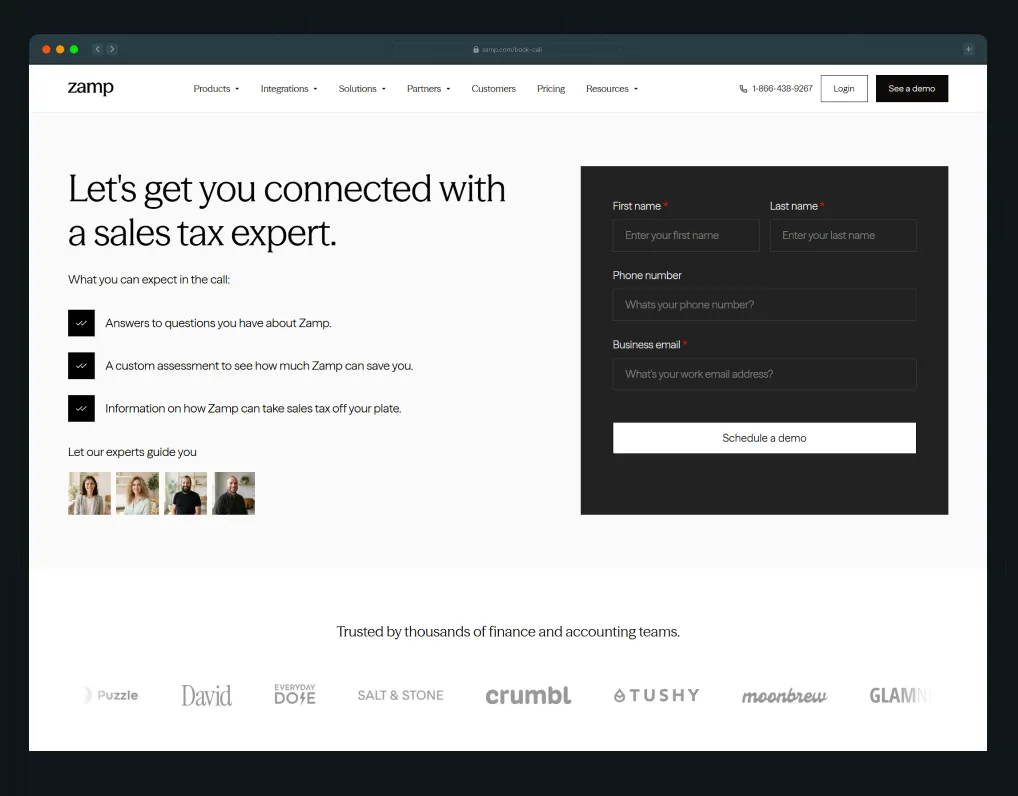
To fix this drop-off, we reshaped Zamp's positioning around three core pillars: owned data, best-in-class accuracy, and elite tax experts. We restructured their landing page sitemap to guide persona-driven paths straight to the demo form, placed high-contrast CTAs above the fold, and highlighted their 99.9% filing accuracy alongside white-glove onboarding. By pairing sharper headline copy with the same playbook the best CRO agencies use, Zamp turned existing traffic into qualified sales calls and established clear category leadership.
The company now communicates value clearly, backed by onboarding that completes in under two hours, response times under one hour, and G2 recognition.
Best Practice 2: Cut Your Demo Form Down to the Fields You Actually Need
Nobody wakes up excited to fill out a 12-field demo form.
Your visitors have places to be, and every extra field gives them another reason to close the tab. Before you ask for a job title, company size, phone number, or anything else, ask yourself one question. Does your sales team actually need this information before the first call?
If the answer is no, cut it.
A shorter form also changes how the request feels. One column, clear labels, and a small visual footprint make the booking process look easier. It is the core logic of user experience (UX), and smart conversion rate optimization (CRO) comes down to making the ask feel effortlessly light.
Your field labels and submit buttons need to carry their weight, too. “Submit” says almost nothing. Action-focused CTA copy like “See It in Action” or “Book Your Walkthrough” tells visitors what they get when they click.
Plivo, a communications API platform, found that the field count was contributing to form drop-off on one of its forms. The team also found that the CTA “Get Volume Pricing” confused visitors who expected a more direct sales conversation. Those are two useful things to look for on your own demo form. How much information are you asking for, and does your CTA match what happens next?
Deploy form analytics with field-level tracking to pinpoint the exact inputs causing visitors to abandon ship. A 2025 analysis of more than 50,000 web sessions by Factors.ai found demo request forms with four to six required fields converted best, at an average of 51%, compared to roughly 31% for forms with seven or more fields. Going shorter didn’t help either, as forms with one to three fields converted at only 41%, likely because they read as a newsletter sign-up to visitors who aren’t ready to book a call.
Once you spot your own pain points, run systematic A/B Testing to let real data build a form that balances lead volume with quality.
Best Practice 3: Put Proof on the Demo Page Itself, Not Just the Homepage
Leaving social proof off your booking page? You might as well tell your prospects to keep scrolling.
When a prospect reaches your product demo landing page, they make a call in under ten seconds, to hand over their work email or close the tab. Keeping your logos, G2 ratings, and testimonials buried exclusively on your homepage does zero heavy lifting at the precise moment your visitor decides whether to trust you.
There is a viral thread on r/techsales by a 15-year procurement professional that exposes what happens after a pitch:
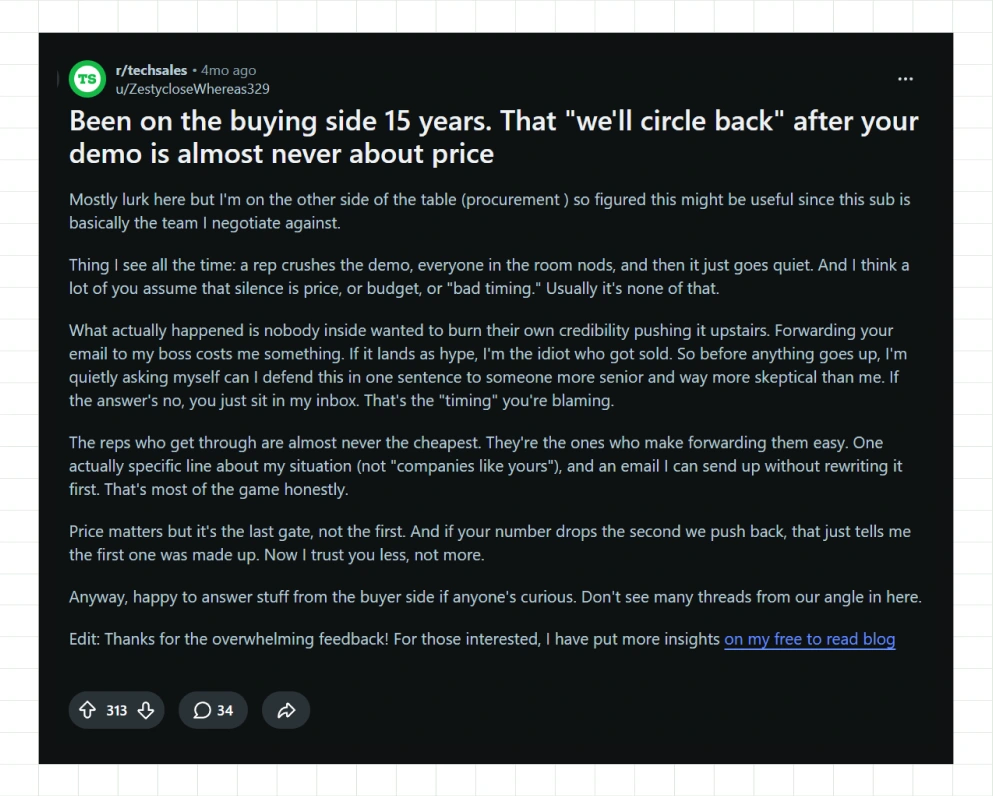
When a prospect goes silent (that "we'll circle back" email?), it is almost never about price or bad timing. It comes down to personal credibility. As they put it, forwarding your pitch to their boss costs them political capital, and if your page reads like unproven hype, they look foolish. Before pushing your deal upstairs, they ask themselves one question: Can I defend this in one sentence to someone senior and skeptical?
That is why your product demo page needs to arm your advocate with proof right next to your form.
Instead of isolating your trust signals in a lower section, sprinkle them across major decision points. Drop a logo strip under your primary call-to-action (CTA) or place a punchy pull-quote alongside your input fields. When choosing quotes, ditch generic praise like "Great team to work with." A number, a short timeframe, or a clear outcome gives your champion actual ammunition.
ThunderClap ran into a similar issue with WizCommerce. The company had strong customer relationships and made a great impression at industry events, but its website wasn’t carrying that credibility through to the digital experience. Our audit found that the site underused customer proof and made the platform harder to understand.
As part of the redesign, we brought customer logos, testimonials, and success stories throughout the site instead of keeping all that proof in one isolated section. We placed a clean "OUR CUSTOMERS" logo grid directly under the headline and alongside the scheduling widget on their demo booking page.
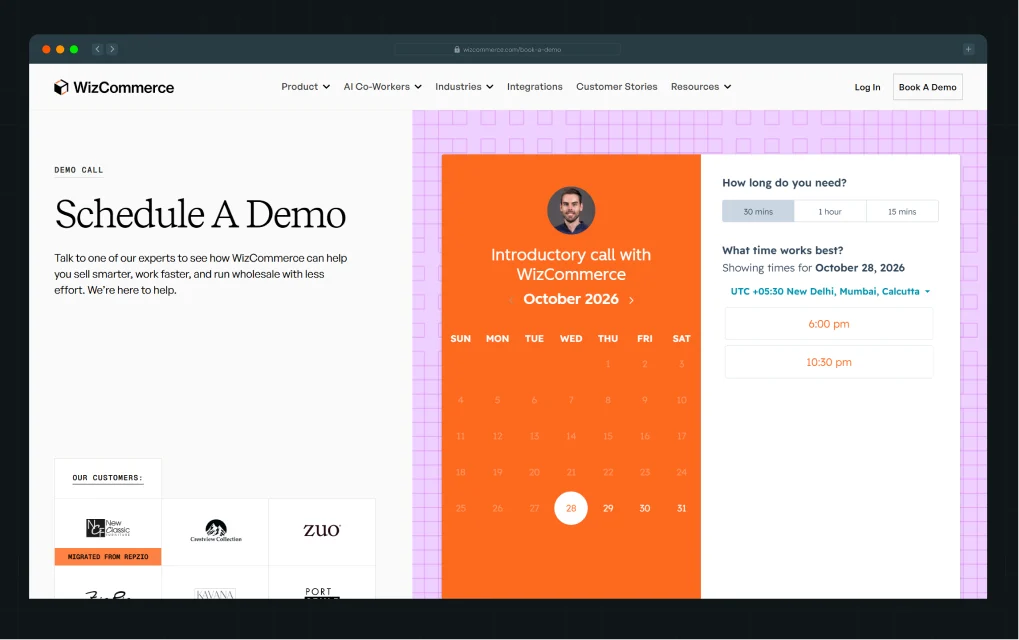
We also used stronger product visuals and clearer brand messaging to help prospects understand the platform without digging through layers of copy.
Your demo page deserves the same treatment. Put relevant social proof near the form and key CTAs. Give visitors specific outcomes they can remember. If your buyers check G2 or Clutch before booking, bring those ratings into the experience, too. Your buyers already consult these mid-decision, and a badge on your page meets them exactly where they're already looking.
Make the decision easier for the person on the page and easier for the person they need to convince.
Best Practice 4: Let Visitors Preview the Product Before They Book
Not ready to talk to sales yet? Fair enough.
A demo page shouldn’t force every visitor into the same next step. Some people want to speak with your team. Others want to poke around the product first, see how it works, and decide if it’s worth a conversation. If you give them no way to do that, you may lose a genuinely interested visitor simply because they weren’t ready for a call.
That’s where an interactive or recorded product preview can help. Give visitors a quick look at the product without making them leave the page. A short walkthrough, interactive demo, or embedded product tour can answer the basic “What am I actually getting?” question before you ask for their details.
Take roommaster’s demo page as an example. When ThunderClap repositioned roommaster around a “by hoteliers, for hoteliers” narrative and rebuilt their site on Webflow, their “Request Demo” page kept proof close to the ask. Eight named customer testimonials, complete with photos and job titles, sit right in the booking flow, not tucked away on the homepage.
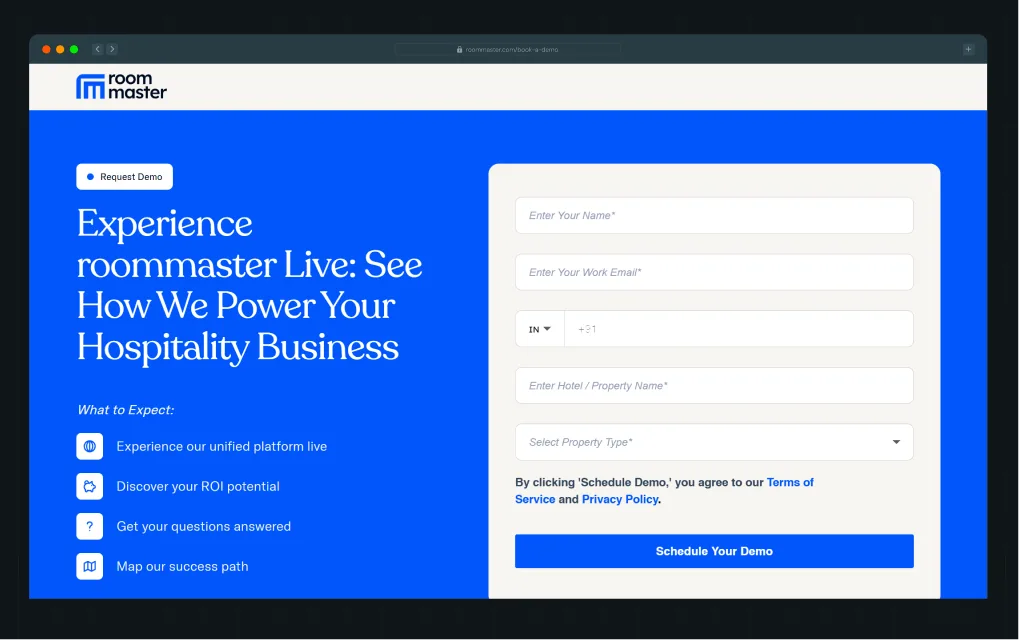
The redesign drove an 80% increase in demo requests and organic traffic, along with a 338% jump in unique visitors, the kind of lift that follows when proof sits exactly where the decision happens.
The same principle applies when you add a product preview to your demo page. Match the surrounding design, keep the interaction focused, and make the next step obvious. You can also make the choice explicit in your copy. “Want to look around first?” feels much more inviting than hiding an interactive demo behind another navigation link. You’re giving visitors another way to learn about your product while keeping the option to book a product demo right there.
Take a look at your current demo page. If someone isn’t ready to talk to sales, what can they do next? If the answer is “leave,” you have an opportunity to capture more of that interest. See how design elements like this shape a SaaS site's first impression.
Best Practice 5: Tell Visitors Exactly What Happens After They Submit
When a visitor fills out your product demo form, ambiguity destroys momentum. Leaving them with a generic "Thanks, we'll be in touch" toast message forces them to have uncertainties.
Who’s getting in touch? When? Are they calling or emailing? Do they need to do anything else? If they do not know what comes next, they simply move on with their day. It is important to give your visitor those answers while the interaction is still fresh.
As a sales engineer on r/salesengineers pointed out when hunting for automated demo tools, prospects expect immediate value or clear direction.
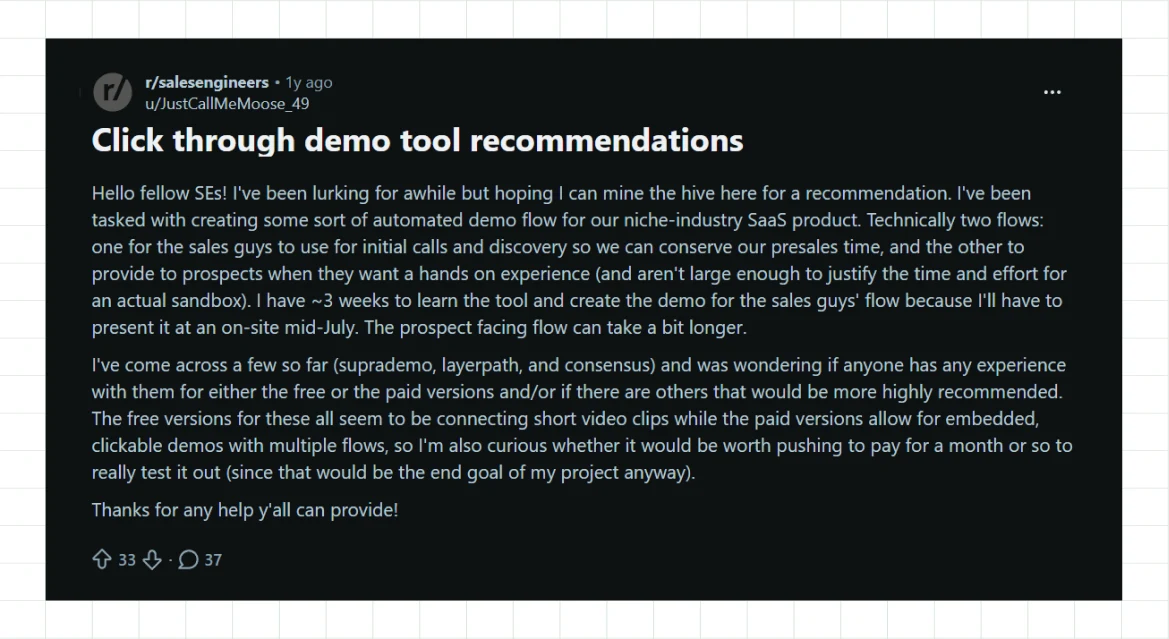
Forcing buyers through vague sales gates without setting clear expectations burns presales time and frustrates qualified leads who just want a straightforward walkthrough.
The fix:
- Name the exact next step right on a visible confirmation screen.
- Skip the faddish toast popups that disappear in two seconds.
- Build a dedicated post-submission module or embed a calendar scheduling tool directly on the confirmation page.
Your copy should leave zero room for doubt:
"Someone from our team will email you within one business day to confirm your 20-minute walkthrough."
ThunderClap saw this firsthand with Paytient, a healthcare payments platform whose strong product-market fit was undercut by high drop-off because key next-step information was buried in FAQ accordions. We replaced those buried FAQs with clear, structured in-flow messaging placed directly in the conversion path. Ultimately, visitors got immediate answers about what happens next instead of hunting for them after converting.
Want to see these principles applied to real demo pages? The ThunderClap High-Converting Demo Page Playbook breaks them down with real examples, wireframes, and messaging patterns used by leading SaaS brands.
When prospects know precisely what to expect, your show-up rates increase automatically. This kind of clarity is part of the broader B2B brand positioning work we do for SaaS clients.
Best Practice 6: Test Every Change With a Structured Framework
Testing is what separates a demo page redesign from a real conversion program. It’s also one of SaaS CRO best practices for demo pages that teams most often skip. Treat every change, including headline weight, form length, proof placement, preview module, and confirmation screen, as a testable hypothesis.
The CRO best practices for SaaS demo pages that hold up over time are effective precisely because none of them are permanent. Document what you expect to happen and why before shipping a change. That way, when performance goes up or down, you can trace the result to the change itself rather than attributing it to general traffic.
At ThunderClap, we treat CRO as a continuous cycle of research, strategy, execution, and testing. Here’s how we approach it as a CRO agency with 140+ websites launched in an average of under 10 weeks:
- Audit what you have: We review your site structure, analytics, messaging, UX, competitors, and conversion paths to find where visitors lose momentum.
- Find the biggest opportunities: We use Funnel Analysis to understand where each page sits in the buying journey and prioritize problems based on potential impact and available traffic.
- Build a hypothesis: Before changing anything, we define what we expect to happen, why we expect it, and which metric should show the impact.
- Ship the change: We don’t stop at recommendations. Our team handles the implementation, whether that means rewriting a headline, restructuring a form, changing the page hierarchy, or rebuilding a conversion flow.
- Test and learn: We use A/B Testing and analytics to see what actually changed. A winning test gives you a direction to build on. A losing test tells you something useful about your visitors.
- Keep optimizing: One test rarely solves an entire conversion problem. We use the results to shape the next hypothesis and keep working through the highest-value opportunities.
ThunderClap saw this approach play out with ConsultADD. The HR consultancy relied heavily on its website for leads, but the site had unclear messaging, poor UX, and pages that attracted as few as zero to five users. Visitors spent only 11 to 16 seconds on many pages, and conversions remained minimal.
Our team started with an audit of the site structure, Google Analytics data, and competitors. We then refocused the messaging on hiring companies, simplified the user journeys, removed redundant pages, and redesigned key experiences with clearer copy, segmented forms, and stronger UX. The result was a 500% increase in engagement, with average time on site rising from 11 seconds to 72 seconds, alongside a 50% to 60% increase in conversions and higher-quality leads.
You can apply the same thinking to your demo page. Don’t change five things and hope the numbers improve. Find the problem, form a hypothesis, make the change, measure the result, and use what you learn to decide what comes next.
Demo Page Conversion Checklist
Before you call your page done, run it through this list of CRO best practices for demo pages.
- Headline: State the outcome your visitor can expect compared to a list of features.
- Form: Ask only for the information your sales team needs before the first call.
- Social Proof: Add a specific, outcome-based testimonial or rating badge to the page.
- Product Demo: Give visitors an on-demand preview if they aren’t ready to talk to sales.
- Confirmation: Tell visitors who will contact them, how they will reach them, and when.
- A/B Testing: Test every change against a documented hypothesis before you roll it out.
Work through each point and look for gaps in your landing page, call-to-action (CTA), user experience (UX), and conversion flow. You can also look at the best B2B website designs built for conversion to see how strong pages handle these elements together.
What to Do After: How ThunderClap Approaches Demo Page CRO
A demo page needs more than a one-time rewrite. You need to know why visitors leave, what change could address the problem, and what the data shows after you make it.
At ThunderClap, we start with an audit of your site structure, analytics, messaging, UX, competitors, and conversion paths. We use funnel analysis to identify the biggest opportunities, define a clear hypothesis, then ship and test the change. You get a practical way to apply the CRO best practices for SaaS demo pages covered above and find the changes that can improve CTR for demo page traffic.
Our team follows the same process across client projects. We research the problem, shape the strategy, implement the changes, and test the results.
As Matthew Plinck, Managing Director at Coka, put it, “ThunderClap was responsive, collaborative, and always professional. The new website has given us real confidence in how we present our brand—I’m proud to showcase it, and it’s already bringing in new leads.”
You should know what you want to change, why you expect it to work, and which result would confirm your hypothesis. A strong CRO program gives you those answers before you move on to the next test.
Not sure where your demo page is losing conversions?
{{ctaBlock}}
FAQs
1. What makes a high-converting demo page?
A high-converting demo page gives visitors a clear reason to book, keeps the form easy to complete, places proof near key CTAs, and explains what happens after submission. These four elements form the foundation of the CRO best practices for demo pages covered above. Your headline can earn attention, but you still need relevant proof and a clear path to the form once you have it.
2. How can I increase conversions on my product demo page?
To increase conversions on your product demo page, start with the headline and form because both shape the visitor’s first interaction with your offer. Use CRO best practices for SaaS demo pages to identify the changes worth testing, then document your hypothesis before you ship anything. You can also improve CTR for demo page traffic by matching your CTA to the promise in your headline and making the primary action easy to find.
3. What elements should every SaaS demo page include?
Every SaaS demo page should include an outcome-led headline, a focused form, visible proof, a product preview for visitors who want to explore first, and clear post-submission instructions. Those elements cover the key stages of the booking journey and give you a practical checklist of CRO best practices for demo pages to review. Your page also needs a clear visual hierarchy that guides visitors from the first headline to the final CTA.



.webp)
Browse Similar Articles



Leading 5 SaaS Branding Agencies in Florida (That Actually Understand SaaS Growth)

.svg)
How to Turn Your B2B Website into a Self-Serve Growth Engine? (PLG Ready in 2026)

9-Step Website Copy Audit Checklist to Improve Conversions (Examples from Top B2B Brands)

.webp)

How to Choose the Right Fintech Web Development Company for Your Business
Top B2B Website Design Principles That Turn Visitors into Qualified Leads
%20Audit%20That%20Actually%20Improves%20Revenue.webp)
How to Do a Conversion Rate Optimization (CRO) Audit That Actually Improves Revenue
Web Design Agency vs. Freelancer vs. In-House: What Actually Works in 2026
5 CRO Agencies in London and How to Choose the Best CRO Agency for Your Business
The Ultimate Fintech B2B Positioning Guide for 2026 (That Actually Drives Conversions)
Mapping the B2B Buyer Journey to Improve Conversions Across Every Touchpoint
.webp)
7 Best Website Maintenance Companies in India for Growth-Led B2B Teams (2026)

.webp)
8 Best Healthcare Website Design Agencies for HIPAA-Compliant Sites in 2026

How to Find the Best Web Design Company in Houston, Texas for B2B Brands (6 Best Picks)
Positioning That Wins: How to Make Complex B2B Products Clear and Compelling
The Step-by-Step Website Redesign Process B2B Teams Use to Increase Conversions (Without Killing SEO and Pipeline)
7 Best Video Production Agencies for SaaS Product Walkthroughs and Feature Videos
How to Choose the Best B2B Website Maintenance Company: 9 Questions to Ask Before You Hire One

How to Choose a Web Design Company in San Francisco in 2026 (with Examples)

10 Best Web Design Companies in Florida in 2026 and How to Choose the Right One
How to Use Brand Storytelling on Your Website to Close More B2B Deals and Build Buyer Trust
SaaS CRO Best Practices: What High-Growth Brands Do Differently to Win Conversions

How a Rebranding Agency Can Redefine Your B2B SaaS Identity and Boost Pipeline
B2B Marketing Trends in 2026 That Directly Influence Pipeline and Revenue
Top 7 Video Marketing Agencies Driving B2B SaaS Brand Awareness in 2026
Why Partnering with a B2B Brand Positioning Agency Accelerates Market Differentiation

The Complete Website Redesign Checklist for B2B SaaS Teams Ready to Scale
.avif)
10 Best Webflow Development Agencies in India for 2026 (In-Depth Review)

10 Product Marketing Companies Powering the Fastest-Growing SaaS Brands in 2026
Website Copywriting Services vs In-House: What's Right for Your Business?

How to Choose a Marketing Agency That Understands B2B SaaS Growth Metrics


How to Choose a Video Marketing Agency That Understands B2B Storytelling

Outsourcing Web Design: Cost-Benefit Analysis for Mid-Market & Enterprise Brands

From Leads to Lifetime Value: How Growth Marketing Agencies Scale SaaS Revenue
Build a B2B Website Strategy That Aligns with Sales and Marketing Goals
Webflow vs WordPress: Which Platform Is Better for Your Business Website in 2026?
Fintech Web Design That Builds Trust: 8 UX Principles Every Fintech Site Needs
Optimizing for Intent: How B2B Website Messaging and UX Changes Help Capture Top-Funnel Buyers

12 Best B2B Web Development Agencies in the US to Build Scalable Websites

From Audit to Action: 8-Step Process to Optimize Your B2B Website Strategy for 2026 Buyers
How to Design a High-Converting Landing Page from Scratch (2026 Edition)
From Click to Customer: Proven Landing Page Conversion Optimization Techniques
How to Write Website Copy That Converts: A Step-by-Step Guide for 2026




Interested in seeing what we can do for your website?



.webp)
