













AI-Generated Website Not Converting? Here’s What’s Missing (and How to Fix Yours)


AI-built websites don’t convert because AI copies what product sites usually say and show, not what your buyers need to see first. A site that went live over a weekend can look polished and still lead with a generic “supercharge your workflow” headline, never explain what the product does or who it’s for, and slowly drop demo requests at the form. And when every competitor’s homepage has the same gradient hero, feature grid, and logo strip, design stops being your edge.
Buyers choose based on how clearly you explain your product and whether the site works when they try to book a demo or start a trial. The fix isn’t to ditch AI: decide your messaging, page order, and visual identity first, then let AI scale those decisions.
In this blog, we break down where AI-built websites fall short and how to fix each gap so your site turns more visitors into demos and trials.
TL;DR
- AI-built websites don’t convert because AI copies common patterns, not what your buyers need to see first.
- They look alike because AI repeats popular layouts, fonts, and copy formulas without knowing why they exist.
- Generic messaging, unclear positioning, and broken forms or tracking cost you demo requests and trial sign-ups.
- To fix it, build your foundation, get the V1 right, then let AI scale it and test every flow.
How Did AI Website Builders Change the Conversation Around B2B Websites?
AI website builders use generative AI and large language models (LLMs) to generate website layouts, copy, and code from prompts. Tools like Lovable, v0, Framer AI, Webflow AI, and WordPress AI are making it easier for B2B marketers, founders, and small teams to build websites in an afternoon or over a weekend.
LinkedIn is filled with posts about how easy it has become and how polished the results look. Here’s one from Carlo Bellati, co-founder of zipchat.ai, on how his co-founder rebuilt their company website over a weekend.
Then came the other conversation: if AI could build websites this well, whose job was actually at risk?
Posts about the end of web designers and developers started cropping up everywhere, whether they built on Webflow, Framer, or WordPress. One Reddit thread asked whether it was still worth going deep into Webflow in 2026, and people debated whether AI would make Webflow developers obsolete.
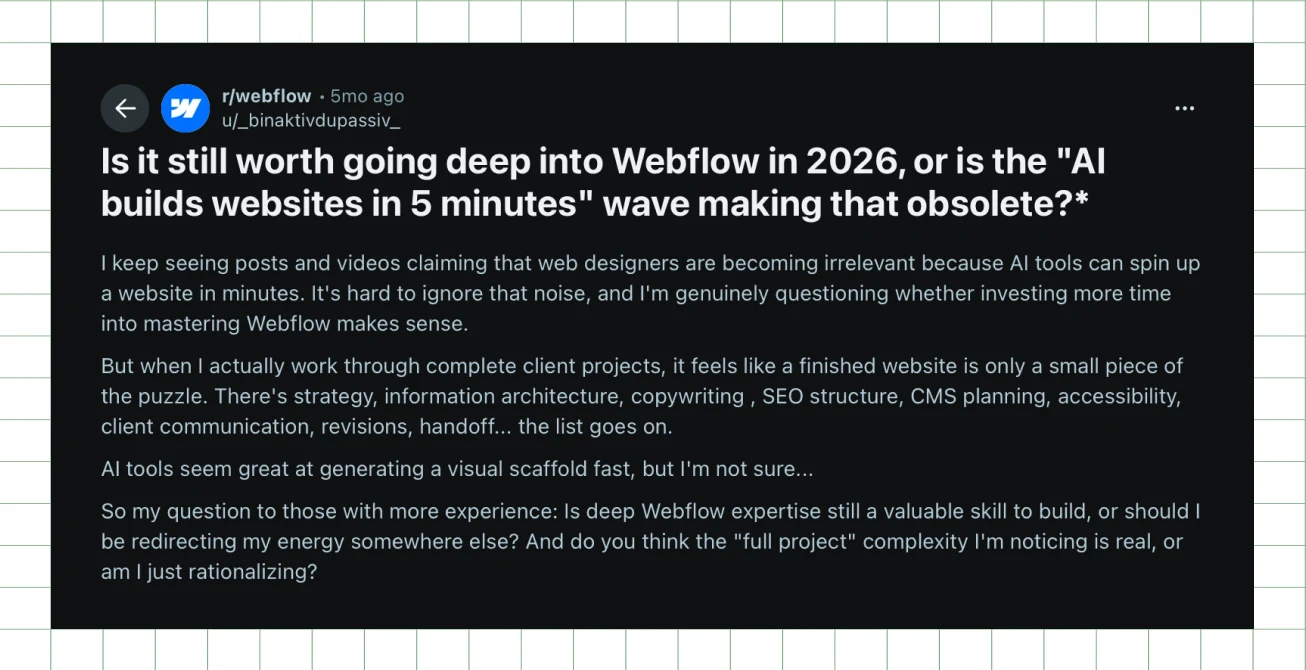
Some argued AI website builders for B2B would take over website development. Others pointed out that the AI website builder vs. professional web design debate missed the point: building pages was only one part of the job.
Website strategy, information architecture, messaging, UX, brand thinking, and every decision before and after a page gets built were still there. (AI can build the page. Someone still has to decide what goes on it.)
Both conversations landed on one question:
What Do B2B Teams Actually Get From AI Website Builders?
The biggest benefit is speed. AI website builders let teams get from an idea to a working first draft without going through the usual design and development process for every iteration. Here’s what that speed looks like for each team.
Early-stage businesses: launch without a full website budget
A founder can use AI builders like Framer AI to get a homepage, product page and contact form live, then invest in professional strategy, design and development once the business can justify it.
Mature B2B teams: test landing pages without dev backlog
According to Netlify’s 2024 survey of 300 marketers and developers, a landing page took 13 days on average to develop. With AI-generated landing pages, a PMM can skip that wait for the first version. They can prototype a page for a new use case or offer, test it with buyers, and bring in design and development only to refine what works.
Pair that with proven landing page conversion optimization techniques to learn which messaging resonates with buyers.
Product marketers: show designers drafts, not briefs
Instead of describing a new page in writing, a product marketer can build a rough V1 with AI builders like Lovable and give the designer something tangible to react to, whether it’s a product page, campaign landing page, or use-case page.
Designers: explore directions before committing
There’s no need to build each direction from scratch. AI builders like v0 return several UI options for each prompt, so designers can compare and refine before picking one.
AI website builders make the first draft easier to produce. The challenges of using AI website builders usually show up later, when buyers start using the site.
What Are the Limitations of AI Website Builders, and Why Do Their Websites Look So Similar?
AI-generated B2B websites look similar because AI reproduces the most common layouts, fonts, and copy formulas in its training data without knowing why they exist. The result is a website that looks polished but interchangeable. The bigger issue is what teams expect from it.
As Harsh Barnwal, Co-founder and Head of Ops at ThunderClap, puts it:
"You see a lot of the same design choices everywhere because AI is naturally going to show you the lowest common denominator, aka what's already common. Most teams tend to forget this and expect AI to build something tasteful and differentiated."
But here's the thing: templates aren't the problem. Templates and wireframes were already common in B2B web development because they follow proven B2B website design principles for good user experience and solid conversions.
The trouble starts when AI keeps the pattern but loses the purpose behind it. Take social proof in a hero section. On a well-built site, it answers a doubt the buyer has at that exact moment. On an AI-built site, it can get dropped in simply because that's where social proof usually goes. The element is there, while the thinking behind it isn't.
That’s when a familiar B2B pattern starts to feel like AI slop, the generic, copy-paste look buyers now spot instantly. And once you know what to look for, you start seeing the same telltale signs everywhere.
Repeated layouts
Hero with eyebrow copy, a logo strip, a three-column feature grid, a testimonial slider, and a closing CTA. These are familiar B2B homepage elements, but their effectiveness depends on the product, audience, and positioning. AI tends to reproduce the same sequence regardless.
For instance, we gave v0, Vercel’s AI builder, the hero sections of two of our fintech clients and asked it to redesign each for a fintech audience.
Cashfree’s enterprise page speaks to businesses looking for payment infrastructure at scale, with customers like CRED and Rapido up front. DPDzero’s homepage introduces an empathy-first approach to loan collections.
Yet v0 gave both the same hero, with a badge, an oversized headline, two CTAs, a trust strip on the left, and a data panel on the right.
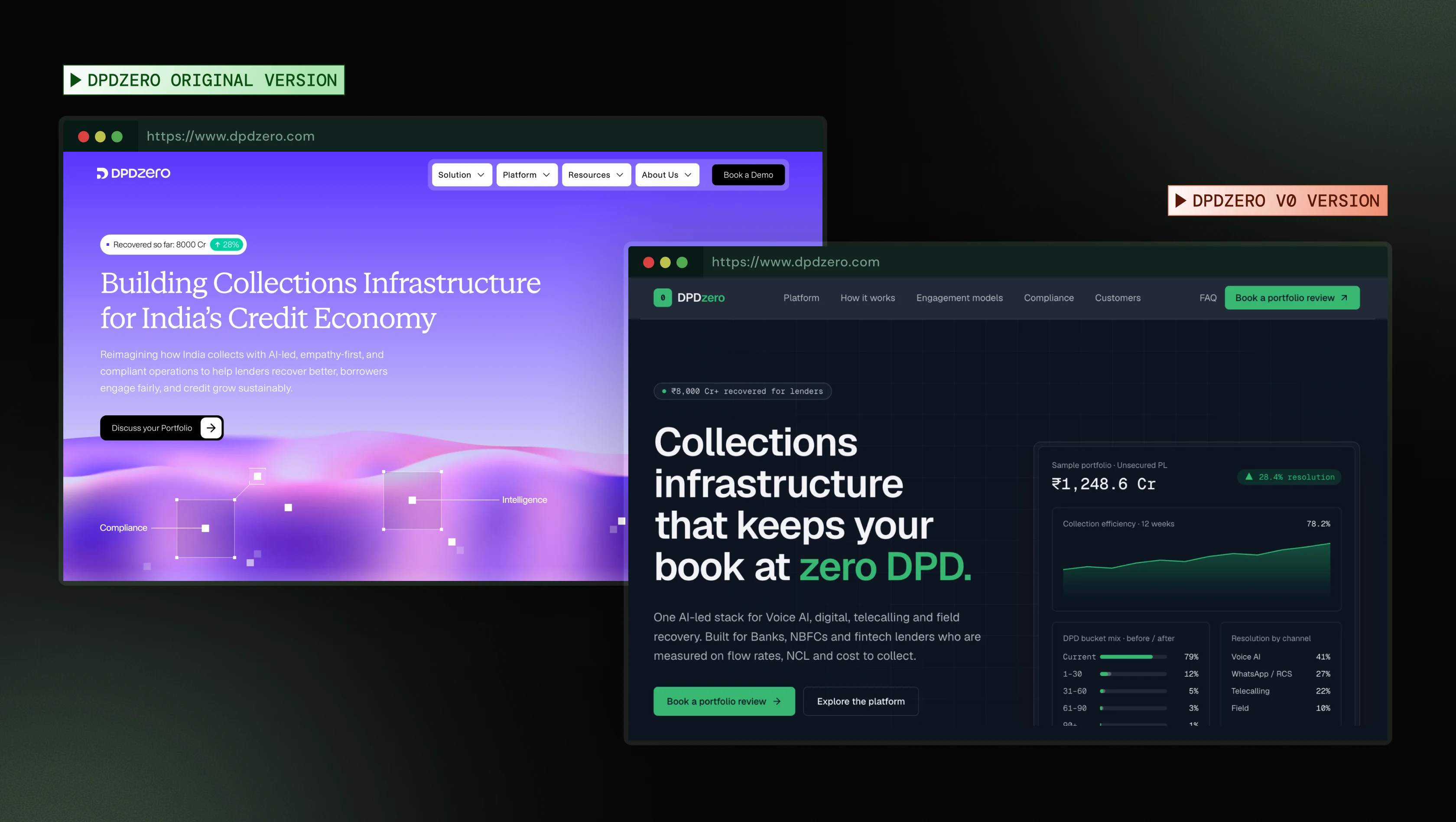
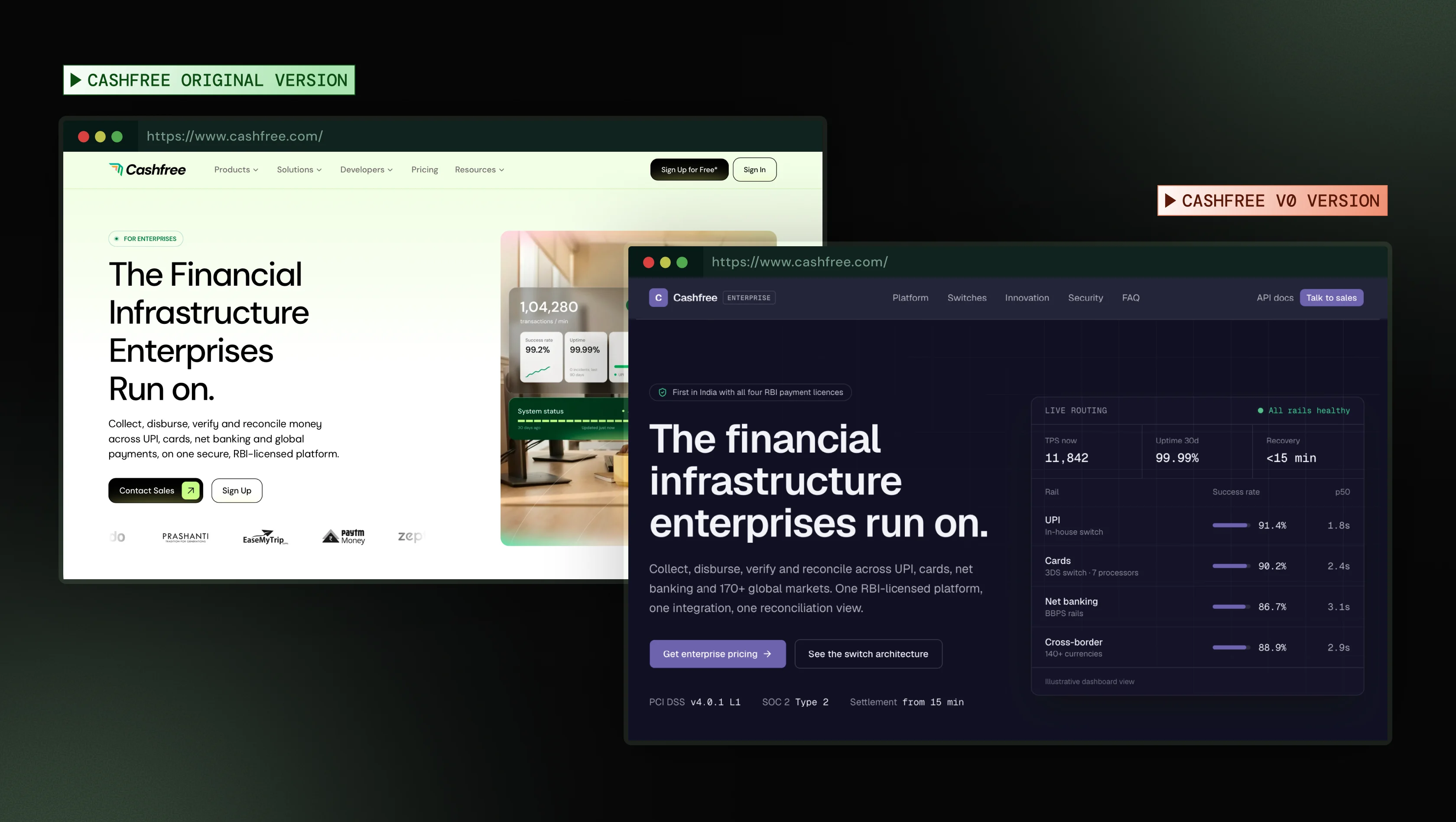
Priyanka Chakraborty, PMM at ThunderClap, explains what this misses.
“A lender evaluating DPDzero needs to understand the approach before seeing numbers, so a recovery dashboard up top makes it look like the aggressive collector it’s trying not to be. A Cashfree buyer comparing a shortlist needs recognizable customers more than any dashboard. Same layout, different damage.”
And the sameness doesn’t stop at layout.
Similar visual patterns
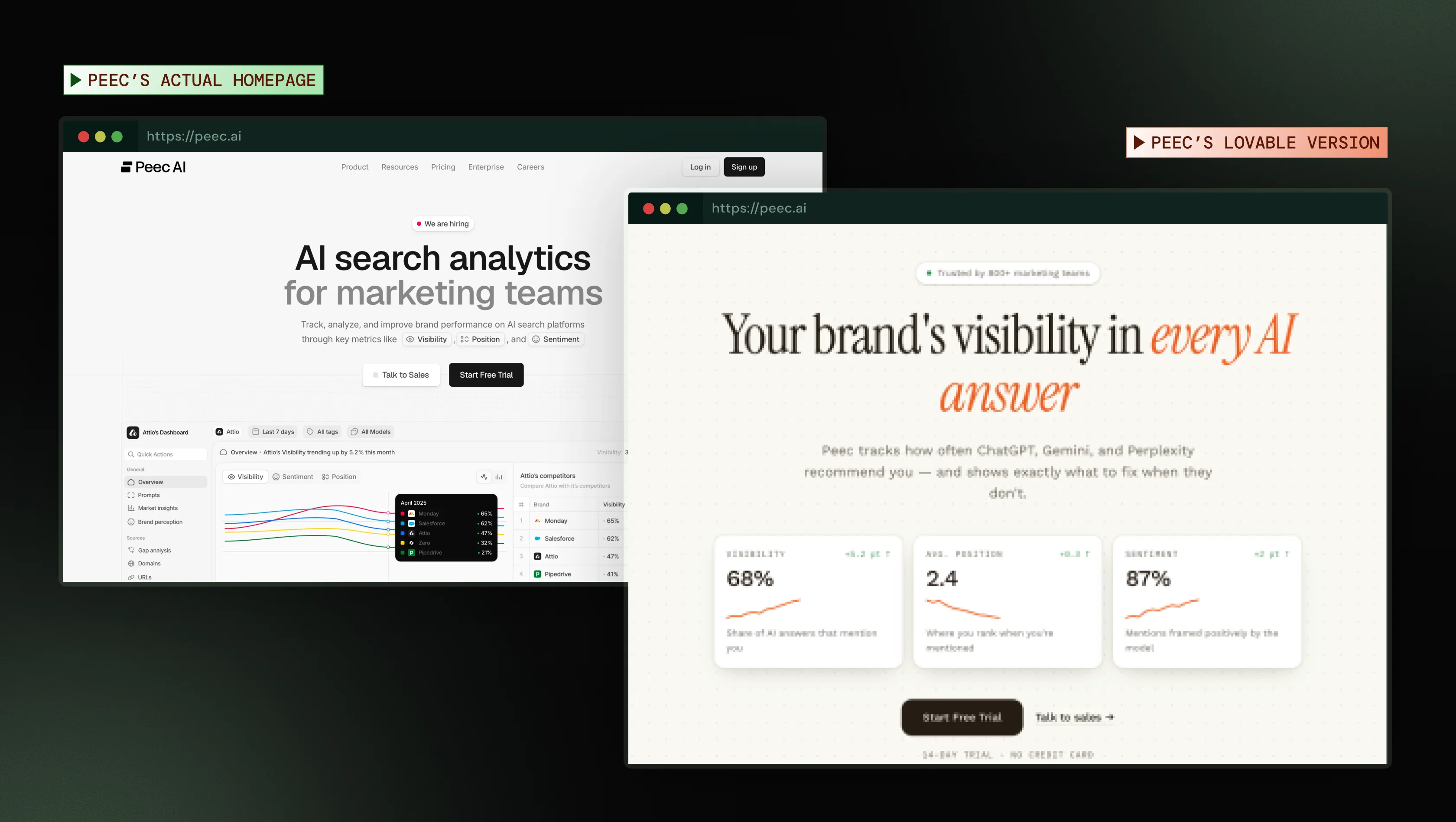
Most AI builders have a thing for pill-shaped badges, grid or dotted backgrounds, monospace labels, and dashboard-style metric cards, often set in Inter, the most common default font. They look polished because they follow design best practices, but when everyone uses them, a buyer comparing three vendors in three tabs can’t tell them apart.
The v0 redesigns above show the same kit, with a pill badge, monospace numbers, and a dashboard panel. Lovable’s redesign of Peec AI’s homepage, an AI search analytics platform, lands in the same place.
Inconsistent UI (AI drift)
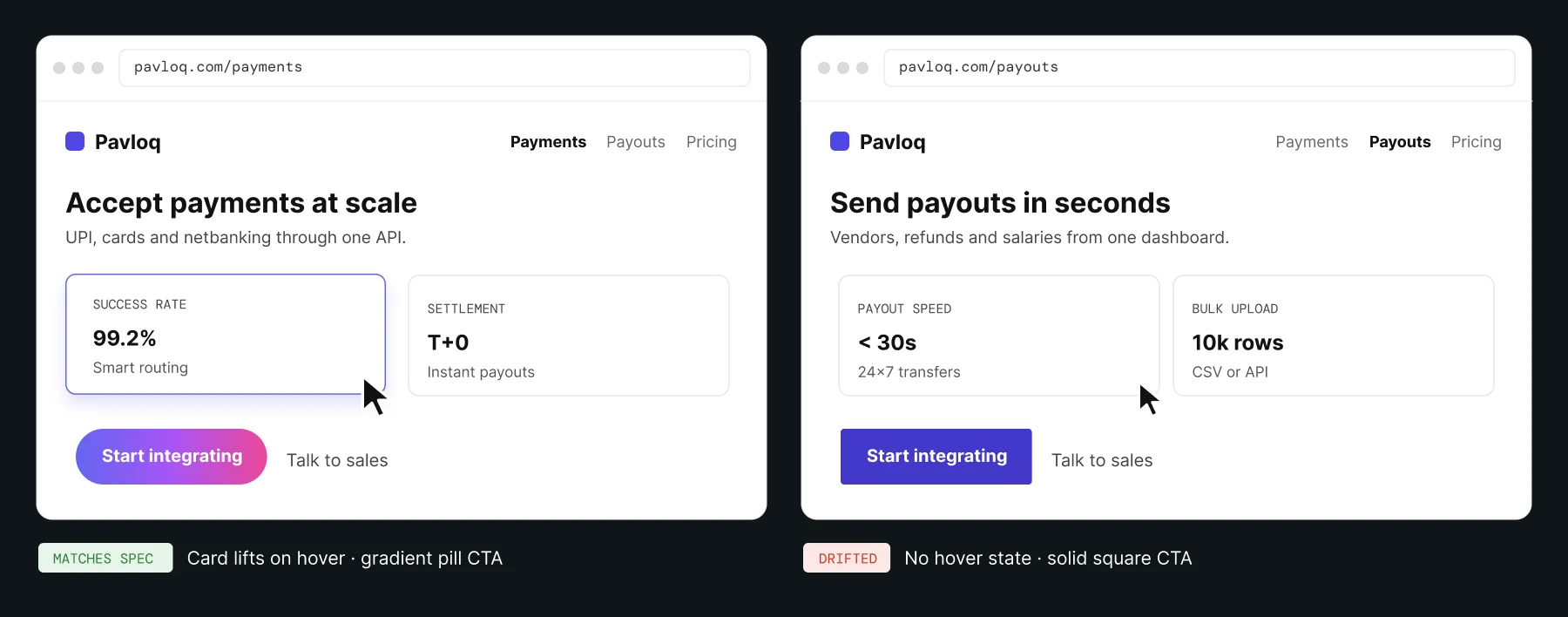
A website that looks like everyone else's often doesn't match itself. Omkar Khadamkar, Design Architect at Skyhigh Security, says AI gets only about 90% of the UI right against a design system. The other 10% drifts, a problem commonly called AI-generated UI drift. Here's his LinkedIn post on it.
On your site, drift might be a hover effect on one page but not another, or a gradient CTA here and a solid one there.
Generic website messaging
AI pairs familiar copywriting formulas with aspirational language like “all-in-one,” “seamless,” “powerful,” and “unlock new possibilities,” words tech writers now flag as telltale signs of AI copy. So you get headlines and sections that sound like they know what they’re talking about without actually saying much.
Aleksandar Radosevic, a B2B SaaS website messaging and copywriting expert, explains where it goes wrong.
"These words aren't inherently wrong. They describe how a company wants buyers to see the product as powerful, intuitive, and seamless. The problem is when the copy stops there."
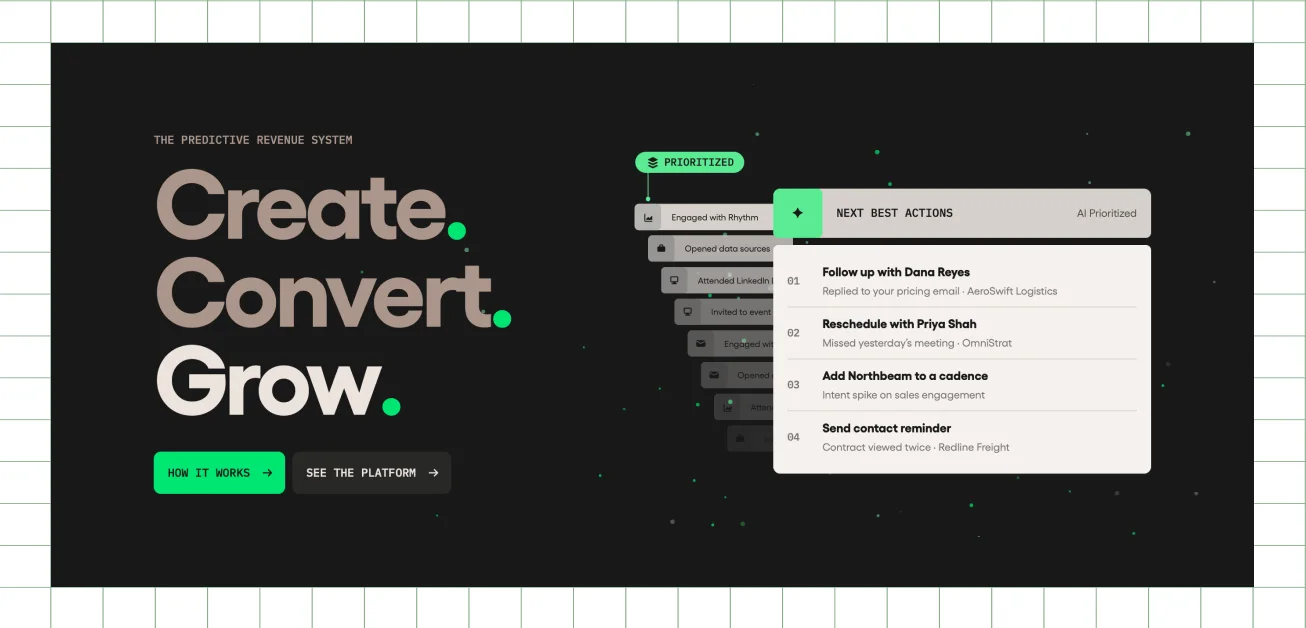
One sales platform’s homepage, for instance, leads with “Create. Convert. Grow.” Three confident verbs, and none of them says what the product does or who it’s for. The same headline could sit on a CRM, an ad tool, or an agency site.
An Experiment
To see how quickly these patterns show up, we gave Lovable ThunderClap's homepage and one broad prompt.
"Make this homepage better. This is for B2B marketing heads, like CMOs and PMMs, looking for a website agency that understands B2B buyers."
Note: We skipped any prompt engineering on purpose, because that’s how most teams use these tools on a first pass.
Before (ThunderClap's original website)
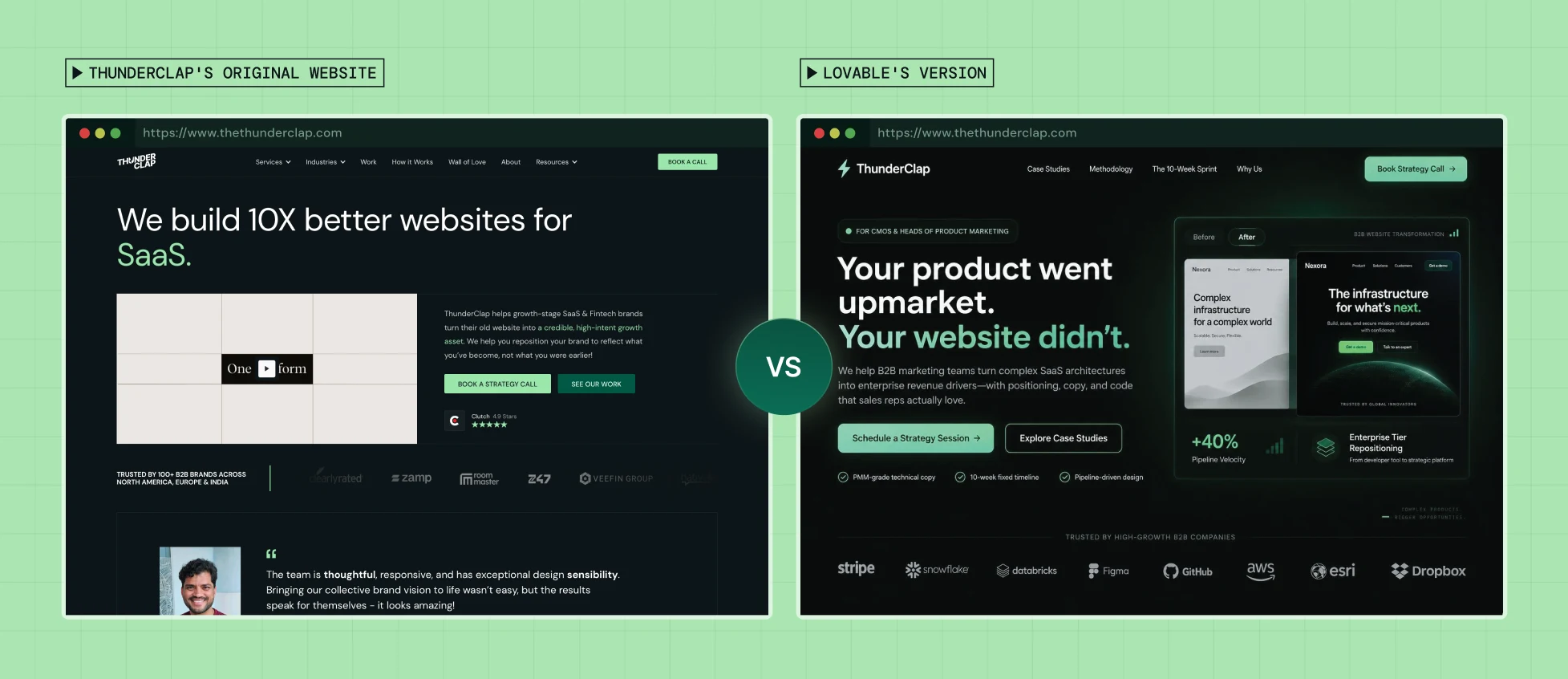
Three things stood out.
The copy went generic: "Turn complex SaaS architectures into enterprise revenue drivers" sounds like it says something, but when you ask how, it says through copy and code that sales love. What does it even mean?
It added every familiar B2B element: An audience pill, eyebrow copy, an oversized headline, two CTAs, checkmarked benefits, a logo strip, a before/after visual, a big metric, and glowing cards. Each looks polished on its own, but the full set is one you've seen before.
It all felt like table stakes: The homepage has everything a B2B site is expected to have and very little that's specific to ThunderClap.
Why Do AI-Built Websites Look Professional but Struggle to Convert Visitors?
When AI-built websites look good but don’t convert, it usually comes down to one of three things: the website reads like AI slop, the positioning and messaging are unclear, or the page looks finished, but what's behind it isn't working.
1. Your website looks generic
According to a Harris Poll conducted for the 4As and Infillion, 63% of consumers are less inclined to buy from brands that rely on AI-generated ads. The finding is about advertising, but it suggests a broader risk for brands that lean on AI without a point of view.
An AI-built website with generic messaging and overused design patterns runs into the same problem. When your site looks interchangeable with every competitor’s, buyers have little reason to see what makes you different.
And that raises a simple question: “Can I really trust a company that presents itself like this?”
2. Your website fails to tell them what you do
At ThunderClap, we review every website we work on against four questions buyers ask when they land on it:
- What do you offer?
- Does the offering suit a team like mine?
- Why should I trust you?
- How are you different from the competitor I just browsed?
If your website can’t answer these quickly, ideally above the fold, every unanswered question adds decision friction and gives them no reason to continue.
And more buyers now look for those answers before they ever reach your site. In Wynter’s 2026 survey of 101 mid-market B2B SaaS CMOs, 84% said they use AI tools like ChatGPT and Perplexity for vendor discovery.
That makes clear messaging important beyond your website. When buyers use LLMs to discover vendors, vague copy gives them less specific information to work with. A line like “everything needed for testing,” for example, doesn’t explain what the product does, who it’s for, or how it helps. More specific messaging gives buyers a clearer reason to consider your product.
Also read: Decoding The Above the Folds (ATF) Of 100 SaaS Brands [Backed by research]
3. Your website looks polished, but the conversion path is broken
Sometimes buyers do try to convert. Your website fails them at the moment they act.
In CodeRabbit’s analysis of 470 open-source pull requests, AI-written code had 1.7 times as many issues as code written by humans alone. The study looked at open-source software, not websites, but it’s a good reminder to test an AI-built site carefully before launch. On a marketing site, the issues that cost you conversions usually show up in four areas.
Forms:
A thank-you message on screen doesn’t guarantee the lead reached your CRM, got routed to the right rep, or triggered a follow-up. Submit a test lead and trace it through each step.
Tracking:
UTM parameters and conversion events can stop recording correctly, making a successful campaign look ineffective. Visit through a tagged link and verify that the source and conversion appear in your analytics.
Page speed:
Heavy scripts and animations can slow pages down, especially on mobile connections. Test key pages on a slower connection to identify delays.
Mobile experience:
A page that looks fine on a laptop might hide its CTA or make a form difficult to use on a phone. Test each key page on an actual mobile device.
Fixing one issue with AI can quietly break another, so after every fix, retest the full conversion path, not just the part that broke. Check that forms, tracking, CTAs, and key pages still work together.
How Do You Overcome the Challenges of Using AI Website Builders?
You can overcome the challenges of using AI website builders by making the important decisions yourself, then using AI to execute and scale them. A positioning document, message brief, and brand guidelines are essential, but on their own they don’t tell AI what order buyers need to see things in or what should make the site look like yours. Without those two, AI falls back on the same layouts and visuals as everyone else.
The trick is to make the important decisions before asking AI to build, then use it to execute and scale them.
1. Start with your foundational work
Before you open the website builder, get clear on what you’re selling, who you’re selling to, why they should choose you, and what proof makes your claims believable.
The temptation to brainstorm all of this with AI is high. Its answers sound convincing, and it can make an unclear position sound perfectly coherent.
But sounding convincing isn’t the same as being right. Use customer conversations and competitor research to establish what makes you different. AI is more useful later, poking holes in what you’ve decided than deciding it for you.
At ThunderClap, our in-house product marketers and SaaS writers usually run this foundational work in four steps.
- Audit what exists: Review the current site, analytics, and sales conversations to see where buyers drop off and what questions keep coming up.
- Talk to customers: Ask why they bought it, what they compared, and what almost stopped them, and note their exact words.
- Map the competition: Compare what each competitor claims, who they say they serve, and what proof they show. The gaps are your opening.
- Write the message brief: Put positioning, key messages, and proof into one document that design and development can build from.

2. Get the V1 right before asking AI to scale it
Once the basics are in place, don’t hand everything to AI right away. Your brand and messaging documents tell AI what to say. They don’t tell AI what your buyer needs to hear first or what would make the page look like yours.
Start with a wireframe built around your user intent and journey.
- List the top five questions your buyer needs answered before they’ll book a demo.
- Order your sections to answer those questions in that sequence.
- Give each section one proof point, such as a metric, a customer logo, a quote, or a product screenshot.
A fintech buyer, for instance, might need to see security, compliance, and proof before they care about features. A buyer evaluating a developer tool might want to see the product working before reading any claims.
Getting this order right gives buyers the information they need to move forward and keeps you away from the default templates AI relies on.
Then bring in a designer to give that structure an identity. You don’t need a full website at this stage, just a visual signature, something a buyer would recognize as yours even with the logo cropped out.
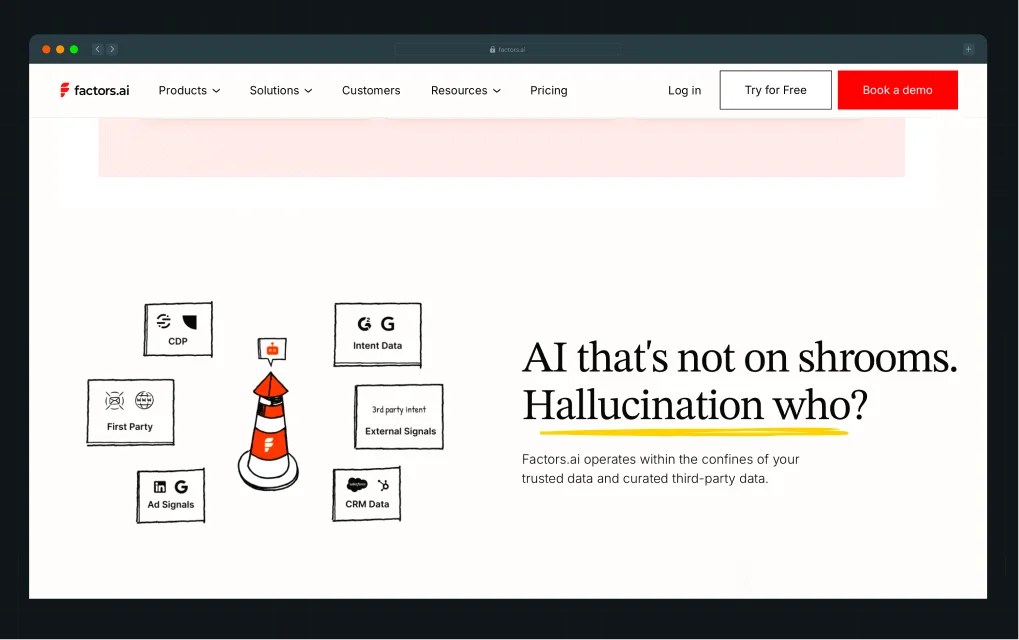
Our client Factors.ai is a good example. Its site uses hand-drawn illustrations, yellow highlights on important words, and red buttons. Even without the logo, you’d know it’s Factors.
The designer can then turn that signature into a few rules AI can follow.
- Color: One accent color, used only for buttons and key moments.
- Type: One font for headlines, another for body copy, and fixed sizes for each.
- Imagery: One illustration style across every page, such as hand-drawn sketches instead of stock photos.
- Motion: One kind of animation, used the same way everywhere.
- Components: One button style and one card style, reused on every page.
With those rules in place, AI builds from your brand’s choices rather than the web’s averages, whether you’re building in Webflow, Framer, or WordPress.
{{specficService}}
3. Let AI scale it, then test what actually converts
Once your V1 is right, you can use AI to build the remaining pages. But if you want them to look and feel like the original, you need to give AI clear rules to follow.
- Design tokens: Give AI your exact colors, fonts, type sizes, and spacing values so it doesn’t make up its own.
- Components: Specify how buttons, cards, forms, and other reusable elements should look. Tell AI when to reuse existing components instead of creating new ones.
- Prompts: Work on one page at a time. Give AI the page goal, section order, approved copy, and V1 as a reference. Tell it what must stay unchanged.
Once the pages are built, don’t assume they work just because they look right. Check the details that can break the experience.
If your AI-generated website is not converting after launch, find out what actually gets visitors to convert.
- Tracking: Use GA4 to track meaningful actions, such as demo requests or trial sign-ups.
- Visitor behavior: Tools like Microsoft Clarity and Hotjar show where visitors click, how far they scroll, and where they drop off.
- Testing: Try one change at a time, such as a new headline or CTA, and measure whether it leads to more demo requests or sign-ups, not just more clicks.
- Low traffic: If your site doesn’t get enough traffic for a meaningful A/B test, use analytics and session recordings to guide your next round of changes.
Also read: CRO Audit: 14 Conversion Rate Optimization Issues to Fix in 2026
When Is an AI Website Builder Enough, and When Do You Need a Professional Web Design Team?
The AI website builder vs. professional web design question doesn’t have one right answer. And yes, we’re a web design and development agency, so we have a stake in it. But not every company needs an agency, and plenty of sites are better off built with AI. It depends on your stage, how much rides on the site, and what you can spend.
The hidden cost curve
AI builders are cheap at the start. Costs tend to show up later: rewritten messaging when the site doesn’t convert, fixes for design drift across pages, rebuilds when the site outgrows what was prompted together, and leads lost to broken forms along the way.
A B2B web design and development team costs more upfront, but its work usually needs less rework. Neither is automatically cheaper. It comes down to how long the site needs to last and how much of your pipeline runs through it. Many teams land in the middle, using AI for speed and bringing in web design and development expertise for the foundation and the final review.
Which one fits you?
You probably don’t need an agency if:
- You need a single landing page or a simple site to test an idea
- Your positioning and design are already decided, and you just need them built
- You’re making minor changes to a site you already have
- Few leads or deals depend on the site yet
A B2B web design and development team is probably worth it if:
- Your website is a key source of pipeline
- You sell to mid-market or enterprise B2B buyers who will scrutinize the site
- Your positioning is unclear or changing
- You need the site connected to your CRM, analytics, or other tools
- You’ve already launched an AI-built site, and it isn’t converting
Need Help Making Your AI-Built Website Convert?
If there’s one takeaway, it’s that you can’t outsource the foundational work to AI. You know your customers, your positioning, and the language your buyers use. AI can mimic that, but it can’t replace it.
That doesn’t make an AI-built V1 useless. In fact, we like it when clients bring one to us. It shows what they have in mind more clearly than a brief can. We treat it as a starting point for that foundational work, not a replacement for it.
It’s the approach behind 100+ websites we’ve built for B2B brands, including Cashfree, DPDzero, Bureau, Veridocs, Factors, and roommaster. Here’s why they chose ThunderClap:
- B2B experience: Across 144+ website projects in SaaS, fintech, AI, HR tech, and venture capital, from new builds and redesigns to migrations and maintenance, we’ve learned to shape every page around what buyers need to see. For Roommaster, that meant an 80% rise in demo requests after the revamp.
- AI-forward Webflow developers and designers: You see more directions and launch sooner, with a website that’s distinctly yours and holds up as you grow.
- In-house PMMs: Messaging and design get worked out together, so positioning gaps are caught before launch, not a few months after.
{{ctaBlock}}
FAQs
1. What are the biggest limitations of AI website builders?
The biggest limitations of AI website builders are repetitive layouts, look-alike visuals, generic messaging, and UI that drifts between pages. Many also have broken conversion paths, like forms that never reach the CRM. These are the most common reasons an AI-generated website is not converting.
2. Can AI website builders create unique brand positioning?
No. AI can express positioning once it’s decided, but it can’t decide it for you. Positioning comes from auditing what exists, talking to customers, mapping competitors, and writing a message brief. AI is better at poking holes in that work.
3. Can AI website builders optimize for conversion rates?
Not by themselves. AI builders help you build and test pages faster, but improving conversions still means tracking demo requests in GA4, watching visitor behavior in tools like Microsoft Clarity or Hotjar, and testing one change at a time.
4. Should I use an AI website builder or hire a web design agency?
The AI website builder vs. professional web design choice comes down to stakes. AI is often enough for a single landing page or an early-stage idea. A B2B web design and development team is worth it when the website drives a pipeline or targets mid-market and enterprise buyers.
5. Can I redesign an AI-built website without starting over?
Often, yes. If the structure and code are sound, you can keep the build and rework the messaging, page order, and visual identity. If the code is hard to maintain, rebuilding on Webflow, Framer, or WordPress may be faster long-term.
6. Will I be able to update the website myself afterward if I use AI to build it?
It depends on where it’s built. Webflow, Framer, and WordPress have visual editors and a CMS, so marketers can update pages without a developer. Custom code from tools like Lovable or v0 is harder to edit by hand.
7. How do I stop an AI-built website looking generic?
Make the key decisions before you prompt the AI. Prompt engineering helps, but it can’t decide for you. Order sections around user intent, then set rules for color, type, imagery, motion, and components, so AI builds from your brand’s choices, not the web’s defaults.
8. Why do AI-built websites look good but don’t convert?
AI-built websites look good but don’t convert when messaging fails to explain the product, page structures don't reflect the buyer journey, or backend issues prevent leads from reaching sales. These are common reasons an AI-generated website is not converting despite looking polished.
9. Why do AI-generated websites often look similar?
AI-generated websites often look similar because they rely on familiar design patterns, such as gradients, pill-shaped UI, trendy fonts, feature grids, and predictable CTA placements. Without a clear strategy, these elements make websites look polished but interchangeable




Browse Similar Articles
10 Best Venture Capital Websites in 2026 for Design Inspiration (Detailed Breakdowns + Templates)




Leading 5 SaaS Branding Agencies in Florida (That Actually Understand SaaS Growth)
How to Turn Your B2B Website into a Self-Serve Growth Engine? (PLG Ready in 2026)

9-Step Website Copy Audit Checklist to Improve Conversions (Examples from Top B2B Brands)


How to Choose the Right Fintech Web Development Company for Your Business
Top B2B Website Design Principles That Turn Visitors into Qualified Leads

How to Do a Conversion Rate Optimization (CRO) Audit That Actually Improves Revenue
Web Design Agency vs. Freelancer vs. In-House: What Actually Works in 2026
5 CRO Agencies in London and How to Choose the Best CRO Agency for Your Business
The Ultimate Fintech B2B Positioning Guide for 2026 (That Actually Drives Conversions)
Mapping the B2B Buyer Journey to Improve Conversions Across Every Touchpoint

7 Best Website Maintenance Companies in India for Growth-Led B2B Teams (2026)


8 Best Healthcare Website Design Agencies for HIPAA-Compliant Sites in 2026
How to Find the Best Web Design Company in Houston, Texas for B2B Brands (6 Best Picks)
Positioning That Wins: How to Make Complex B2B Products Clear and Compelling
The Step-by-Step Website Redesign Process B2B Teams Use to Increase Conversions (Without Killing SEO and Pipeline)
7 Best Video Production Agencies for SaaS Product Walkthroughs and Feature Videos
How to Choose the Best B2B Website Maintenance Company: 9 Questions to Ask Before You Hire One
How to Choose a Web Design Company in San Francisco in 2026 (with Examples)
10 Best Web Design Companies in Florida in 2026 and How to Choose the Right One
How to Use Brand Storytelling on Your Website to Close More B2B Deals and Build Buyer Trust
SaaS CRO Best Practices: What High-Growth Brands Do Differently to Win Conversions
How a Rebranding Agency Can Redefine Your B2B SaaS Identity and Boost Pipeline
B2B Marketing Trends in 2026 That Directly Influence Pipeline and Revenue
Top 7 Video Marketing Agencies Driving B2B SaaS Brand Awareness in 2026
Why Partnering with a B2B Brand Positioning Agency Accelerates Market Differentiation

The Complete Website Redesign Checklist for B2B SaaS Teams Ready to Scale

10 Best Webflow Development Agencies in India for 2026 (In-Depth Review)

10 Product Marketing Companies Powering the Fastest-Growing SaaS Brands in 2026
Website Copywriting Services vs In-House: What's Right for Your Business?

How to Choose a Marketing Agency That Understands B2B SaaS Growth Metrics

How to Choose a Video Marketing Agency That Understands B2B Storytelling
Outsourcing Web Design: Cost-Benefit Analysis for Mid-Market & Enterprise Brands

From Leads to Lifetime Value: How Growth Marketing Agencies Scale SaaS Revenue
Build a B2B Website Strategy That Aligns with Sales and Marketing Goals
Webflow vs WordPress: Which Platform Is Better for Your Business Website in 2026?
Fintech Web Design That Builds Trust: 8 UX Principles Every Fintech Site Needs
Optimizing for Intent: How B2B Website Messaging and UX Changes Help Capture Top-Funnel Buyers


Interested in seeing what we can do for your website?