















Webflow vs Wix: Which Platform Wins for SEO & Scale?



So, Webflow or Wix? Honestly, both are capable website builders, and each one is the right call for a different kind of team. Wix makes the most sense when a small team wants to launch quickly and run the site, a store, bookings and email marketing from one place. Webflow makes more sense when a marketing team needs a distinctive brand, structured content and finer control over SEO and AI search. Both now handle SEO basics well, so the choice really comes down to how much control you need and how many people will be editing the site.
Nobody googles “Webflow vs Wix” for fun. It usually starts in a leadership meeting, when someone asks why the site still looks like it did two funding rounds ago. Or someone on the team suggests Wix Studio because it’s cheaper and “basically the same thing.”
The frustration underneath is almost always the same one we hear on sales calls: "We can't touch the website without a developer." So instead of repeating the old "Webflow has cleaner code" argument, this comparison looks at outcomes. We'll cover design, day-to-day editing, SEO, AI search, and scale with numbers where they exist.
TL;DR
The platform call usually sits with the head of marketing or growth, with input from design and engineering. Whatever you pick shapes how fast your team ships pages, how well you rank and how much you depend on developers for years.
- Wix has caught up on SEO basics, with server-side rendering, an editable robots.txt, and structured data, and its sites actually pass mobile Core Web Vitals more often than Webflow’s (80.7% vs 68.9%).
- Webflow still wins on control and team scale because it offers deeper design systems, structured content, page-level SEO and AI search controls, and safer editing when several marketers ship pages every week.
- Wix or Wix Studio is the better fit for lean teams that need to launch fast, while Webflow suits Series A+ SaaS and fintech teams that treat their website as a growth channel.
Which Wix are we actually comparing?
Wix isn’t one no-code website builder anymore, it’s three. There’s the classic Wix Editor, the drag-and-drop tool most people picture, and Wix Harmony, which builds a site from prompts to its AI agent, Aria. Then there’s Wix Studio, made for designers and agencies, with responsive breakpoints, custom CSS and reusable design assets.
You also can’t move freely between them, since a classic Editor site can’t be migrated into Harmony. So when a B2B SaaS or fintech team asks which is the best website builder for them, Wix Studio is the fair comparison with Webflow. Here’s how the two stack up.
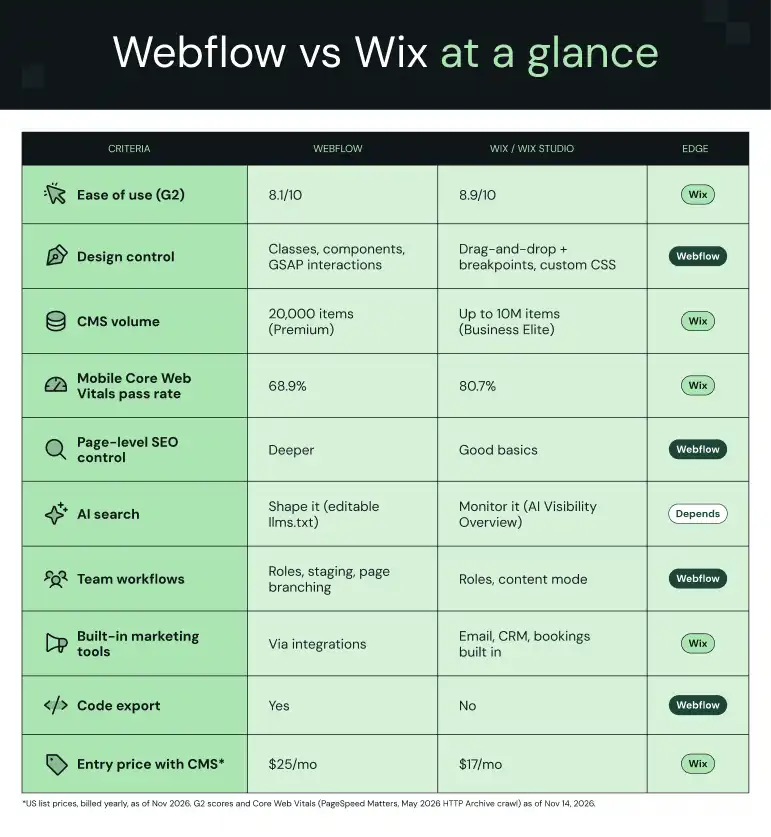
Webflow vs Wix at a glance: How do they compare on design, SEO, CMS, and pricing?
If you only have 30 seconds, this table covers the decision. The rest of the article explains the rows that matter most for a growing B2B team.
Core Web Vitals data is from PageSpeed Matters' analysis of the May 2026 HTTP Archive crawl.
*US list prices, billed yearly
Where Wix Studio wins
- Built-in AI tools for layouts, copy and responsive design
- 24/7 support on every paid plan
- Higher CMS limits on its top plans
- A lower starting price
Where Webflow wins
- A deeper design system that keeps every page consistent
- Full design control over every CMS page template
- Code export, so you’re never tied to one host
- A larger network of B2B-focused Webflow partners to hire from
In short, Wix Studio suits early-stage startups that need a polished site live fast, run by one or two people, with bookings, payments and email built in. Webflow suits Series A+ SaaS and fintech companies whose marketing team ships pages every week and whose brand, SEO and AI search drive pipeline. Most growing B2B teams start on the first path and move to the second. That move usually starts with design, where the two platforms feel most different from day one.
Before you decide, here are the questions worth answering first.
{{specficBlog}}
Questions to ask before choosing between Webflow and Wix
Before you compare features line by line, it helps to get clear on what your site needs to do over the next two to three years. These six questions cover the decisions that matter most for a growing B2B team, and each one gets its own section below.
- Which platform gives your designers more control?
- Can your marketing team run the site without a developer?
- Is Webflow or Wix better for SEO in 2027?
- Which platform helps you show up in AI search?
- Will the platform keep up as your content, traffic, and team grow?
- Which platform fits your team’s stage right now?
Let’s start with design, since that’s where the two platforms feel most different from day one.
Which Platform Gives Designers More Control, Webflow Or Wix?
In the Webflow vs Wix for designers debate, Webflow gives designers more control because it works like visual CSS. You’re not arranging boxes on a canvas. You’re building a design system with classes, variables and reusable components, so one change to a button style updates it everywhere it appears. Webflow’s interactions (now powered by GSAP) also let you build scroll and hover animations that would normally need a front-end developer.
Reviewers back this up. On G2, design flexibility comes up in about 158 Webflow reviews as a top strength. The trade-off shows up in the same reviews, where the learning curve is the most common complaint. One reviewer summed it up as “highly customizable yet complex for new users”.
Wix Studio deserves real credit here. It added responsive breakpoints, custom CSS and reusable assets, which closes most of the gap for a single, well-scoped site. It’s also easier to pick up: ease of use is the strength G2 reviewers mention most for Wix Studio, though limited customization shows up among its drawbacks.
How long does it take to learn each one?
Wix is quicker to get going. Zapier’s reviewer launched a basic Wix design in about half an hour, and Wix Studio’s Essentials course runs a little over two hours. Webflow takes longer. Editing a template’s content takes a couple of hours, but building new sections and animations from scratch takes most people a few weeks. Webflow University’s free video courses help shorten that curve.
What happens at client handoff?
Handoff matters too, since the agency or designer who builds your site usually isn’t the one running it day to day. Webflow lets you transfer the site into your own Workspace, and your team edits through a content-only role, so nobody can accidentally change the design. Wix Studio covers the same ground with site ownership transfer, a Client Kit and a content mode that limits editors to text and images. Either way, ask your agency to set up roles and training before launch, so the handover feels like getting the keys rather than inheriting a puzzle.
One honest caveat. Webflow’s control is wasted if nobody on your team (or at your agency) knows how to use it. A badly structured Webflow build is harder to manage than a tidy Wix site.
Our take: Choose Webflow if your brand needs a custom design system and you have a designer or partner to build it. Choose Wix Studio if you want polished pages fast and can live with less customization.
Design is what visitors see, but editing is what your team lives with every day. That brings us to the question that decides most platform debates.
Can Your Marketing Team Run The Site Without A Developer?
Yes on both platforms, but they get there differently, and that shows up once more team members start working on the site. It's also the question we hear most after a launch: "Can we make changes ourselves once you hand it over?" And it’s previous platform one of the most common reasons teams reach out to us, even when they first come in asking for a redesign.
How Webflow handles it
Webflow separates designing from editing. Designers build the system and a set of approved page blocks. Marketers then assemble new landing pages from those blocks and edit copy in a content-only role, so nobody accidentally breaks the layout while fixing a typo.
On Webflow’s Team and Enterprise plans, page branching lets you make a copy of a page, work on it separately and get it reviewed, then merge it into the live site once it’s approved. For a SaaS team shipping campaign pages every week, that means a half-finished pricing page update never goes live by accident.
How Wix handles it
Wix has roles, but its editing permissions are less granular than Webflow’s. Anyone with design access can usually change any page, including shared elements like the header, footer or global styles. So a marketer fixing a typo on the pricing page could accidentally shift the site-wide navigation, and the next publish pushes that change live everywhere. Wix Studio’s content mode helps by limiting some collaborators to editing text and images only.
Wix also wins a point Webflow doesn't contest anymore. Email marketing, a CRM and automations come built in, while Webflow retired its Logic automation tool and now relies on tools like Zapier or Make.
Who owns the site after launch?
This is the lock-in question, and it's worth asking out loud. On a paid Webflow Workspace plan, you can export your site's HTML and CSS and export CMS content as CSV files. Wix doesn't offer code export, so your site lives on Wix for as long as it exists.
Neither option is wrong. It's just a question of how much you want to own versus rent. If you're weighing who should maintain the site once it's live, our post on Outsourcing Webflow Maintenance vs In-House Management: Which is Better? breaks down the trade-offs.
Editing is the daily experience, but most teams switch platforms because of what happens in search. That's where the old talking points need the most correcting.
Is Webflow or Wix better for SEO in 2027?
Webflow is better for SEO only if you need fine control over structure. For SEO basics, Wix has caught up. Most ranking comparisons still claim Webflow wins on "clean code" and that Wix is slow, and that view is a few years out of date.
What Wix gets right now
Wix sites use server-side rendering, which means search engines receive a fully built page instead of waiting for JavaScript to load it. You can edit robots.txt, set canonical tags, add JSON-LD structured data and create 301 redirects. "Wix can't rank" simply isn't true anymore.
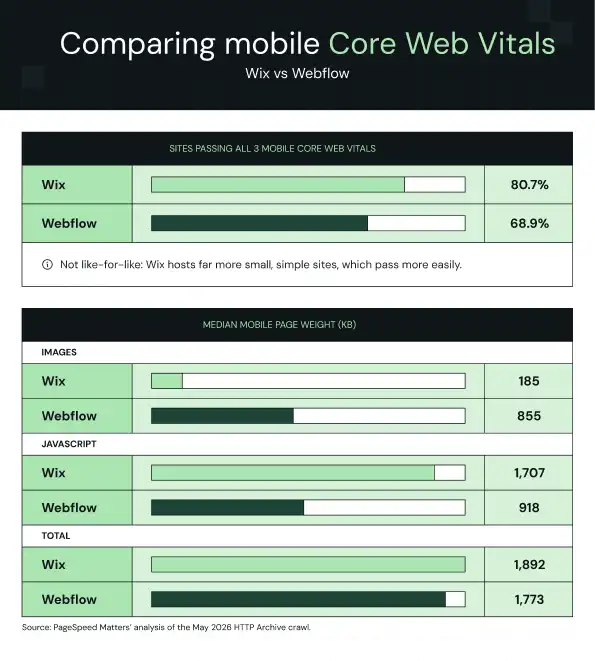
Wix sites pass Google’s speed checks more often than Webflow sites. In the May 2026 HTTP Archive crawl, 80.7% of Wix sites passed all three mobile Core Web Vitals, compared with 68.9% of Webflow sites. Core Web Vitals are Google’s measures of loading speed, responsiveness, and layout stability.
These figures cover every site on each platform, so they aren’t a like-for-like comparison. Wix hosts far more small, simple sites, like local businesses, portfolios, and single-page sites, and lighter sites pass Core Web Vitals more easily. A content-heavy SaaS site on Wix won’t automatically score 80%, and a well-built Webflow site can pass comfortably.
Page weight tells a similar story. In the same May 2026 data, the median mobile page on Wix shipped 1,892 KB, against 1,773 KB on Webflow. Wix pages carry far lighter images (185 KB vs 855 KB) but almost twice as much JavaScript (1,707 KB vs 918 KB). In other words, Wix wins on image handling, while Webflow pages run less code in the background.
The reason is simple. Wix controls the hosting, the templates, and the image pipeline for every site it serves, so it can tune performance centrally. On Webflow, your designer makes more of those choices, which means a well-built site passes easily and a heavy, animation-stuffed one doesn't.
Where Webflow still wins
Webflow's advantage is control. You decide the heading hierarchy, the URL and folder structure, and which CMS items get indexed, one item at a time. You can add schema markup (structured data that tells search engines and AI tools what a page is about) to any CMS template and have it fill in automatically.
Wix is more restrictive at that level: For a five-page site, none of that matters. For a SaaS site with hundreds of integration, use-case, and comparison pages, it starts to.
It's worth keeping perspective, though. Rankings come from content, information architecture, and internal linking far more than from the logo on your builder. A platform can make good SEO easier to do at scale, but it can't do it for you.
Both platforms cover every item on a standard technical SEO checklist. The difference shows up at scale, which is where Webflow’s extra control starts to matter.
Case study: How ClearlyRated grew search visibility without losing its existing pages
ClearlyRated is a customer experience (CX) platform for B2B service firms, based in Portland, Oregon. It runs NPS surveys for staffing, accounting, and other professional services firms. It also publishes a public directory of rated firms and the Best of awards, which together bring in a large share of its organic traffic. When ClearlyRated moved its marketing site from [previous platform] to Webflow, the risk was clear: any page that dropped out of search would cost them visitors who were already looking for them.
So the rebuild started with a firm rule: every existing page stayed, alongside dedicated pages for the directory and the Best of awards. We rewrote generic copy into messaging aimed at the firms ClearlyRated actually wants to win. We also kept the site’s structure intact, so search engines could keep finding the pages that already ranked.
The results after launch:
- 35% increase in clicks and impressions from search
- 70% increase in user engagement
- 157% increase in webinar conversion events
Our take: Webflow won’t rank your site for you, but a rebuild planned around keeping what already ranks lets you upgrade the story without losing search traffic.
Traditional search is only half the picture now, though. More B2B buyers start their shortlist inside an AI assistant, and that’s where the platforms differ the most.
Which platform helps you show up in AI search (AEO/GEO)?
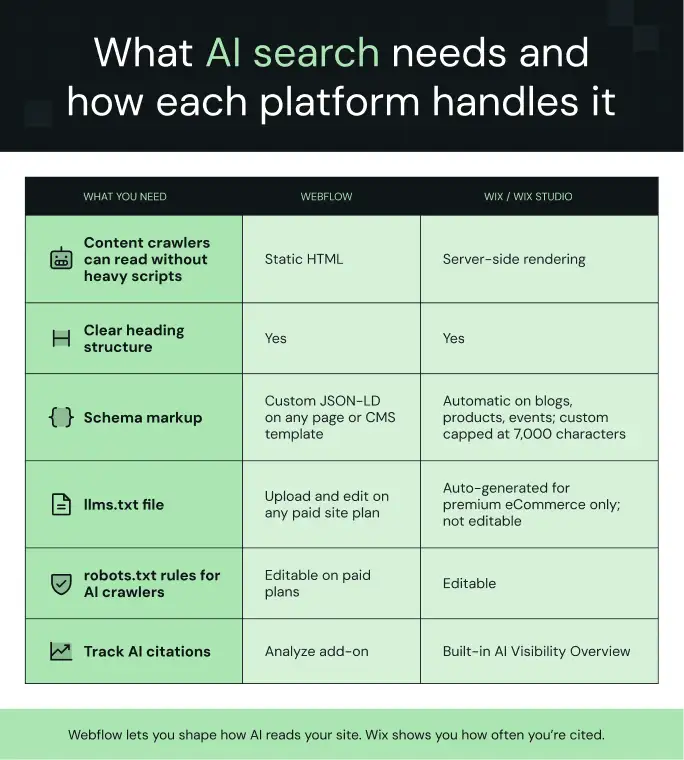
Webflow gives you more control over how AI tools read your site, while Wix gives you a clearer picture of how you already show up in AI answers. You can see that gap in what users ask for. On the Wix Studio forum, one user wanted to add an llms.txt file to their site’s root folder, and a Wix team member explained that the file is generated automatically and can’t be edited. On Webflow, you can upload and edit llms.txt yourself on any paid site plan.
Answer engine optimization (AEO) simply means structuring your site so AI tools like ChatGPT, Gemini and Perplexity can understand it, trust it and cite it. In practice, that needs five things:
- Content that crawlers can read without running heavy scripts
- A clear heading structure, so each section can stand alone as an answer
- Schema markup that labels what each page is about
- An llms.txt file, a short plain-text guide at the root of your site that points AI tools to your most important pages
- A robots.txt file that lets AI crawlers in, instead of blocking them by default
What Webflow offers
On paid site plans, Webflow lets you edit robots.txt and llms.txt directly, add schema markup and run AI-assisted SEO and AEO audits across the site. Its Analyze add-on reports on LLM visibility and AI agent traffic. On the Team plan ($2,500/mo on an annual contract) and Enterprise, Webflow adds AEO agents that recommend and ship fixes at scale.
{{specficService}}
What Wix offers
Wix moved first on measurement. Its AI Visibility Overview thuntracks how often your brand is cited in ChatGPT, Gemini, Perplexity and Claude. That's genuinely useful. The gap is control, because llms.txt is generated automatically for premium eCommerce sites only, and you can’t edit it
Visibility is one kind of scale. The other is what happens when your content library, traffic and team all grow at once.
Which Platform Scales Better: CMS, Hosting And Teams?
It depends on what "scale" means for you, because each kind has a different winner. Wix wins on raw content volume, Webflow wins on content structure and team workflows, and hosting is close to a tie.
Content volume
Wix's CMS limits are far higher. Its plans run from 1,500 items on Light to up to 10 million items on Business Elite. Webflow's Premium plan caps you at 20,000 CMS items across 40 collections.
Most B2B SaaS sites never come close to 20,000 entries. A blog, case studies, integrations and a glossary usually add up to a few thousand. For a typical SaaS or fintech marketing site, Webflow’s limit won’t hold you back. If you’re planning programmatic SEO at scale, with thousands of pages generated from a template like one per US state or per integration, Wix’s higher limits give you more room, or you’ll need Webflow’s Enterprise plan, which sets custom CMS limits.
Content structure
This is where Webflow pulls ahead. You can link different types of content together, so a case study automatically shows its industry, product, and integrations without anyone copying them over. Each content type also gets its own page template, which you design once with the same control as the rest of the site, and every new entry follows it. If your content lives in other tools, Webflow’s APIs can sync it in automatically.
Web hosting and DNS
Both are fully managed web hosting, so there's no server for your team to babysit. Webflow serves sites through Cloudflare's global CDN with free SSL, and Wix runs on its own multi-cloud setup with SSL included. Connecting a custom domain works the same way on both: you point your DNS records (an A record and a CNAME) at the platform, and Wix also lets you switch nameservers instead.
The real difference is bandwidth. Webflow's Premium plan includes 50 GB a month, with paid add-ons up to 2.5 TB. Wix doesn't meter bandwidth on its paid plans, according to a review. A SaaS site with steady traffic won't notice, but a viral launch on Webflow might nudge you into an add-on.
Teams
Webflow is built for many hands. Site-level roles, publishing permissions, staging and (on Team plans) page branching mean a designer, a content marketer and a PMM can work on the same site without stepping on each other. Localization is a paid add-on through Webflow Localize, while Wix includes multilingual tools on classic Editor sites.
So which one fits your team? Here’s a quick way to decide.
Webflow vs Wix: Which One Is Right For Your Team?
Choose Wix over Webflow when one or two people run the site and speed to launch matters more than a distinctive brand. Use these two checklists to see where you land.
Choose Wix if:
- One or two people run the website
- You sell products or take bookings directly on the site
- You want email marketing and a CRM built in
- Launching this month matters more than looking different from competitors
Choose Webflow if:
- Marketing owns the site and ships new pages every week
- Your brand is part of how you win deals
- You need structured content like case studies, integrations and use cases
- You care about controlling SEO and AI search at the page level
- You don't want to be locked to a single host
And if neither list fits neatly, that's worth listening to. Thunderclap also builds on WordPress and Framer, and sometimes Webflow genuinely isn't the right platform for a team's stage or stack.
If you've landed on Webflow and you're currently on Wix, the next worry is usually the scariest one.
How Do You Move From Wix to Webflow Without Losing Rankings?
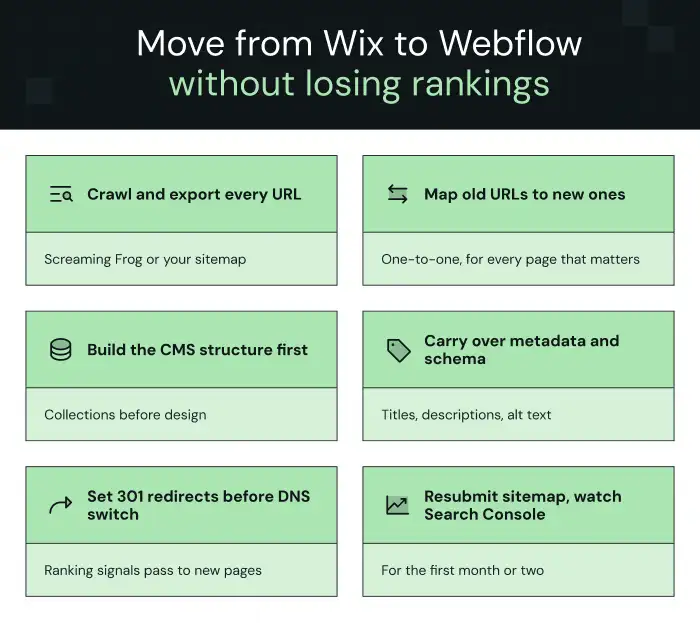
You move from Wix to Webflow without losing rankings by mapping every old URL to a new one and setting up redirects before the domain switches over. There's no one-click export, so the design gets rebuilt in Webflow while your content comes across as CSV files. Most of the SEO risk sits in the URLs, and it's very manageable with a plan.
- Crawl and export every URL. Use a crawler like Screaming Frog, or your sitemap, to list every page that's indexed or earning traffic today.
- Map old URLs to new ones, one-to-one. Every page that matters needs a clear destination, even if the new site structure is different.
- Build the CMS structure before the design. Set up your Webflow collections (blog, case studies, integrations) first, then import content into them.
- Carry over metadata, alt text and schema. Page titles, meta descriptions and image alt text are easy to lose in a rebuild, so check them field by field.
- Set 301 redirects before switching DNS. A 301 redirect tells search engines a page has permanently moved, so the old page's ranking signals pass to the new one.
- Resubmit your sitemap and watch Search Console. Keep an eye on indexing and crawl errors for at least the first month or two, and fix broken links as they appear.
If you'd rather not run this yourself, our Webflow migration services cover the full move, from URL mapping to post-launch checks.
Not Sure Which Platform Fits? Here’s How ThunderClap Can Help
Go back to that leadership meeting where someone asked why you're still on Wix, or why you shouldn't just use Wix Studio. The honest answer is that Wix is a great business tool to run, and Webflow is a better growth asset for a marketing team to run. Both rank, both load fast, and both can be the right call at the right stage.
For most Series A+ SaaS and fintech companies, the deciding factor is control: over your brand, your content structure, and how AI tools read your site. If that's where your team is feeling the pinch, it's probably time to look seriously at Webflow.
Not sure if you've outgrown your platform? Talk to a strategist, not a salesperson. We start by looking at how your team actually works, then recommend Webflow, WordPress or Framer based on what will hold up as you grow. We'll also look at your current site and tell you honestly whether a move is worth it.
{{ctaBlock}}
FAQs
1. Which is better for B2B brands, Webflow or Wix?
Webflow is better for most B2B brands past the earliest stage, especially Series A+ SaaS and fintech companies. Their sites need a distinct brand, structured content and several people editing safely. An early-stage B2B team without a designer can still start comfortably on Wix Studio and move later.
2. Which platform is more customizable, Webflow or Wix?
Webflow is the more customizable platform. It gives you visual control over CSS, components, and interactions, plus custom code and code export. Wix Studio adds breakpoints and custom CSS, but your site stays inside the Wix ecosystem.
3. Which is better for SEO-driven websites, Webflow or Wix?
For SEO-driven websites, Webflow is usually the better fit because it gives you more control over structure, schema, and AI crawler files. Both platforms now cover the technical SEO basics. Wix actually scores higher on default mobile Core Web Vitals, so speed alone isn't a reason to switch.
4. When should I choose Wix over Webflow?
The right choice depends less on which platform is better and more on how your team works today. Use these two checklists to see where you land.
5. Is Wix Studio the same as Webflow?
No, Wix Studio isn't the same as Webflow, though it's Webflow's closest rival. Studio wins on AI tools, 24/7 support, and CMS volume. Webflow wins on design system depth, content structure, and portability through code export.
6. Will I lose my SEO if I move from Wix to Webflow?
You won't lose your SEO moving from Wix to Webflow if every old URL is mapped and 301 redirects are live before the DNS switch. Carry over your titles, meta descriptions, and alt text too. Then monitor Google Search Console closely for the first month or two.
7. Is Webflow more expensive than Wix?
Yes, Webflow is usually more expensive than Wix at list price. A site with a CMS starts at $25/mo on Webflow's Premium plan versus $17/mo on Wix's Light plan, both billed yearly. Over a few years, though, the cost of building and maintaining the site outweighs either subscription.
8. We get 50,000 visits a month. Which Webflow plan do we need?
If you get 50,000 visits a month, the Premium plan covers most B2B SaaS marketing sites, plus a bandwidth add-on if your pages are heavy. Premium includes 50 GB a month, and at around 2 MB per visit, you'd use roughly 100 GB. Extra bandwidth starts at $20/mo for 50 GB, billed yearly. Move to Team or Enterprise when you need publishing workflows, built-in localization, or security reviews.
9. Can't we just build the site ourselves with Wix's AI or another AI builder?
You can build the site yourself with Wix's AI or another AI builder, and you'll get a homepage live fast. The trouble starts as the site grows: inconsistent layouts, no real content structure, and SEO that nobody planned. One buyer told us their AI-built site had broken images and issues they couldn't fix, which is a common story by the time teams call an agency.




Browse Similar Articles
How to Write a Website Design Brief Template That Prevents Scope Creep



Website User Experience Audit: 7 Steps to Spot (and Fix) What's Hurting Conversions


AI-Generated Website Not Converting? Here’s What’s Missing (and How to Fix Yours)

10 Best Venture Capital Websites in 2026 for Design Inspiration (Detailed Breakdowns + Templates)















Leading 5 SaaS Branding Agencies in Florida (That Actually Understand SaaS Growth)


How to Turn Your B2B Website into a Self-Serve Growth Engine? (PLG Ready in 2026)


9-Step Website Copy Audit Checklist to Improve Conversions (Examples from Top B2B Brands)


How to Choose the Right Fintech Web Development Company for Your Business

Top B2B Website Design Principles That Turn Visitors into Qualified Leads

How to Do a Conversion Rate Optimization (CRO) Audit That Actually Improves Revenue
Web Design Agency vs. Freelancer vs. In-House: What Actually Works in 2026
5 CRO Agencies in London and How to Choose the Best CRO Agency for Your Business

The Ultimate Fintech B2B Positioning Guide for 2026 (That Actually Drives Conversions)
Mapping the B2B Buyer Journey to Improve Conversions Across Every Touchpoint
7 Best Website Maintenance Companies in India for Growth-Led B2B Teams (2026)


8 Best Healthcare Website Design Agencies for HIPAA-Compliant Sites in 2026


How to Find the Best Web Design Company in Houston, Texas for B2B Brands (6 Best Picks)

Positioning That Wins: How to Make Complex B2B Products Clear and Compelling
The Step-by-Step Website Redesign Process B2B Teams Use to Increase Conversions (Without Killing SEO and Pipeline)

7 Best Video Production Agencies for SaaS Product Walkthroughs and Feature Videos

How to Choose the Best B2B Website Maintenance Company: 9 Questions to Ask Before You Hire One



How to Choose a Web Design Company in San Francisco in 2026 (with Examples)

10 Best Web Design Companies in Florida in 2026 and How to Choose the Right One

How to Use Brand Storytelling on Your Website to Close More B2B Deals and Build Buyer Trust

SaaS CRO Best Practices: What High-Growth Brands Do Differently to Win Conversions

How a Rebranding Agency Can Redefine Your B2B SaaS Identity and Boost Pipeline
B2B Marketing Trends in 2026 That Directly Influence Pipeline and Revenue

Top 7 Video Marketing Agencies Driving B2B SaaS Brand Awareness in 2026

Why Partnering with a B2B Brand Positioning Agency Accelerates Market Differentiation

The Complete Website Redesign Checklist for B2B SaaS Teams Ready to Scale
10 Best Webflow Development Agencies in India for 2026 (In-Depth Review)

10 Product Marketing Companies Powering the Fastest-Growing SaaS Brands in 2026
Website Copywriting Services vs In-House: What's Right for Your Business?


How to Choose a Marketing Agency That Understands B2B SaaS Growth Metrics


How to Choose a Video Marketing Agency That Understands B2B Storytelling

Outsourcing Web Design: Cost-Benefit Analysis for Mid-Market & Enterprise Brands

From Leads to Lifetime Value: How Growth Marketing Agencies Scale SaaS Revenue

Build a B2B Website Strategy That Aligns with Sales and Marketing Goals

Webflow vs WordPress: Which Platform Is Better for Your Business Website in 2026?
Fintech Web Design That Builds Trust: 8 UX Principles Every Fintech Site Needs





Interested in seeing what we can do for your website?